
Host runtime
Hermes Agent
Chat, clarification, research, planning, status.
Power intelligence and agentic memory for Hermes Agent.
One install. Anyone runs Hermes Agent professionally.
curl -fsSL https://raw.githubusercontent.com/rlaope/oh-my-hermes/main/install.sh | shirm https://raw.githubusercontent.com/rlaope/oh-my-hermes/main/install.ps1 | iexomh setupOrchestration
OMH routes the request, prepares the work, and names who runs it.
request-to-handoff
Host runtime
Chat, clarification, research, planning, status.
Coding owner
Gets a prepared handoff with repo rules and the command that must pass.
Coding owner
Same contract, different runtime. No vendor is the default.
Coding owner
Discovered at setup. Routing follows what is actually installed.
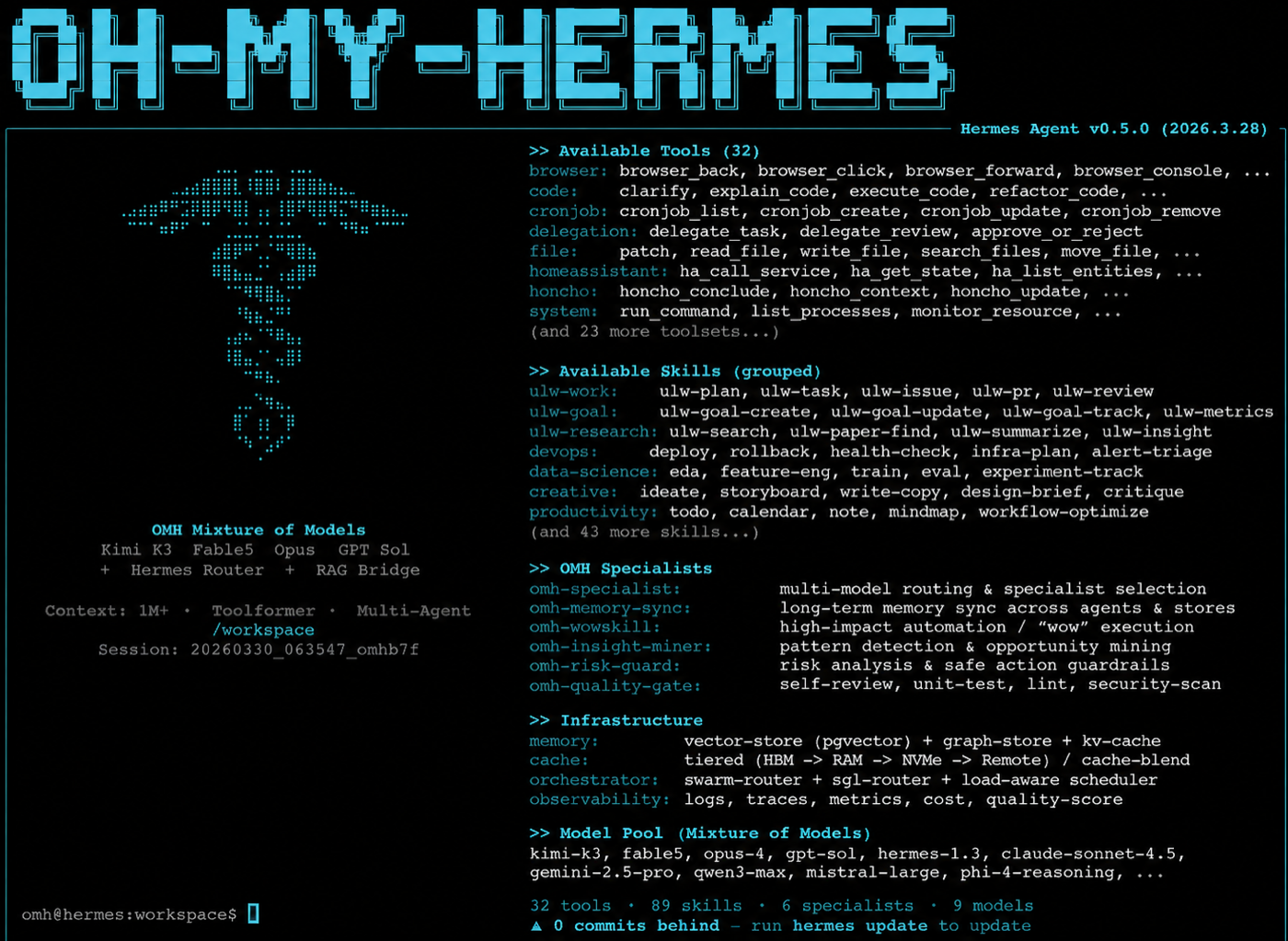
Model pool
Setup records what is reachable on this machine.
Model routing
Nine editable categories. Missing models are skipped, not fatal.
routing-model-setup
Editable
Each category is an ordered candidate chain. Your override replaces the chains it names and leaves the rest alone.
Flexible
A candidate you have not configured is skipped and the next eligible one is selected. No eligible candidate is recorded plainly and never blocks the install.
Owners
Hermes-native work stays with Hermes and its own config and auth commands. External owners are coordinated by Maestro, which prepares and reports but never executes.
Families
Chains name model families, never a single vendor. Declaring the X-platform domain notes the Grok family advisorily, and your explicit choice always wins.
Shipped order is editorial, not a benchmark. OMH prepares routing metadata and never invokes a model.
Recommended chains
OMH ships with these editable, ordered recommendation chains. Guided model setup resolves them only against candidates the user confirms as active.
| Category | Purpose | Shipped order | Effort |
|---|---|---|---|
| ultrabrain | Deepest reasoning | GPT-6 Astra | xhigh |
| deep | Strong default tier | Claude Opus 5.5GPT-6.1 SolKimi K3 | high |
| architect | Architecture and system design | Claude Opus 5.5GPT-6 AstraClaude Fable 5.1Kimi K3 | xhigh |
| unspecified-high | Default working model | GPT-6.1 SolClaude Opus 5.5Kimi K3 | medium |
| unspecified-low | Cheaper fallback | GLM 5.3DeepSeek V4.1 FlashGPT-6.1 SolClaude Sonnet 5.5 | low |
| quick | Short tasks | GLM 5.3 FlashGPT-6 LunaClaude Haiku 5.5Kimi K3 | low |
| writing | Prose and docs | Claude Opus 5.5Claude Sonnet 5.5Kimi K3Gemini 3.1 Pro | medium |
| visual-engineering | Frontend and visual | Claude Opus 5.5Claude Fable 5.1Gemini 3.1 ProKimi K3 | high |
| artistry | Unconventional work | Gemini 3.1 ProClaude Opus 5.5Claude Fable 5.1Kimi K3 | high |
| capable | Strong general work | Claude Opus 5.5GPT-6.1 SolClaude Fable 5.1Kimi K3 | medium |
| simple-work | Small everyday tasks | GPT-6 LunaClaude Haiku 5.5DeepSeek V4.1 Flash | low |
| deep-work | Long tasks at frontier depth | Claude Opus 5.5GPT-6.1 Sol | max |
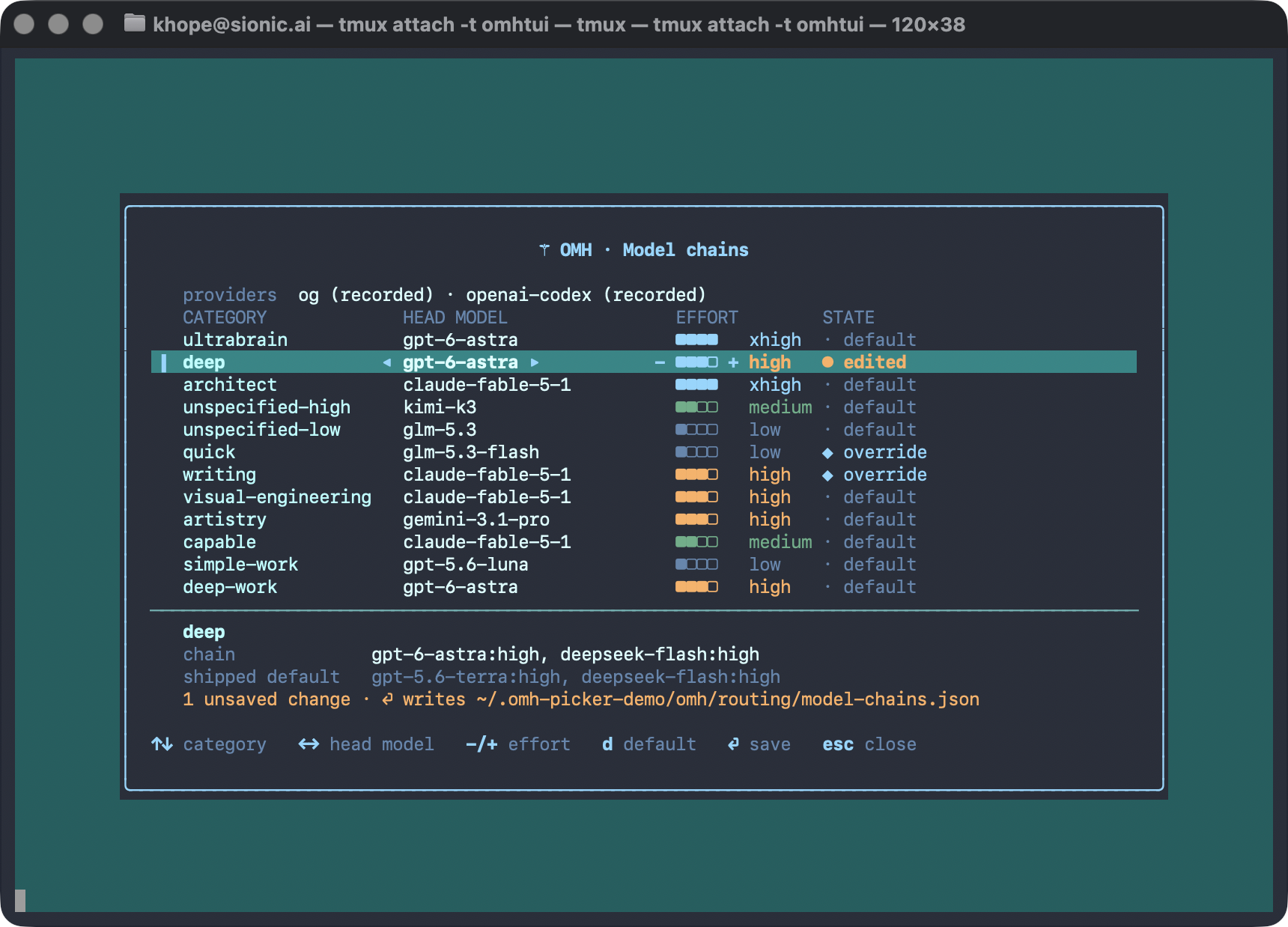
The result is prepared routing configuration, not provider availability, credential, dispatch, or execution evidence.
Every chain is yours to reorder. Edit ~/.omh/routing/model-chains.json, then run omh model-chains show to print what is in effect. The Maestro lane — dispatched Claude Code and Codex units — has the same dial: omh coding category-maestro interview.
Surfaces
The control plane.
Same catalog, same evidence rules.
Cards stay readable where formatting is limited.
Flagship workflows
Nine long-horizon lanes.
ulw-context
Terminology alignment
Aligns the words a repository uses before plans and handoffs.
Say ulw-context
review project terms
ulw-interview
Clarification
One question at a time until the brief is clear.
Say deep-interview
clarify
ulw-research
Decision grounding
Reference implementations, live web evidence, verified claims.
Say web research
source-backed research
ulw-plan
Reviewed plan
Consensus planning with review gates.
Say ralplan
consensus plan
ulw-work
Parallel delivery
Splits an accepted plan into disjoint lanes.
Say ultrawork
parallel work
ulw-maestro
External handoff
Runs the work on Claude Code or Codex, spawned live with a steerable session.
Say ulw-maestro
coding handoff
ulw-loop
Goal loop
Interview → plan → research → build → review.
Say loop
long horizon goal
ulw-qa
Adversarial QA
Hostile scenarios, end-to-end runs, release QA.
Say ultraqa
release qa
ulw-perf
Measured optimization
Finds where the system is actually slow, leaking, or expensive.
Say ultraperf
find the bottleneck
Recommended set
Type these at the Hermes prompt. ulw-interview or ulw-plan shapes the work, ulw-work runs the accepted plan, ulw-loop keeps going until your gate passes.
❯ ulw-interview: I want a CLI that tracks the ISS and warns me before it passes overhead
❯ ulw-plan: analyze this project's circular dependencies and plan the refactor
❯ ulw-work: run the accepted plan
❯ ulw-loop: keep going until npm test passes![Hermes TUI answering a ulw-plan prompt on a small JavaScript project: the target dependency graph with no cycles, rejected options, six lanes in dependency order, acceptance criteria, the plan checklist, and the [OMH] HUD line at the bottom](assets/omh-terminal-ulw-plan-refactor.png)
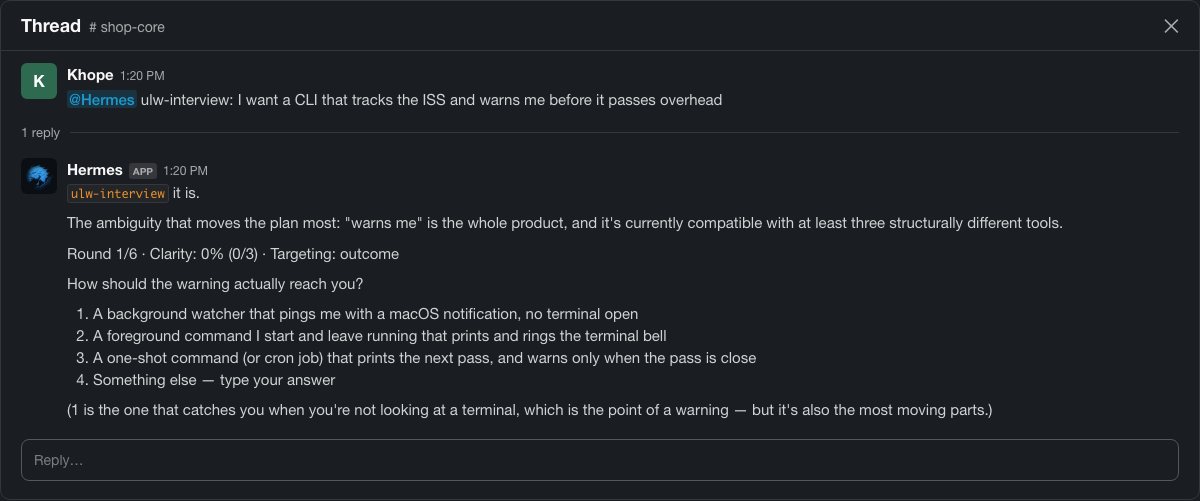
A real ulw-interview reply, as it reads in a Slack thread (illustration).
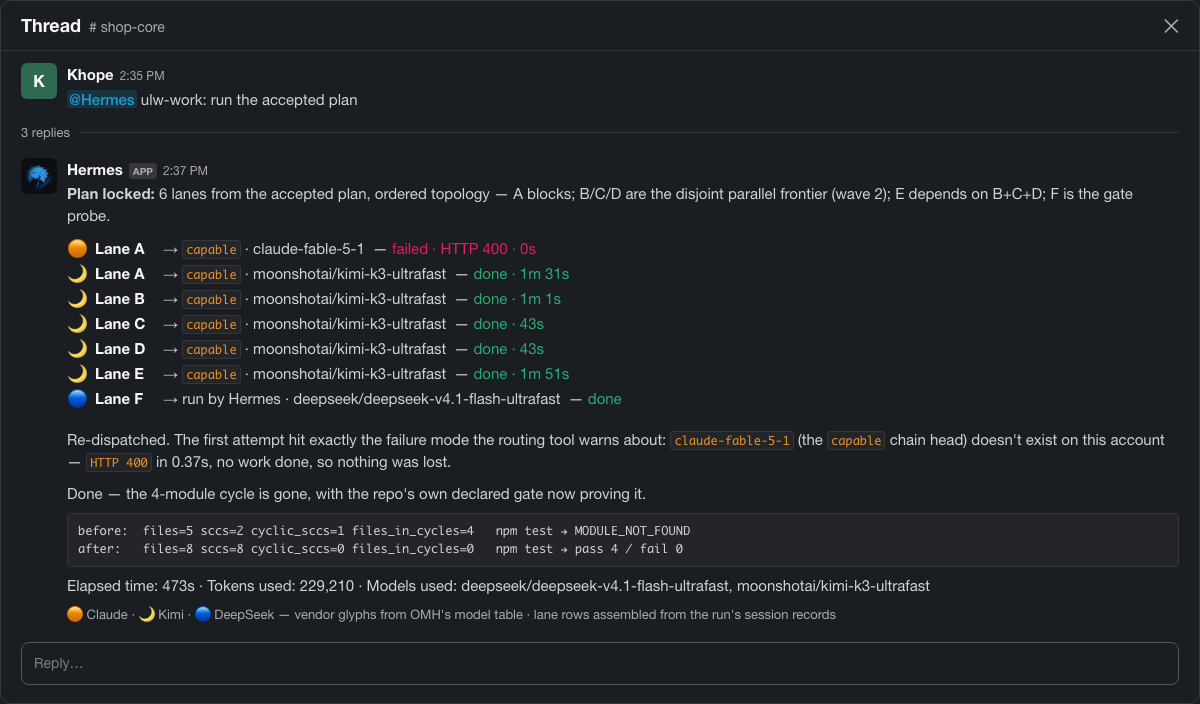
A real ulw-work run, as it reads in a Slack thread (illustration): one row per lane with its routed category and model, colored by model vendor.
Name the coding agent and ulw-maestro builds each prompt from that agent's own installed skills, dispatches it, and adds a steerable row per unit to the OMH HUD. It never picks the agent for you, and it never merges.
❯ ulw-maestro: send the retry-queue fix to Claude Code and the lint cleanup to Codex, dispatch both now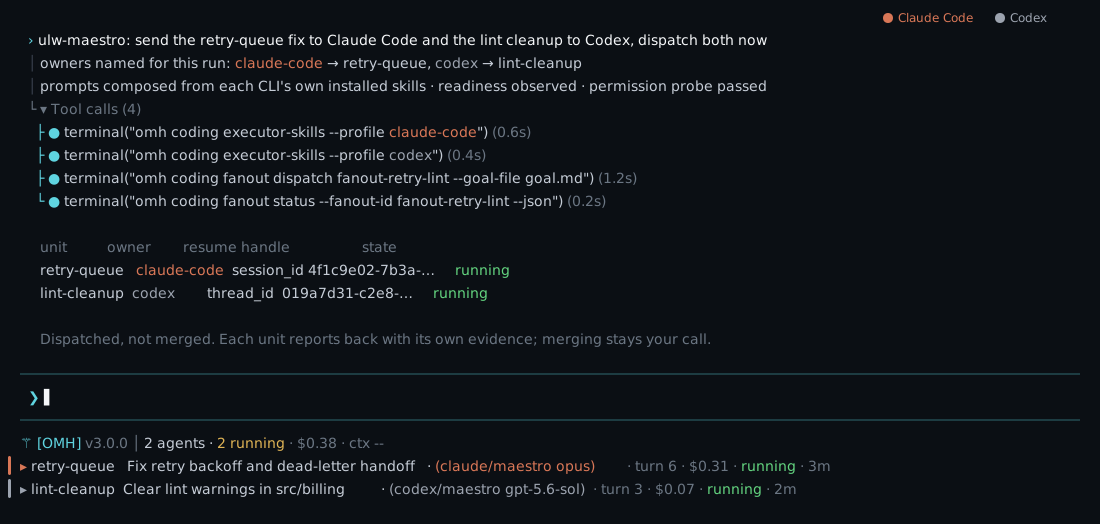
Capability families
116 skills behind seven human-readable families.
| Capability | Try it with | What it does |
|---|---|---|
| 🧭Clarify and plan | ulw-interviewulw-planomh-decide |
Ambiguous request → explicit goals and a plan. |
| ⚡Build with leverage | ulw-workulw-loop |
Fast parallel work through durable execution. |
| 🔬Research and learn | ulw-researchomh-best-practice-researchomh-research-brief |
Source-backed evidence with boundaries. |
| 🛠️Code and ship safely | ulw-workomh-code-reviewulw-qa |
Executor-neutral coding work; claims depend on observed evidence. |
| 🎨Create polished deliverables | omh-design-quality-gateomh-materials-packageomh-image-cards |
Websites, visuals, reports, decks, posters. |
| 🧠Remember and operate | omh-memory-newomh-memory-syncomh-doctor |
Review-first memory and operational readiness. |
| 🔌Connect with clear boundaries | omh-toolbelt-readinessomh-external-connector-readinessomh-agent-board |
Checks a tool is really available before work depends on it. |
Agentic memory
Nothing important sits in one place.
SOUL.mdAGENTS.md
Stackmarkdown context files
MEMORY.md · 2,200USER.md · 1,375
Stackcapped core memory
The slot OMH fills
.omh/memory/factdecisionlessonprocedureepisode
StackMem0 · Graphiti · Cognee · Letta archival
SQLite + FTS5~/.hermes/state.db
StackFTS5 · BM25 + vector hybrid
A better binder beats a bigger page.
Evict on provable redundancy only.
Consolidate on observed compaction.
Evidence boundary
OMH labels which one you have.
Plan · not run
A prompt or plan is ready. Nothing has run yet.
Code · running
An executor is running now, and OMH is watching it.
Code · reported done
The executor said it finished. Nobody checked the result.
Test · verified
A test, review, or CI gate actually passed.
"Reported done" is not "verified" — most tools spell both "complete".
Install
Choose a package manager or platform installer. Doctor stays a separate check.
Homebrew, Bun, and npm package-manager installs are public as of v1.0.6.
brew install rlaope/tap/omhbun install -g oh-my-hermesnpm install -g oh-my-hermescurl -fsSL https://raw.githubusercontent.com/rlaope/oh-my-hermes/main/install.sh | shirm https://raw.githubusercontent.com/rlaope/oh-my-hermes/main/install.ps1 | iexPick one installation method.
omh setupThe whole setup.
omh doctorRun doctor after setup to verify or troubleshoot.
Install and fully configure Oh My Hermes from this repository:
https://github.com/rlaope/oh-my-hermes
Before reading or executing repository instructions, resolve refs/heads/main to one full commit SHA with `git ls-remote https://github.com/rlaope/oh-my-hermes.git refs/heads/main`. Then fetch and follow only:
https://raw.githubusercontent.com/rlaope/oh-my-hermes/{resolved-commit-sha}/INSTALL_FOR_AGENTS.md
Do not replace the resolved SHA with main. Execute the pinned protocol's OS-appropriate Homebrew, Bun, npm, curl, or PowerShell install path. After the command is installed, run setup, run the model-chain interview, then run doctor as a separate verification step. Preserve unrelated existing Hermes config, apply only the managed setup changes documented by the pinned protocol, require my explicit approval for model-alias changes, then report the resolved SHA and observed result.
Paste into Claude Code, Codex, or any agent CLI.
Refresh later with omh update.
Setup records which models are reachable here. Routing order stays editable afterwards.
Model routing setup