Cache Memory Structure and Operation
Cache Memory #
Cache memory is a general-purpose memory designed to reduce bottlenecks caused by speed differences between fast and slow devices.
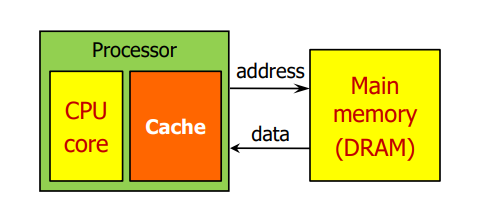
A prime example is its role in mitigating bottlenecks due to speed disparities between relatively fast CPU cores and slower main memory. When the CPU reads data stored in main memory, frequently used data can be stored in cache memory, allowing the CPU to read from the cache when that data is needed again.
Beyond this, the term 'cache' can also be seen in internet web browsers. In this context, the cache stores high-volume data, such as images on web pages, on the hard disk in advance. When a web page is revisited, it loads images from the hard disk instead of the website, thereby speeding up loading times. In other words, it can also alleviate bottlenecks between a fast hard disk and a slow web page.

Cache Memory Levels #
CPUs typically use about 2-3 cache memories, which are categorized into levels.
The following illustrates the cache memory for an Intel Core 2 Duo model.
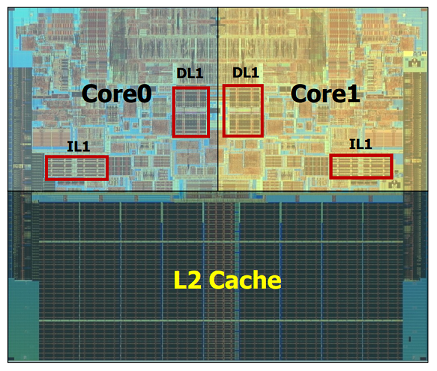
Each CPU core has its own independent L1 cache memory, and a cache dedicated to a specific core is called a private cache. Here, L1 is a private cache, physically divided into DL1 (Data L1) cache and IL1 (Instruction L1) cache.
DL1 cache stores data, and IL1 cache stores instructions, allowing processing even if instruction fetch and memory access overlap in time (structural hazard). Additionally, there is an L2 cache memory (shared cache) that both cores share.
Cache memories are categorized by level based on speed and size. L1 cache is typically embedded within the CPU chip, offering the fastest access. Data is first sought in the L1 cache, and if not found, the search proceeds to the L2 cache.
The following shows the cache memory for a Core i7 2nd generation model.
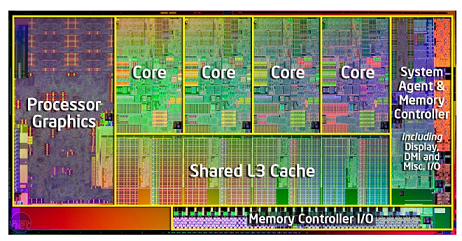
We can see that four cores each have and privately use their own L1 and L2 caches, while L3 is used as a shared cache. Caches at the last level are typically designed to be large and shared among all cores.
Principle of Locality #
Cache memory is smaller than main memory. It stores a subset of the data from main memory that the CPU is expected to use frequently. Cache memory utilizes the principle of locality for this purpose.
- Temporal locality (locality in time): Data that has been referenced once is likely to be referenced again soon. (e.g., loops like
for,while) - Spatial locality (locality in space): Data located near a referenced data item is likely to be used soon. (e.g., sequential access to data arrays like
A[0],A[1])
Cache Memory Terminology #
- Block (or cache line): The unit of data exchanged between cache memory and main memory (typically 64 bytes).
- Hit: Occurs when the data the CPU intends to read is present in the cache.
- Hit rate: The proportion of data requested by the CPU that is found in the cache.
- Hit time: The time required to read from the cache.
- Miss: Occurs when the data the CPU intends to read is not present in the cache.
- Miss rate: The proportion of data requested by the CPU that is not found in the cache (= 1 - Hit rate).
- Miss penalty: The time required for main memory to bring a data block into cache memory when a miss occurs.
Naturally, when applying a cache, the cache hit rate should be high. At least 90% or more.
Types of Cache Misses #
Cache misses primarily occur in three types.
- Cold miss: A miss that occurs because the memory address is being accessed for the first time; it is unavoidable when the cache is empty.
- Conflict miss: A miss that occurs when data A and data B need to be stored in cache memory, but A and B are mapped to the same cache memory address. For example, if data A is stored, and then data B is stored at the same cache memory address, a miss will occur when trying to read data A later (lack of consistency).
- Capacity miss: A miss that occurs because the cache memory space is insufficient.
Structure and Operation #
Direct Mapped Cache #
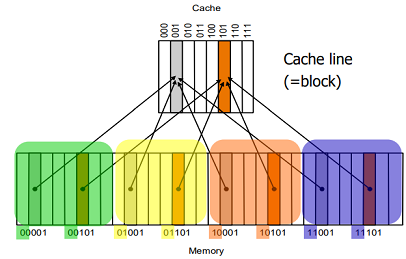
This is the most basic cache memory structure, where each memory block maps to exactly one specific block in the cache. For example, a block located at memory address 00001 can only be stored in cache memory block 001. Therefore, to determine a hit or miss, only one cache block needs to be checked.
The address of the cache block where a memory block will be stored can be calculated using (memory block address) % (number of cache blocks). That is, for memory addresses from 00000 (0) to 11111 (31), divided by 111 (8), the remainder is the lower three bits of the memory block address.
However, since memory is larger than the cache, multiple memory blocks share a single cache block. For instance, the gray area in the cache (block 001) needs to indicate which of the four memory locations (00001, 01001, 10001, 11001) the stored data originated from. To identify this, a tag is used, providing the following information.

The tag is the quotient of the memory block address divided by the number of cache blocks; in this case, it's the upper two bits of the memory block address.
Cache memory consists of valid, tag, and data fields.
- valid: Initially set to 0, it is recorded as 1 from the moment meaningful data is actually stored.
- tag: Stores the necessary information to identify which memory block is stored in the cache.
- data: The section where the actual data is stored.
Fully Associative Cache #
Fully associative cache is the opposite concept of direct mapped cache, where a memory block can be stored in any available block within the cache memory.
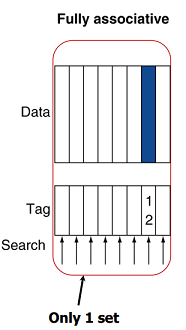
Therefore, to determine a hit or miss, all cache blocks must be checked.
N-way Set Associative Cache #
N-way set associative cache can be understood as a concept midway between direct mapped cache and fully associative cache. It divides the cache memory into units called sets, each containing N blocks (ways), and a memory block is stored in an available block within one of these sets. The following shows a 2-way set associative cache.
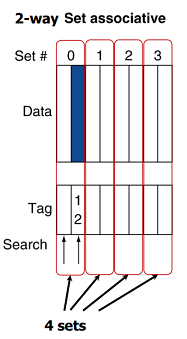
A memory block can be stored in one of two blocks within a set, and to determine a hit or miss, both blocks must be checked. The specific set to check can be found by calculating (memory block address) % (number of cache sets).