TCP Header
In information technology, a header refers to supplementary data located at the beginning of a data block that is stored or transmitted.
In data transmission, the data following the header is sometimes called the payload or body.
Simply put, it's easy to understand if you think of it as the process of reading the header in front of a frame, packet, or segment to verify if the data belongs to the correct owner.
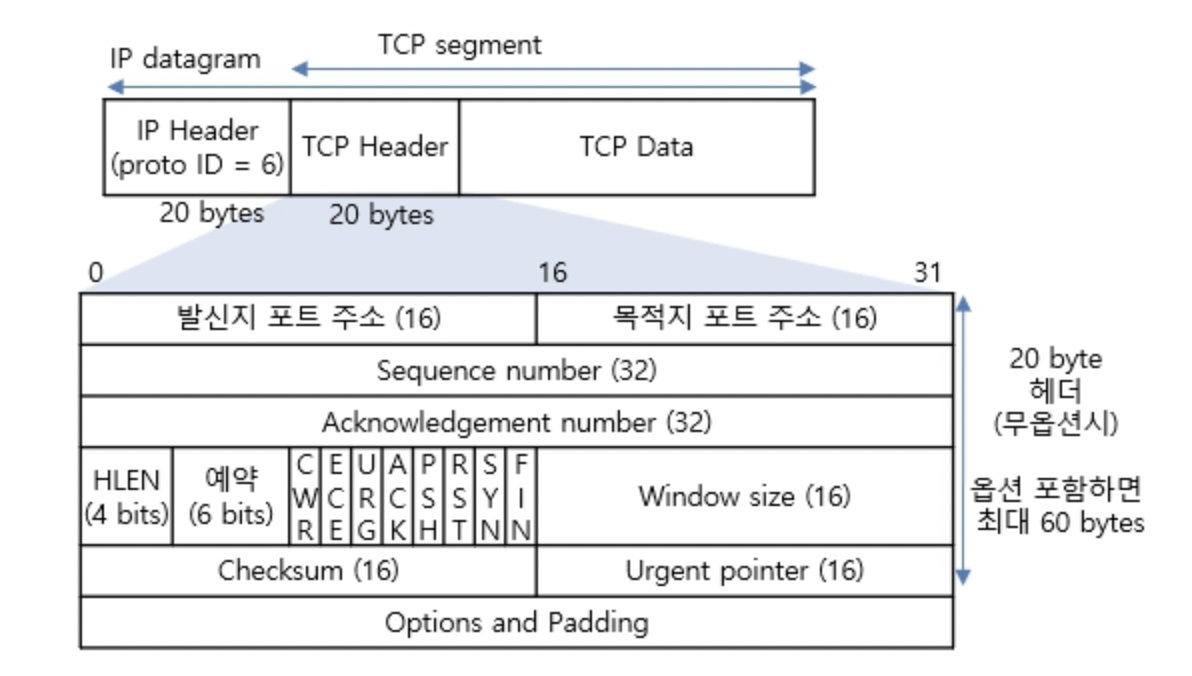
The size of a TCP header is 20 to 60 bytes.
Source/Destination Port Number (16 bits each) #
A socket address = IP address + port number. A socket is an endpoint for two-way communication between two programs running on a network. Sockets are bound (the process of connecting) to a port number, which allows the TCP layer to identify the application to which data should be delivered.
The Source Port Number indicates the address of the sender, and the Destination Port Number indicates the address of the destination.
Sequence Number (32 bits) #
The sequence number indicates the order of the data being transmitted and is used to reassemble fragmented segments. Through this, TCP is said to provide reliability and flow control.
Acknowledgement Number (32 bits) #
The next byte number expected to be received = Sequence number sent by the peer + 1
Simply put, if you imagine learning numbers up to 200, and you've learned up to 100, it's easy to understand this as asking to be taught from 101 next.
HLEN or Data offset (32 bits) #
It uses 32-bit word units, where 1 word = 4 bytes in a 32-bit system. Although the terminology varies depending on the source, it refers to the length of the header or the starting position of the data.
Reserved (3 bits) #
I'm not sure about the details, but I found that this field is reserved for future use. It was originally 6 bits, but 3 bits were transferred to the flag field to enhance congestion control, adding the NS, CWR, and ECE flags.
Flag bits #
These 9-bit flags indicate the attributes of the current segment.
- URG (Urgent Pointer): This flag indicates that the Urgent Pointer field is populated. If the sender's upper layer indicates urgent data, the URG bit is set to 1, and the data is transmitted first, regardless of order.
- ACK (Acknowledgment): If set to 1, it means the acknowledgment number is valid. If set to 0, the acknowledgment number is not included. That is, the 32-bit acknowledgment number field is ignored.
- PSH (Push): This flag requests the receiver to deliver this data directly to the application as quickly as possible for processing. If this flag is 0, the receiver waits until its buffer is full; if it's 1, it can also mean there are no more connected segments.
- RST (Reset): Requests a forced reset on an ESTABLISHED connection.
- SYN (Synchronize): Synchronizes sequence numbers for initiating a TCP connection.
- Connection request: SYN = 1, ACK = 0 (SYN segment)
- Connection acceptance: SYN = 1, ACK = 1 (SYN + ACK segment)
- Connection establishment: ACK = 1 (ACK segment)
- FIN (Finish): A request to terminate the connection with the peer.
The NS, CWR, and ECE flags are for Explicit Congestion Notification (ECN) in the network.
- NS: An additional field to defend against accidental or malicious concealment of the CWR and ECE fields.
- ECE: If this field is 1, and the SYN flag is also 1, it means informing the peer that ECN is being used. If the SYN flag is 0, it means the network is congested and requests to reduce the size of the segment window.
- CWR: Means that the size of the transmitting segment window has already been reduced after receiving the ECE flag.
Window Size (16 bits) #
The Window Size field contains a value indicating the amount of data that can be transmitted at once. Since it is 16 bits, it has a range of 2^16 = 65535.
Checksum (16 bits) #
The checksum is a value used to detect errors that may occur during data transmission.
16비트는 너무 길어서 8비트로 예를 들면
1의 보수(쉽게 주어진 값이 1이면 0인 반대값으로 생각)를 취하고, 그 합에 대한 결과를 전송하면 수신측에서, 같은 합을 해보아서 오류를 검출하는 방식이다.

  10001010
+ 01110101
-----------
  11111111

검사합의 값이 0 이면 오류 없음, 0 이 아니면 오류 있음
Urgent Pointer (16 bits) #
This is the sequence number for the last byte of urgent data included in the TCP segment.
Options (0 ~ 40 bytes) #
This is an optional field primarily used to extend TCP connection management capabilities.