TCP State Machine
TCP is a protocol that provides reliable stream communication.
This implies four core functionalities:
First, ordered delivery: if packets 1, 2, and 3 are sent in order, the Linux kernel's TCP stack must deliver them to the application in the same order.
Second, loss recovery (retransmission): if a packet is lost, no ACK is received, so the sender retransmits it based on a timer.
Third, flow control: the receiver uses the window size to signal, 'My buffer is low, please send slowly,' thereby regulating the flow.
Fourth, congestion control: if the network itself is congested, packet loss occurs. TCP adjusts the transmission rate using Linux kernel congestion control algorithms like CUBIC.
These four combined constitute the essence of TCP.
CUBIC is one of the congestion avoidance algorithms. It uses a cubic function to increase the window size and adjusts the rate of window size increase over a specific period to efficiently utilize bandwidth according to network conditions. Stability and fairness: It evolved from BIC TCP (Binary Increase Congestion control), maintaining BIC TCP's strengths in stability and fairness while having a simplified structure.
How TCP Sockets are Created and Managed within the Kernel #
When an application calls socket(), the following are created in the Linux kernel:
struct socketstruct sock(inet_sock)- receive buffer / send buffer
- TCP state machine
Since TCP is a state-based protocol, each connection is managed in states such as ESTABLISHED, SYN_SENT, FIN_WAIT1, and TIME_WAIT.
The Actual Packet Path in Linux #
Application -> Kernel -> NIC -> Switch/Router -> Other side -> Linux Kernel -> Application is one complete cycle.
Transmission Path (TX Path)
app write()
  ↓
socket send buffer
  ↓
TCP segmentation (MSS 단위로 자름)
  ↓
IP layer에서 routing 결정
  ↓
netfilter(OUTPUT) / iptables 로 통과
  ↓
qdisc (fq, fq_codel 등 커널 스케줄러)
  ↓
device driver → NIC
  ↓
LAN / 인터넷 전송
Reception Path (RX Path)
NIC가 패킷 수신
  ↓
NAPI 인터럽트 → softirq 처리
  ↓
device driver가 커널로 패킷 전달
  ↓
IP layer에서 demux (목적지 포트 기반)
  ↓
netfilter (INPUT)
  ↓
TCP 재조립(순서 보정, 누락 패킷 확인)
  ↓
socket receive buffer
  ↓
app recv()
TCP State Machine #
All TCP operations are defined based on states.
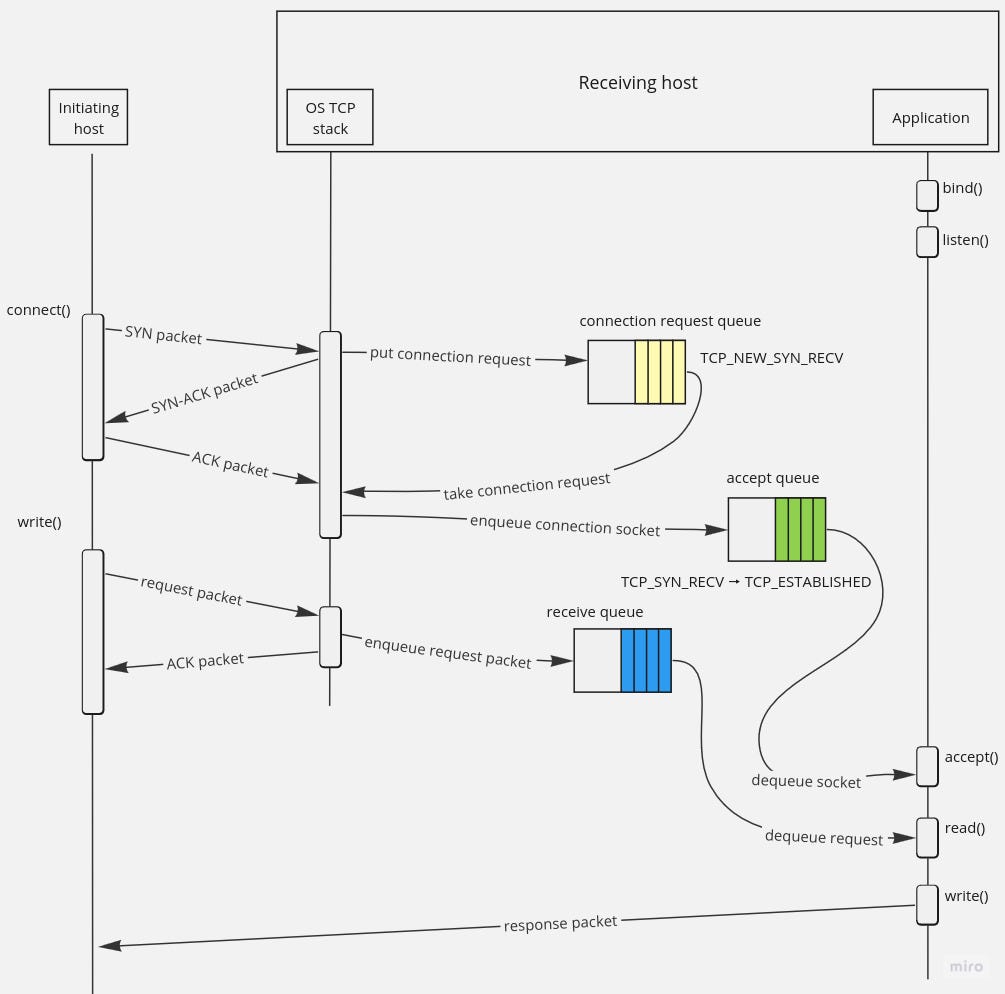
Connection Establishment: 3-Way Handshake
Client ---- SYN ----> Server
Client <--- SYN/ACK - Server
Client ---- ACK ----> Server
Connection Termination: 4-Way FIN
A ---- FIN ----> B
A <--- ACK ---- B
B ---- FIN ----> A
B <--- ACK ---- A
Based on these patterns, Linux manages each TCP socket by state.
3-Way Handshake #
In step 1, the client sends a SYN containing the following information:
- My sequence number (ISN)
- A flag indicating a desire to connect
- The kernel socket is placed in the following state:
SYN_SENT
Step 2: SYN-ACK
The server responds with an ACK while sending its own ISN (Initial Sequence Number).
Server State: SYN_RECV
In this state, it's managed as a half-open connection in Linux and enters the backlog queue.
Here, the backlog queue is a connection queue; when a TCP server receives a client connection request, it cannot immediately pass it to the application.
Therefore, the Linux kernel maintains two queues: the SYN queue and the accept queue, which can be thought of as the half-open queue and the full-open queue, respectively.
When a client requests a connection, it's first placed in the SYN queue. After the handshake completes, it moves to the accept queue, and the application retrieves it by calling accept().
In other words, it's where temporary connection states created during the TCP 3-way handshake process are stored.
Step 3: ACK
When the client sends an ACK, the server formally transitions the connection to the ESTABLISHED state.
And the following are created:
- send buffer
- receive buffer
- congestion control state
- Variables for RTT/RTO calculation
- window control structure
The Actual Path of TCP Packets in the Linux Kernel #
Linux Operations Upon SYN Reception
NIC
 ↓
driver
 ↓
netfilter PREROUTING
 ↓
IP layer: TCP packet demux
 ↓
TCP state machine: listen socket 검사
 ↓
SYN queue(syn backlog)에 저장
 ↓
SYN/ACK 생성하여 송신
Upon Final ACK Reception
NIC
 ↓
driver
 ↓
PREROUTING
 ↓
IP Layer
 ↓
TCP
 ↓
half-open → full ESTABLISHED 소켓으로 승격
 ↓
accept() queue로 이동
 ↓
app이 accept() 호출하면 해당 소켓 반환
TCP Header #
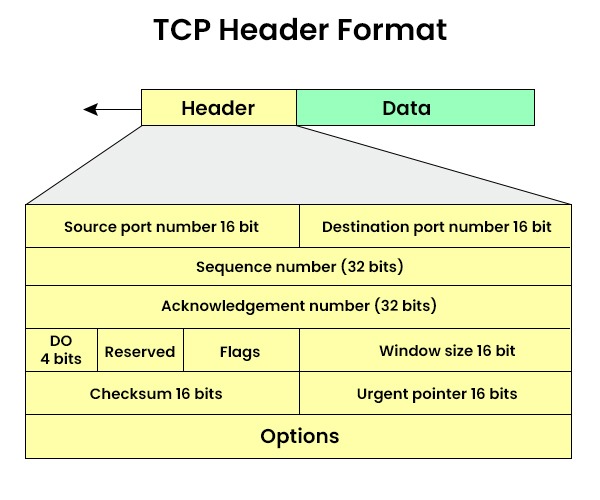
The TCP header is a structure containing information absolutely necessary for TCP to implement reliability.
  0               15 16              31
 +-----------------+-------------------+
 |   Source Port   |   Dest Port       |
 +-----------------+-------------------+
 |           Sequence Number           |
 +-------------------------------------+
 |         Acknowledgment Number       |
 +--------+------+-------+------------+
 | Data   | Res  |Flags |  Window     |
 |Offset  |erved |       |   Size     |
 +--------+------+-------+------------+
 |       Checksum        | Urgent Ptr |
 +------------------------+-----------+
 |        Options (if any, variable)  |
 +-------------------------------------+
 |        Application Data ...        |
It has the structure shown above, and the TCP header (excluding options) is 20 bytes.
Source Port, Dest Port #
Distinguishes which processes are communicating (source and destination).
These values are used by the OS kernel for socket mapping.
Sequence Number #
A core TCP component used for ordered delivery.
Indicates the starting position of the byte stream sent by the sender.
Example:
- Initial Sequence Number (ISN) = 1000 when first sent.
- If 100 bytes were sent, the next is 1100.
In the receive queue, this number is used for reassembly (reordering).
Acknowledgment Number (32-bit) #
Indicates the next byte number the receiver expects after the bytes received from the peer.
Example:
- If I have received bytes 1000-1999 from the peer, the ACK is 2000.
This mechanism forms the basis for TCP's reliability. Retransmissions can also be determined via the ACK number.
Data Offset (4-bit) #
Indicates the length of the TCP header. Since the header length increases if options are present, this field tells where the data begins.
Flags (6-bit or 8-bit depending on version) #
Flags that control TCP operations.
| Flag | Description |
|---|---|
| SYN | Connection initiation |
| ACK | Acknowledgment valid |
| FIN | Connection termination request |
| RST | Immediate connection reset |
| PSH | Deliver immediately to the application without buffering |
| URG | Urgent pointer is used |
| ECE | Congestion control Explicit Congestion Notification |
| CWR | ECN response, congestion window reduced |
The key flags are SYN, ACK, FIN, and RST.
Because the 3-way handshake and 4-way FIN are performed using these flags.
Window Size (16-bit) #
Indicates the maximum amount of data the receiver can accept (receiver buffer size).
That is,
You can send up to x bytes more right now.
This is the core of flow control. If the receive queue is full, a window size of 0 is sent to stop transmission.
Checksum (16-bit) #
Verifies that the TCP segment has not been corrupted.
It's an end-to-end error check to prevent data corruption at the application level.
When NIC Offload is enabled, the hardware may perform the calculation.
Urgent Pointer #
Used with the URG flag. Rarely used.
It's a feature related to TCP urgent data (Out-of-Band).
Options (Variable Length) #
This is the space for TCP extension features.
Important options:
| Option | Description |
|---|---|
| MSS | Maximum Segment Size (maximum segment size the peer can accept) |
| Window Scale | Extends the Window size beyond 16-bit |
| SACK | Selective ACK (partial retransmission) |
| Timestamps | RTT measurement, PAWS protection |
| Fast Open | Allows data transmission without a handshake |
Actual Packet Example
Flags [S], seq 1234567890, win 64240, options [mss 1460,sackOK,TS val 12345 ecr 0, wscale 7]
- Flags[S] → SYN
- seq → Initial sequence number
- win → Window size
- options → MSS, SACK, timestamp, window scale options
Why TCP is Impossible Without the TCP Header #
The TCP header is not just a simple information structure; it exists to achieve these core functionalities:
- Ordered delivery -> sequence number
- Reliability -> acknowledgment number
- Flow control -> window size
- Congestion control -> ECN/ECE/CWR
- Connection establishment/termination -> SYN/ACK/FIN
- Error checking -> checksum
- Performance optimization -> Options (MSS, SACK, Timestamp)
Without the TCP header, it absolutely cannot be created.