Service - Headless, Endpoint, ExternalName
This time, let's think about networking from a Pod's perspective.
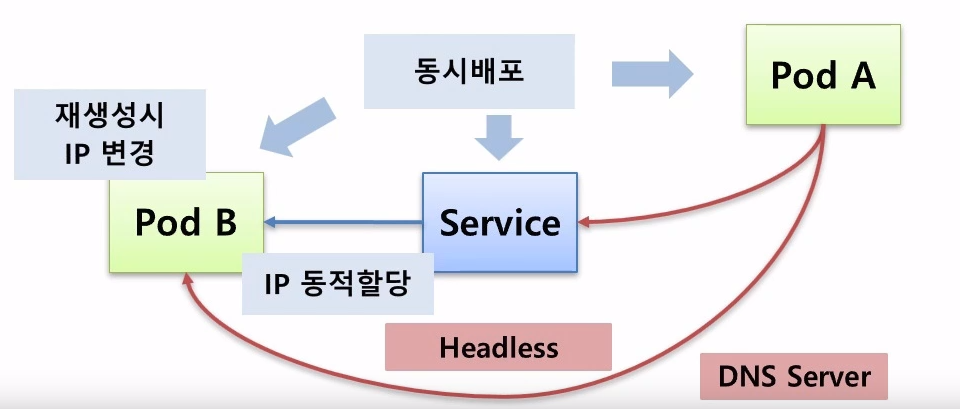
How can Pod A connect to Pod B?
- Direct connection via Pod A - Pod B IP
- Connection via a Service
However, there's a problem here. The most obvious issue is that Pod IPs change, so directly referencing an IP address is not a good approach.
Furthermore, when Pods and Services are deployed simultaneously, IPs are dynamically allocated, leading to a problem where the IP address is unknown until deployment is complete.
Therefore, Headless Services and a DNS Server are necessary.
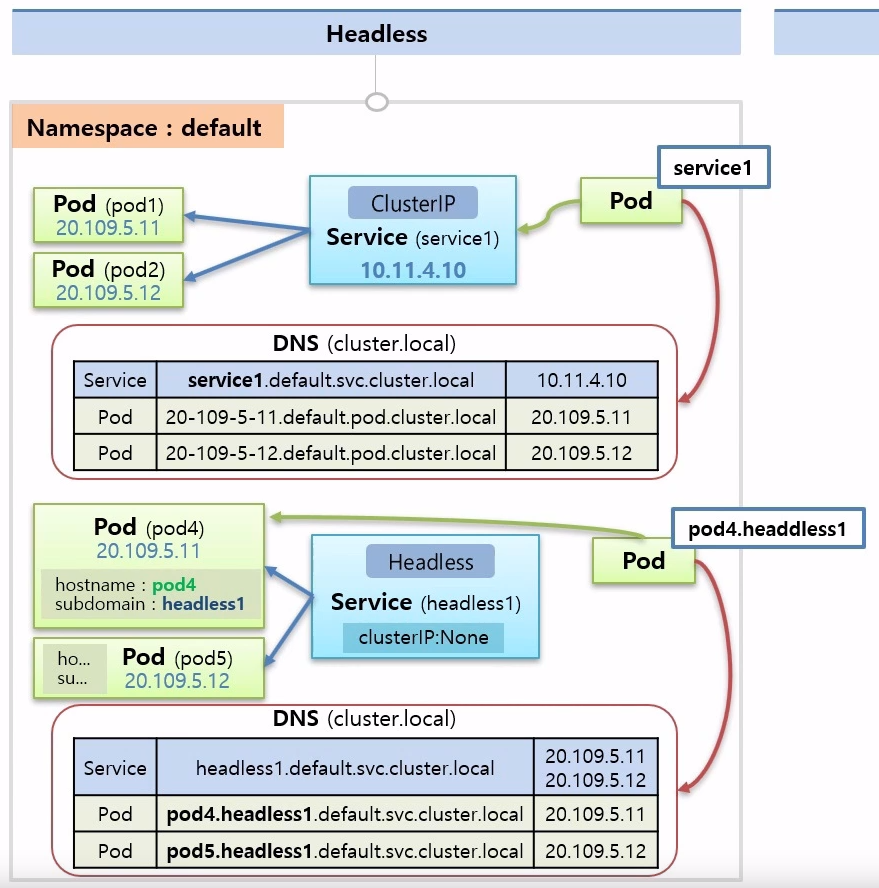
Two Pods and a Service are connected in the default namespace.
Now, let's consider when a Pod wants to connect to a Service.
In the first case above, the Service uses a Cluster IP, which is dynamically allocated and thus unknown at startup.
DNS is ultimately the solution. In the cluster.local DNS, both Pods and Services have unique addresses. And these unique addresses are entered by the user.
Therefore, when creating a Pod, you only need to provide the DNS address, allowing connection at creation time.
DNS Structure #
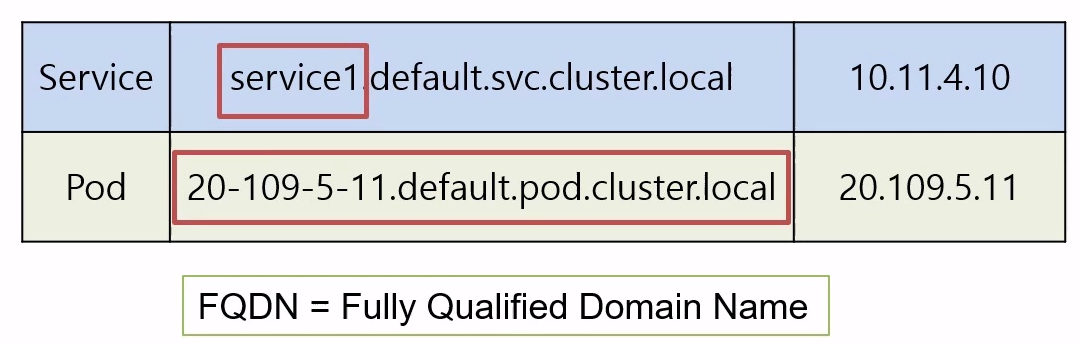
When a typical DNS server is set up, DNS names are written as FQDN = Fully Qualified Domain Name.
service1.default.svc.cluster.local: A Service consists of the service name.namespace.svc (abbreviation for service).DNS name.20-109-5-11.default.pod.cluster.local: A Pod consists of the IP.namespace.pod (meaning pod).DNS name.- These long names are called FQDN = Fully Qualified Domain Name.
- For Services, you only need to use the
service1part, but for Pods, you must use the full name.

If you want to connect directly from a Pod to Pod4, you need to make it headless.
To make it headless, you set clusterIP:None.
For Pod4 and Pod5, you must put the Pod's hostname in hostname (pod4, pod5) and headless1 in subdomain.
When configured this way, the Service in DNS is set up exactly the same as when there is no Headless Service.
However, since the Service has no IP, calling the Service's name will return the IP addresses of all connected Pods.
Pods were previously configured in the format IP.default, but in a headless setup, they are configured as pod4.headless1.default.
Furthermore, for Pods, you only need to call the prefix, such as pod4.headless1.
Therefore, if a Pod wants to connect to pod4 or pod5, it only needs to store the name pod4.headless1 --> Solved!
Endpoint #
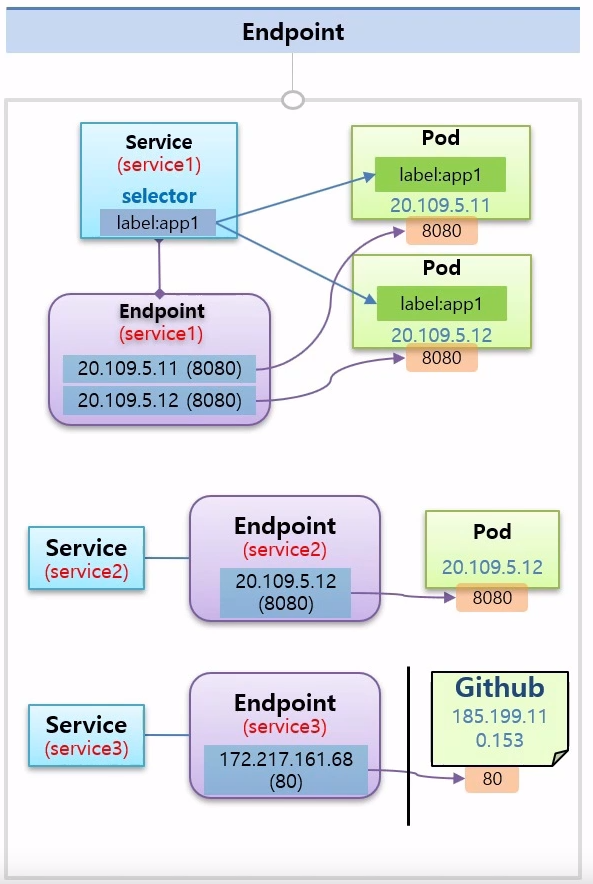
When connecting Services and Pods, labels are used for the connection.
This is actually Kubernetes creating an Endpoint through labels.
An Endpoint has the same name as the Service and contains the Pod's IP information.
Knowing this rule allows for connections even without creating labels and selectors.
When creating a Service Pod, you can directly create an Endpoint, and the target IP can also be an external IP.
ExternalName #
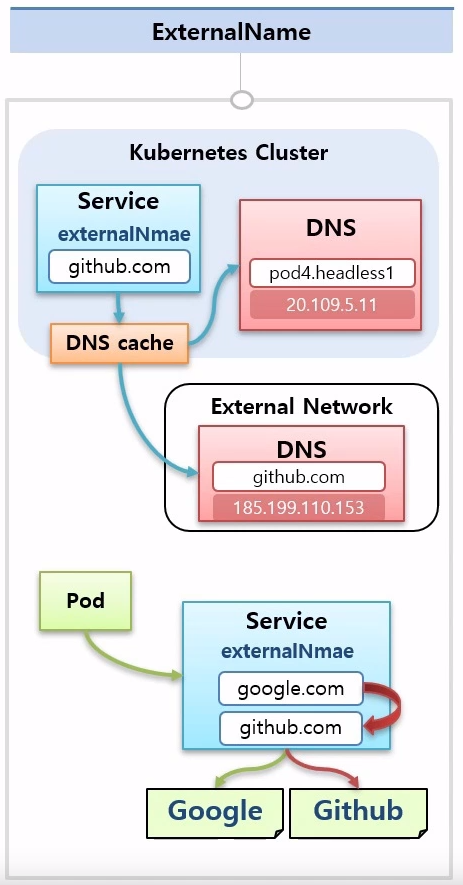
You can specify the Service's ExternalName, which is a domain name.
The DNS cache looks up the IP address from internal and external DNS servers.
If a Pod merely points to a Service, the Service can change its domain address whenever needed, eliminating the need to modify and redeploy the Pod.
[[Service - ClusterIP, NodePort, LoadBalancer]]