Probe
How can Kubernetes analyze and manage the status of containers?
This role is fulfilled by kubelet's Probes.
Probes help diagnose and analyze the state of containers within a Pod, determining whether a restart or termination is necessary.
Probe Operation Methods #
Probes diagnose the state of containers in three main ways.
- HTTP method: Sends an HTTP GET request and checks for 2xx or 3xx responses.
- TCP method: Checks if the 3-way-handshake is successfully established.
- Exec method: Executes a specific command within the container and checks if the exit code is 0.
These diagnostic results are categorized into three types: Success, Failure, and Unknown (diagnostic failure). If the diagnostic result is Failure, kubelet detects this and performs the necessary actions.
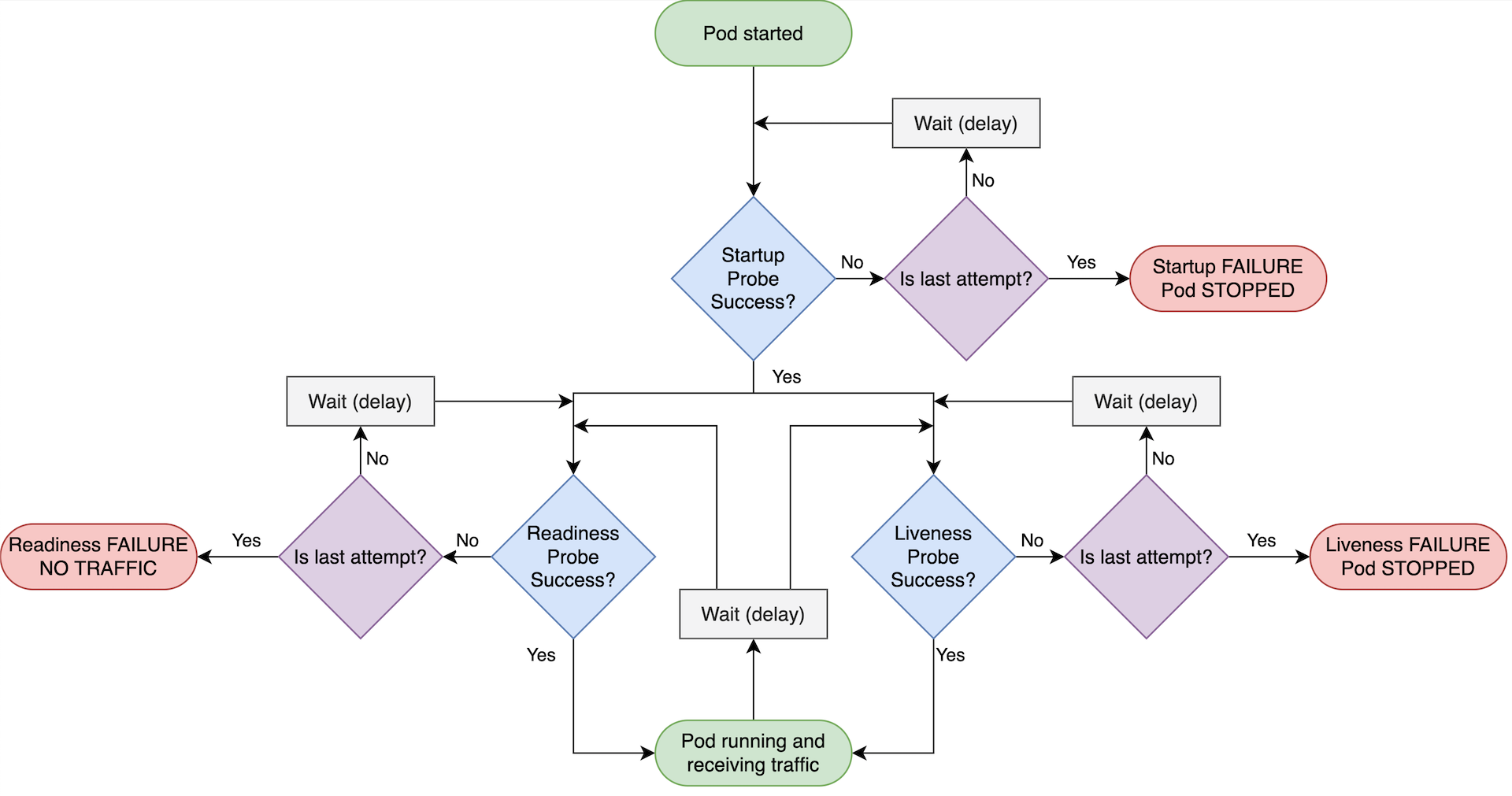
Probes for container state diagnosis are broadly categorized into three types: Liveness, Readiness, and Startup. Their purposes and operating methods are summarized as follows.
Liveness #
It checks the container's state using the three methods above (HTTP, TCP, Exec), and if a Failure occurs, it restarts the container.
This probe ensures high availability even if there are some issues within the container.
However, caution is needed as issues like internal bottlenecks or memory leaks can cause the process to stop entirely.
The example below shows how to configure an Exec method Liveness probe that diagnoses the state by directly executing a command in the container. This content is added to the container specification under spec.containers in the YAML file used for Pod deployment.
livenessProbe:
  exec:
    command:
    - cat
    - /tmp/healthy
  initialDelaySeconds: 5
  periodSeconds: 5
- It waits for the specified duration via
initialDelaySeconds. After that, kubelet executescat /tmp/healthyat intervals defined byperiodSeconds. - If this probe is not explicitly declared during Pod (container) creation in the format above,
Successis considered the default state. - If you want the container to run only when it's fully in a RUNNING state, you can either provide a sufficiently large
initialDelaySecondsvalue or use a Startup Probe in conjunction.
Readiness #
The Readiness method is similar to the Liveness method, with the difference being that if a Failure occurs in the Readiness method, load balancing to that Pod is stopped.
The role of distributing incoming external requests appropriately to nodes is performed by the cluster's Service. What if there's no response from a specific Pod? That Pod is deemed problematic, so requests are not sent to it.
The declaration method is similar to Liveness, differing only in that it's written under readinessProbe.
readinessProbe:
  exec:
    command:
    - cat
    - /tmp/healthy
  initialDelaySeconds: 5
  periodSeconds: 5
- If this probe is not explicitly declared during Pod (container) creation in the format above,
Successis considered the default state. - The Liveness probe operates independently of the Readiness probe. Neither waits for the other to become
Success. Therefore, when using both, they must be configured carefully.
Startup Probe #
This probe checks when the application deployed in the container starts. Until it becomes Success, it blocks Liveness and Readiness probes from proceeding and solely verifies the Pod's startup.
The probes discussed earlier (Liveness, Readiness) all operate using the Pod's computing resources. Therefore, if they show significant activity from the very beginning of a Pod's startup, the time it takes for the container and Pod to reach a Running state will be prolonged. Thus, until the Pod is deemed to have started normally, this probe performs the status diagnosis while keeping other probe functionalities disabled.
Due to its nature, this probe allows the Pod or container state to proceed even if it's determined as Failure. Indeed, when declaring this probe via a YAML file, you can specify the failure threshold as shown below.
startupProbe:
  httpGet:
    path: /health-check
    port: liveness-port
  failureThreshold: 30
  periodSeconds: 10
The method above checks the status using HTTP.
- The
failureThresholdspecifies the maximum number of allowed failures. The status is checkedfailureThreshold(30) times, everyperiodSeconds. startupProbe.failureThreshold: Represents the maximum number of allowed failures.startupProbe.periodSeconds: Represents the probe's status diagnosis interval (in seconds).
Once the normal operation of the container and Pod is fully confirmed, the Startup Probe stops its status check loop and hands over the probing functionality to Liveness and Readiness.