Pod LifeCycle(Phase, Condition)
Pods have a lifecycle from creation to deletion, and they have the following phases:
Phase #
Pending: The Pod is waiting to be created. This can happen if container image downloads take time.Running: The Pod is running.Succeeded: All containers in the Pod have terminated successfully.Failed: One of the containers in the Pod has terminated with a failure.Unknown: Pod communication is not possible for some reason.
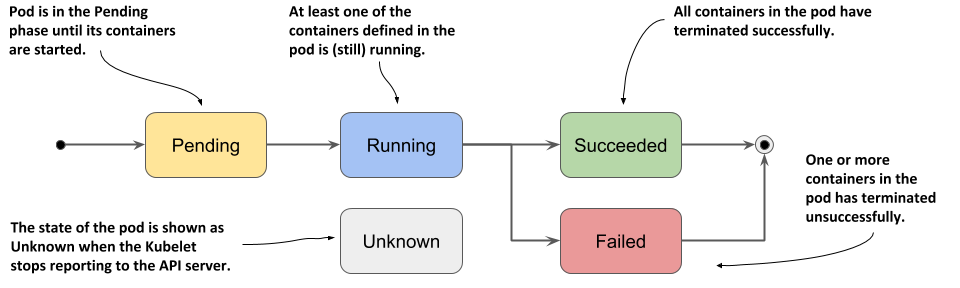
Pods start in the Pending phase, then transition to the Running phase once at least one of the primary containers starts successfully. After that, they move to either the Succeeded or Failed phase depending on whether the Pod's containers terminated successfully or with a failure.
You can check the current Pod lifecycle using the following command:
kubectl describe pods <파드이름>
Let's check the status of a Pod that is currently Running.
The Status item shows the current Pod's lifecycle.
[root@k8s-master ~]# kubectl describe pods nginx-deployment-69cfdf5bc7-gcpd2
Name:         nginx-deployment-69cfdf5bc7-gcpd2
Namespace:    default
Priority:     0
Node:         k8s-node2/192.168.56.32
Start Time:   Fri, 07 Jan 2022 13:35:49 +0000
Labels:       app=nginx-deployment
              pod-template-hash=69cfdf5bc7
Annotations:  cni.projectcalico.org/containerID: b55493deca71e924b1f262af9656954acd426c220b1c026a86de2f640688822f
              cni.projectcalico.org/podIP: 20.109.131.22/32
              cni.projectcalico.org/podIPs: 20.109.131.22/32
Status:       Running

# 중간 생략
Conditions:
  Type              Status
  Initialized       True
  Ready             True
  ContainersReady   True
  PodScheduled      True

# 이후 생략
After a Pod is created, its
statusfield is defined as aPodStatusobject, which includes thephasefield.
Condition #
Looking at the Status item, the Pod is currently in the Running state. The Conditions item indicates the current status information of the Pod, categorized by Type and Status.
It has a single PodStatus and an array of PodConditions for Pods that have passed or not passed.
Kubelet manages the following PodConditions:
PodScheduled: The Pod has been scheduled to a node.PodHasNetwork: (Alpha feature; must be explicitly enabled) The sandbox has been successfully created and networking configured.ContainersReady: All containers in the Pod are ready.Initialized: All init containers have completed successfully.Ready: The Pod can serve requests and should be added to the load balancing pool of all matching services.
When a Pod is assigned to a node, the kubelet begins creating containers via the container runtime engine.
Containers can display three states: Waiting, Running, and Terminated.
Waiting: Waiting indicates that the container is performing tasks that must be completed before it can start (e.g., pulling images from a registry or applying secret data).Running: Indicates that the container has started normally and is running.Terminated: Indicates the state when a container has run to completion or failed for some reason.
When you query a Pod with a container in the Waiting state using kubectl, the Reason field, which summarizes why the container is in that state, is also displayed.
When you query a Pod in the Running state using kubectl, you can see when the Pod started running.
When you query a Pod in the Terminated state using kubectl, you can see the reason for termination, as well as the start and end times.