How Terraform Works
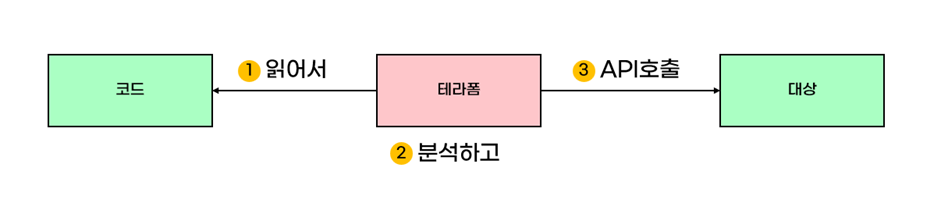
Terraform reads the code and analyzes whether it is executable.
After that, it applies the code to the target using the APIs supported by the target.
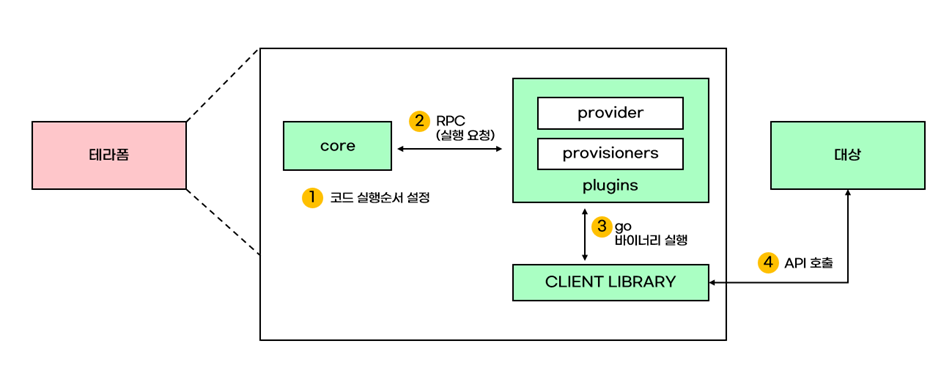
- The core reads the Terraform code, performs syntax validation, and determines the execution order. The execution order is represented as a Resource Dependency Graph.
- The core requests the plugins to execute the Terraform code.
- The plugins read the provider configuration and call the appropriate APIs. The API call logic is implemented in the client binary.
If we run terraform init, we can see the following content.
Initializing the backend...

Initializing provider plugins...
- Finding hashicorp/vault versions matching "3.17.0"...
- Installing hashicorp/vault v3.17.0...
- Installed hashicorp/vault v3.17.0 (signed by HashiCorp)

Terraform has created a lock file .terraform.lock.hcl to record the provider selections it made above. Include this file in your version control repository so that Terraform can guarantee to make the same selections by default when you run "terraform init" in the future.

Terraform has been successfully initialized!

You may now begin working with Terraform. Try running "terraform plan" to see any changes that are required for your infrastructure. All Terraform commands should now work.

If you ever set or change modules or backend configuration for Terraform, rerun this command to reinitialize your working directory. If you forget, other commands will detect it and remind you to do so if necessary.
What we can see here is that during the terraform init process, plugins are initialized, and binary client libraries for API calls are fetched.