HCL Language
Terraform code is written in a language called HCL.
Terraform files have the .tf extension, and these .tf files are written in the HCL language.
Unlike programming languages, HCL is a language focused on expressing configuration.
Units #
HCL is composed of a basic unit called a block.
The image below is an example from the official Terraform documentation.
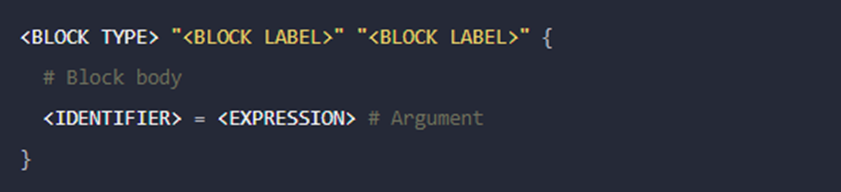
In the image above, the yellow text BLOCK LABEL is optional and can be zero or more.
BLOCK TYPE determines what action the Block performs.
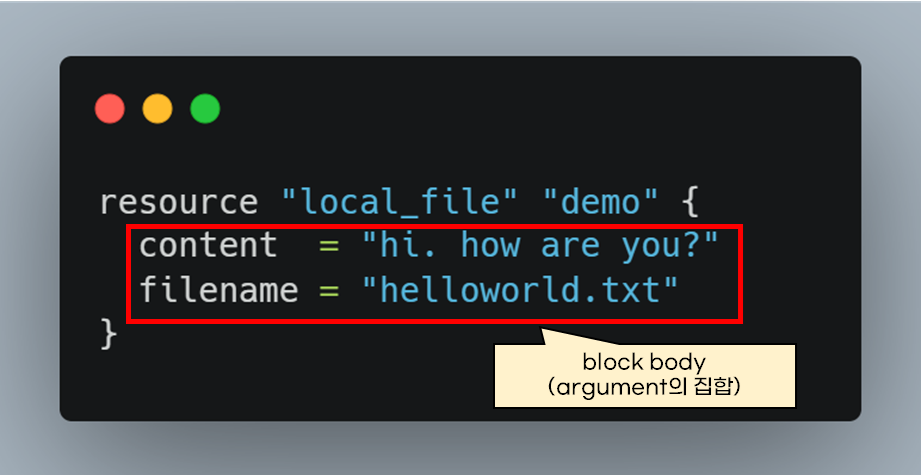
resource "local_file" "demo" {
  content = "hi"
  filename = "hello.txt"
}
In the example above, the first block label determines the type of resource that the resource block creates.
The local_file block label creates a file on the local PC where Terraform is executed.
Since multiple resource blocks can be used, a name is set in the second label to distinguish each resource. (Therefore, if the second label is duplicated, an error will occur.)
To summarize, the first block label creates the resource, and the second label is the distinguishing name.
The block body specifies the block's configuration. The content entered in the body is called an argument.
Arguments can be used with Terraform along with variables, conditional statements, and loops.
Terraform Scope #
The path where Terraform code is executed is called the root module.
Terraform executes all .tf files within the root module.
However, it does not execute .tf files in submodules. To execute Terraform files in a subdirectory,
terraform -chdir="./submodule" init
you can write it as shown above.