Terraform dynamic block
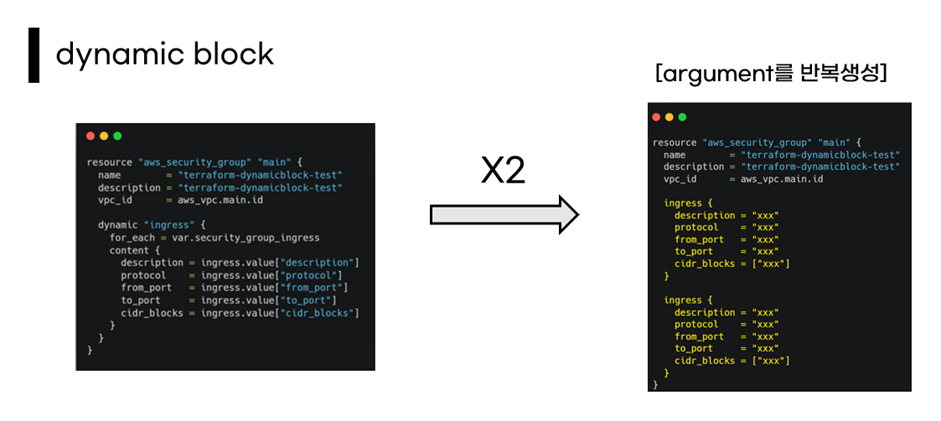
Terraform dynamic blocks provide a feature to dynamically generate block arguments in Terraform.
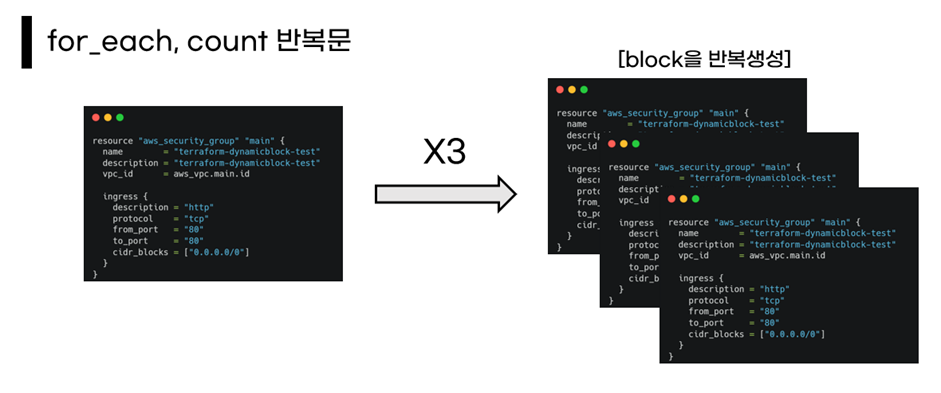
The difference from count/for_each is that while count and for_each repeat and create the block itself, dynamic blocks dynamically generate arguments.
How to Use #
To use it, you simply change the block's arguments into a dynamic block.
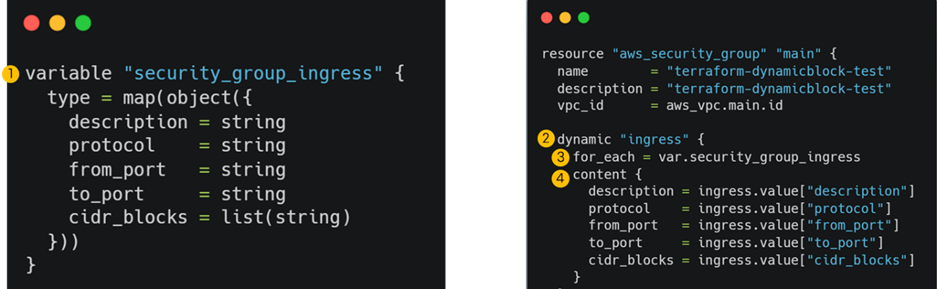
- Define the values to be passed as arguments in a collection form using variables.
- Attach
dynamicto the argument to create the argument. - Reference the value defined as a variable in
for_each. - Repeatedly configure the content within
content.
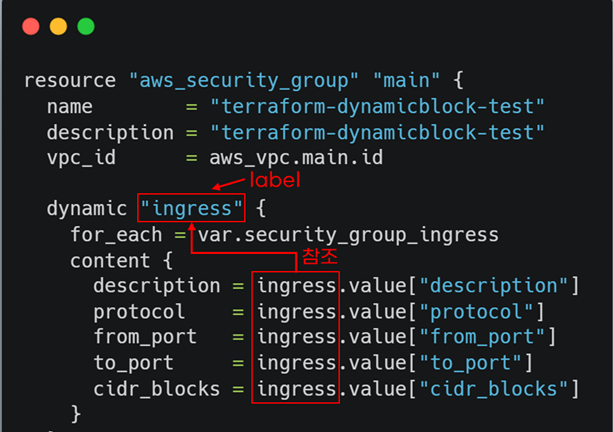
When accessing content, you use the dynamic label.
Example #
Set ingress values using Terraform.
variable "security_group_ingress" {
  type = map(object({
    description = string
    protocol    = string
    from_port   = string
    to_port     = string
    cidr_blocks = list(string)
  }))
}
For variable initialization, terraform.tfvars was used.
security_group_ingress = {
  http = {
    description = "http"
    protocol     = "tcp"
    from_port   = "80"
    to_port     = "80"
    cidr_blocks = ["0.0.0.0/0"]
  },
  https = {
    description = "https"
    protocol    = "tcp"
    from_port   = "443"
    to_port     = "443"
    cidr_blocks = ["0.0.0.0/0"]
  },
  ssh = {
    description = "ssh"
    protocol    = "tcp"
    from_port   = "22"
    to_port     = "22"
    cidr_blocks = ["0.0.0.0/0"]
  }
}
Change the ingress arguments to a dynamic block.
Set the block label (for access) to ingress.
In for_each, use the defined variable, and in content, access the variable's values by referencing the ingress label..
resource "aws_security_group" "main" {
  name        = "terraform-dynamicblock-test"
  description = "terraform-dynamicblock-test"
  vpc_id      = aws_vpc.main.id

  dynamic "ingress" {
    for_each = var.security_group_ingress
    content {
      description = ingress.value["description"]
      protocol    = ingress.value["protocol"]
      from_port   = ingress.value["from_port"]
      to_port     = ingress.value["to_port"]
      cidr_blocks = ingress.value["cidr_blocks"]
    }
  }

  egress {
    from_port   = 0
    to_port     = 0
    protocol    = "-1"
    cidr_blocks = ["0.0.0.0/0"]
  }

  tags = {
    Name = "terraform-dynamicblock-test"
  }
}
Now, you can apply it using terraform apply.