Blue/Green Deployment, Auto Scaling
Let's start by looking at zero-downtime deployment.
When a service's version changes and it's updated to a new version, the old version's processes are terminated and the new version's processes are started. This means requests cannot be processed until the new version is up.
This period is called downtime. There are various methods to eliminate this downtime (rolling, blue/green, canary), and today we will delve deeper into blue/green deployment.
Blue/Green Deployment #
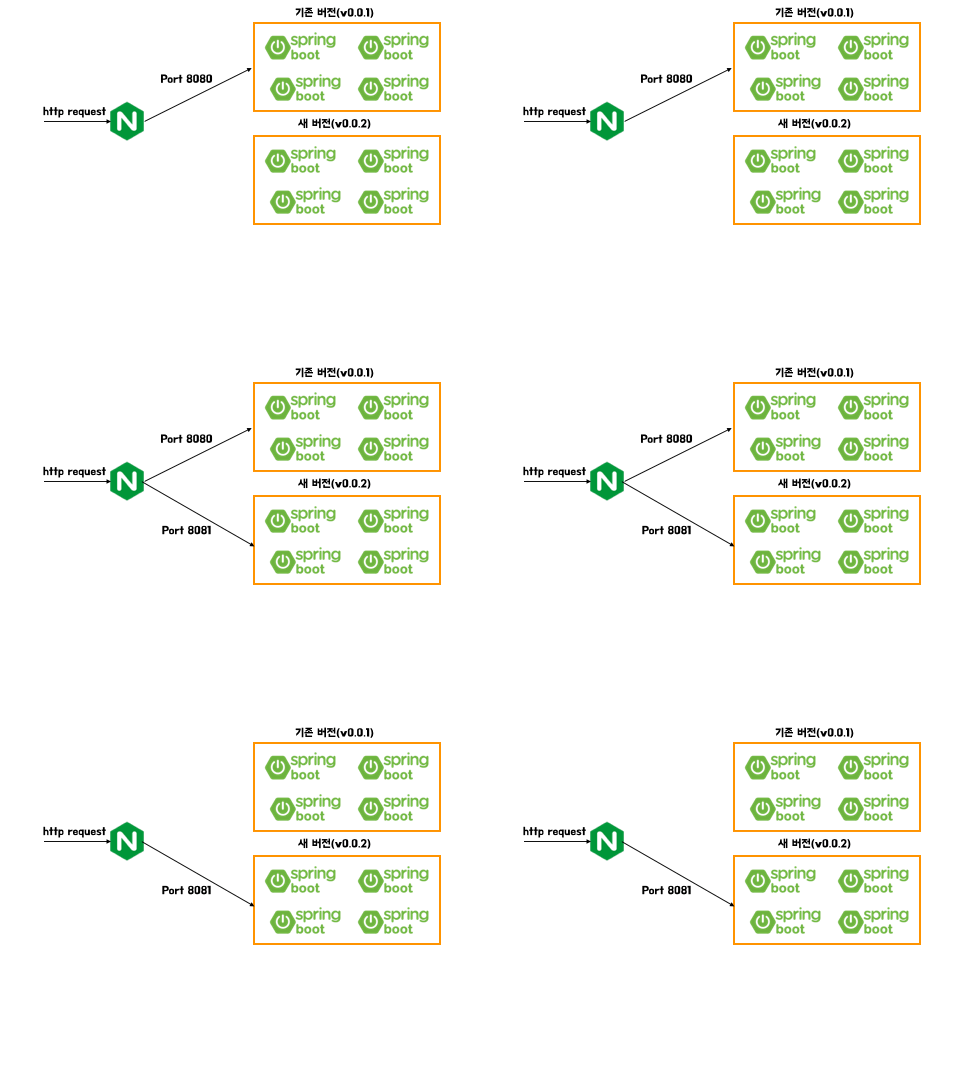
Blue refers to the old version, and green refers to the new version.
This method involves configuring instances for both the old version (currently in operation) and the new version, then switching all traffic to the new version at once via a load balancer.
Advantages #
- Rollback is easy because the old version's instances remain intact.
- The old version's environment can be reused for the next deployment.
- The new version can be tested without affecting the production environment.
Disadvantages #
- Double the system resources are required.
- Testing of the new environment must be a prerequisite.
Let's consider the following scenario as an example.
- An Auto Scaling group is being used.
- Countless instances are automatically created and terminated daily.
- Blue/green deployment must be performed during deployment.
Here, since instances are added automatically, people cannot connect to each instance and update the source code every time an instance is created.
Therefore, instances are created using an EC2 AMI that contains the latest code.

You must have an EC2 instance responsible for the main source code, used only when creating an AMI. (Normally, it's stopped, and when the source code is updated and you want to change the AMI, you start the instance to create the AMI.)

To update to version v1.02, a new version of the AMI must be created. That is, as seen above, let's match the number of instances in the Green group to that in the Blue group.

As shown above, you need to create a new launch template with the new version of the AMI.
Then, register the Green and Blue groups with the load balancer to temporarily distribute and process all requests among the instances in both groups.

Once it's confirmed that both the Blue and Green groups are processing requests without issues, the Blue group is removed from the load balancer.