EKS ALB Controller
To create an ALB or NLB using Kubernetes specs in EKS, you must create an ALB Controller. This is because AWS load balancers use the AWS API.
If you try to create an LB-type resource without an ALB Controller, the creation process will get stuck in a Pending state.

How it Works #
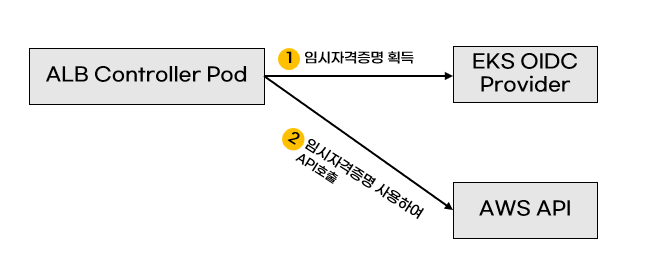
The ALB Controller watches the Kubernetes API Server to detect ALB events.
When an event occurs, it performs ALB operations using the AWS API.

Prerequisites #
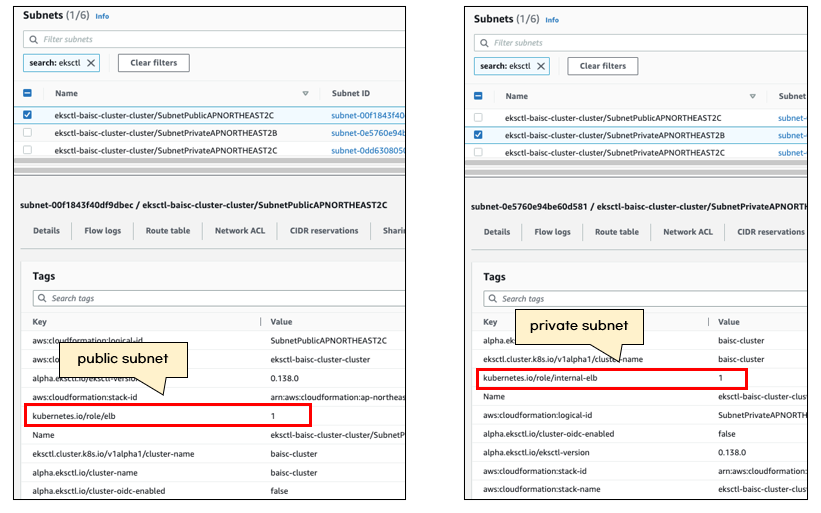
To use the ALB Controller, subnet tags must be configured correctly.
If the tags do not exist, the ALB Controller will not function properly.
When EKS is installed using eksctl, subnet tags are automatically configured.
- private subnet: kubernetes.io/role/internal-elb = 1
- public subnet: kubernetes.io/role/elb = 1
Let's also look into AWS authentication information and the EKS OIDC Provider.
Since the ALB Controller uses the AWS API, it requires AWS authentication credentials.
If authentication information is hardcoded, there's a security risk if the pod is compromised and credentials are stolen.

Therefore, it is safer to use temporary credentials by assigning IAM roles per pod using IRSA (IAM Roles for Service Accounts).
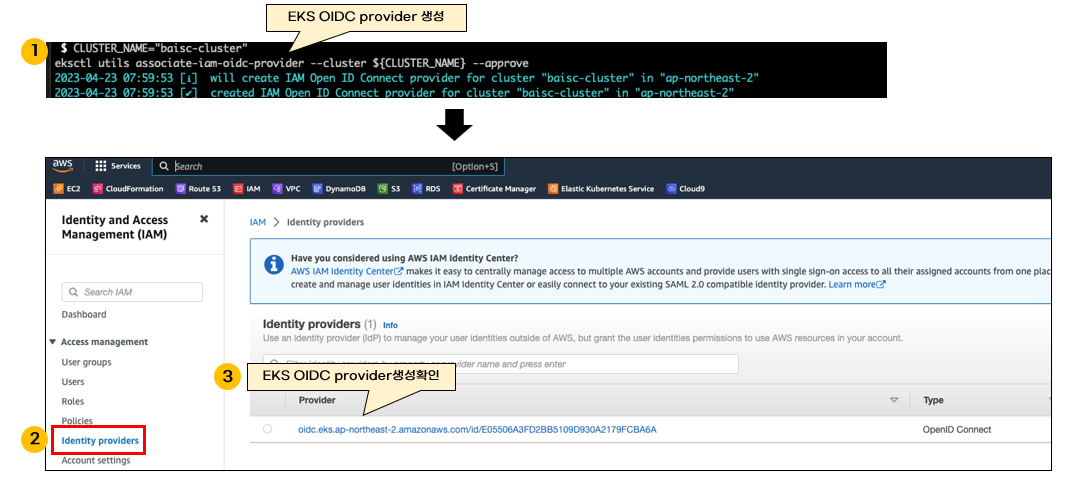
When creating temporary credentials, the EKS OIDC provider is used.
Refer to the EKS official documentation to install the provider as shown below.
CLUSTER_NAME="baisc-cluster"
eksctl utils associate-iam-oidc-provider --cluster ${CLUSTER_NAME} --approve
ALB Controller Installation #
I will now install the AWS ALB Controller using Helm and AWS IRSA.
Create an IAM policy to be used by the ALB Controller pod.
The IAM policy was downloaded from the EKS official documentation.
curl -O https://raw.githubusercontent.com/kubernetes-sigs/aws-load-balancer-controller/v2.4.7/docs/install/iam_policy.json
Create the IAM policy using AWS CLI.
aws iam create-policy \
    --policy-name AWSLoadBalancerControllerIAMPolicy \
    --policy-document file://iam_policy.json
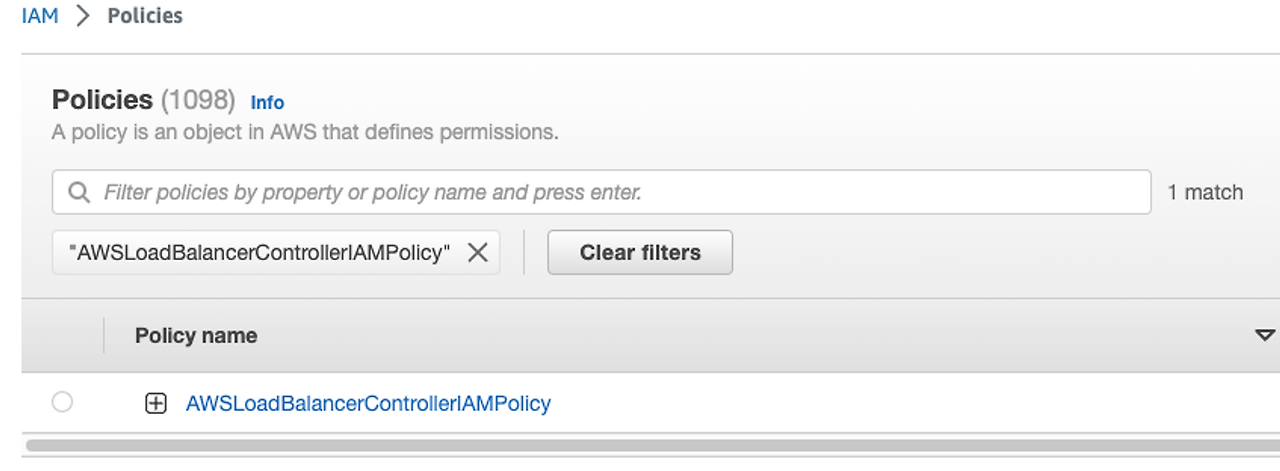
Use the eksctl command to create the IAM role and Kubernetes service account for the ALB Controller.
The ARN of the previously created IAM Policy is also required.
POLICY_ARN=$(aws iam list-policies --query 'Policies[?PolicyName==`AWSLoadBalancerControllerIAMPolicy`].Arn' --output text)
ROLE_NAME="AmazonEKSLoadBalancerControllerRole"
CLUSTER_NAME="${eks-cluster-name}"

eksctl create iamserviceaccount \
  --cluster ${CLUSTER_NAME} \
  --namespace=kube-system \
  --name=aws-load-balancer-controller \
  --role-name ${ROLE_NAME} \
  --attach-policy-arn=${POLICY_ARN} \
  --approve
This way, the Kubernetes service account and AWS IAM role have been created.
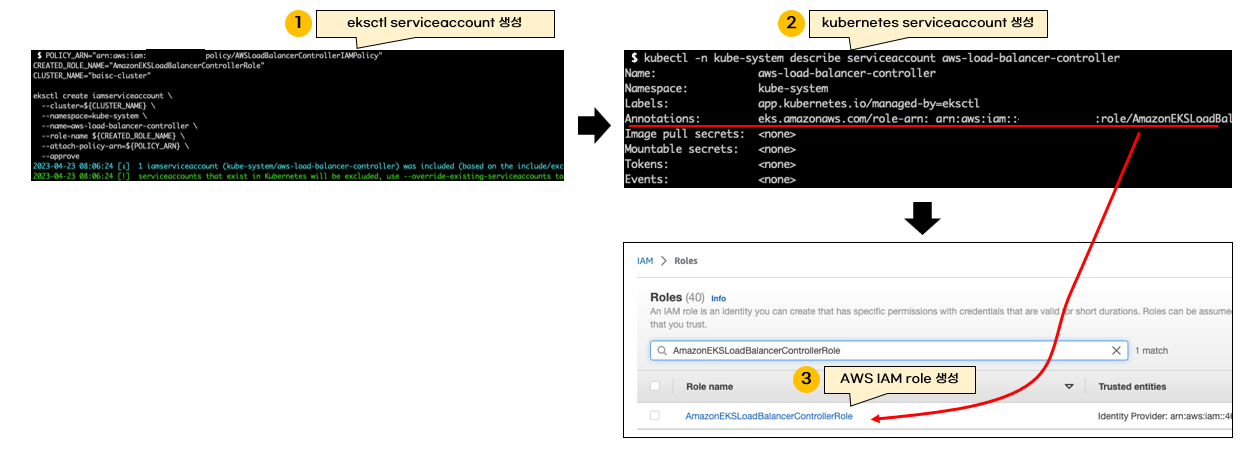
Now that the ALB Controller is ready to be created, I will install it using Helm charts.
First, add the EKS Helm chart.
helm repo add eks https://aws.github.io/eks-charts
helm repo update
Release it with the helm install or helm upgrade command.
You must set the EKS cluster name in the Helm values.
Since the service account has already been created, create is set to false to prevent duplicate creation.
CLUSTER_NAME="${your_eks_cluster_name}"
helm upgrade --install aws-load-balancer-controller eks/aws-load-balancer-controller \
  -n kube-system \
  --set clusterName=${CLUSTER_NAME} \
  --set serviceAccount.create=false \
  --set serviceAccount.name=aws-load-balancer-controller
Check if the ALB Controller pod is running in the kube-system namespace.
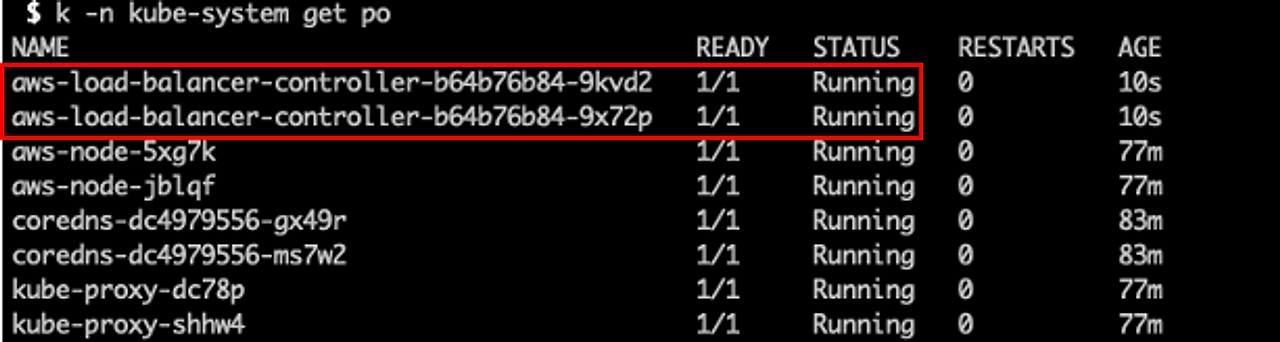
Installation is now complete.