Basic Concepts of Cloud and AWS
Cloud #
A cloud service refers to the free use of computers, assuming they exist in a virtual space. (While we say 'virtual space,' it actually means building very large data centers and making their resources available for use via software.)
A common cloud service we use is Google Drive, but this falls under SaaS (Software as a Service) within cloud services, where the cloud hardware, operating system, and programs are all located elsewhere, and only the service itself is accessed from a virtual space.
However, AWS is fundamentally IaaS (Infrastructure as a Service). This means that once you are provided with virtual hardware (from the company's data center), you are free to use all the operating systems and programs built on top of it as a service.
Advantages of Cloud Services #
- Scalability
- Since I don't need to build my own data center, I can use as much as I need, and if more resources are required, I just pay for them.
- It allows for rapid expansion of services to the desired extent.
- Elasticity
- Traffic to a service might surge only during specific periods.
- In such cases, using cloud services allows you to consume more resources only when many people are accessing, and then scale back when traffic decreases.
- High Availability
- By using cloud services, you can access the cloud or use the services it provides anytime, anywhere.
- Fault Tolerance
- Typically, cloud service providers don't store our data in just one location; they distribute it across multiple spaces (different data centers).
- In such a case, even if a natural disaster occurs in one location, our data remains safe.
What is AWS? #
- It is a cloud service provided by Amazon.
- The basic concepts are as described above.
- Only the detailed service names and usage methods differ slightly among service providers.
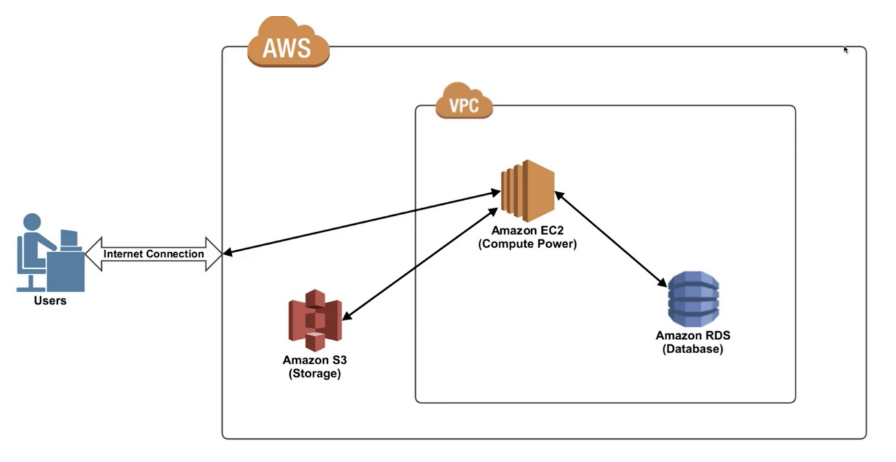
When a user accesses our service, they are specifically accessing a service within AWS data centers that has the functionality we've purchased.
Let's consider the collection of what we've purchased as a VPC.
VPC #
VPC is an abbreviation for virtual private cloud.
You can think of the relationship between Facebook and 'My Page' as analogous to AWS and VPC.
In other words, it's your own private space where you decide whether to make something you've registered public or visible only to specific people, and what to register, allowing you to impose security constraints.
Just as you post on your Facebook page,
the most representative virtual computer you register within a VPC is EC2.
EC2 #
EC2 is an abbreviation for elastic cloud compute. You can simply think of it as a computer. Just as a computer typically has a CPU, OS, hardware RAM, network card, firewall, etc., you are registering your own computer in a virtual space (a real database). It is primarily used as a computer (web hosting server) where we deploy and run the code we develop for websites.
RDS #
RDS is an abbreviation for Relational Database Service, a feature that provides relational databases as a service.
S3 #
S3 is an abbreviation for Simple Storage Service. It is a service that provides the functionality to store files such as movies, videos, and images. It allows for the safe storage and use of vast amounts of data for extended periods.