Docker Swarm
What is Docker Swarm #
Docker Swarm is a clustering and scheduling tool for Docker containers. Swarm makes it easy to manage multiple servers and containers. In other words, Docker Swarm is an Orchestration tool that makes multiple Docker hosts appear as one.
Docker Terminology #
Before we use Docker Swarm in practice, let's briefly define the terms used in Swarm for better understanding.
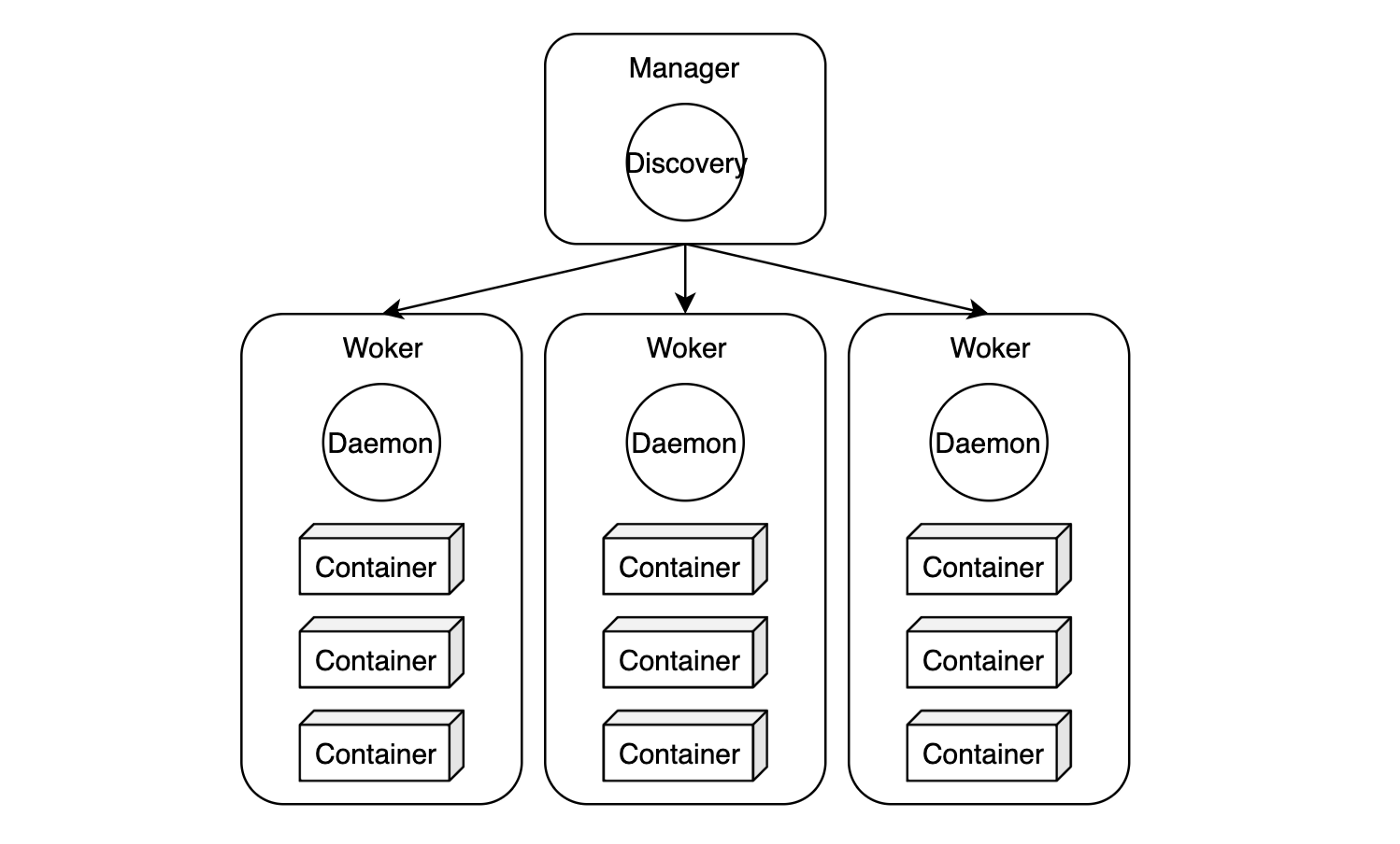
Node #
- A Docker server unit belonging to a cluster. Since one Docker daemon usually runs on one server, a node can be understood as a server (1 node = 1 server).
Manager #
- The manager manages the state of the cluster. Commands can only be executed on manager nodes. In terms of architecture, multiple managers should be run for High Availability. Generally, a manager is deployed on each node.
- Manager nodes manage the Docker cluster through the following tasks:
- Maintain cluster state: Uses the Raft algorithm.
- Scheduling service: Deploys containers to worker nodes. It can deploy to specific nodes only, or one to each node.
- Provide Swarm mode:
docker swarm init
- The manager uses the Raft consensus algorithm to ensure that the entire Swarm and the services running on it maintain a consistent state. The Raft consensus algorithm, simply put, allows the remaining servers to continue providing normal service even if some servers fail (failed servers can be recovered without stopping the entire service).
- Because of this, if you operate a Swarm with only one manager, the service will function, but you will need to create another cluster for recovery. Therefore, to maintain service continuity even in the event of a failure, it is best to operate an odd number of nodes. Docker sets the maximum number at 7, warning that more nodes could lead to performance degradation.
Worker #
- In Docker, a node that typically runs containers is called a worker node. It creates containers and checks their status based on commands from the manager. Just as general employees are not given management roles, worker nodes are not entrusted with the tasks of manager nodes (scheduling, consensus). Run as many as appropriate for the service size, and scale out Workers when requests increase.
- A cluster of worker nodes must have at least one manager node. Manager nodes are also part of the workers. Even in a node cluster with a single manager, you can run Docker Swarm with the
docker service createcommand. - When running Docker Swarm, to prevent the scheduler from running Tasks (deploying and managing containers) on the manager node, set the manager node's availability to
drain(meaning to empty or remove) using the command below. The scheduler will not assign tasks to nodes in adrainstate, only to nodes in anactivestate.
Change Node to Drain State #
docker node update
Change Node to Active State #
docker node inspect
Service Discovery #
- Service Discovery provides the location and status of containers. For this, it has its own DNS server. When a container is created, it registers a domain name identical to the service name, and conversely, removes the domain when it stops.
- You don't need to use external services like Consul, etcd, or Zookeeper, as Swarm handles it internally. It can be compared to OpenStack's Keystone and AWS's IAM.
Service #
- This is the basic unit of deployment. A service is created based on a single image and can run one or more identical containers. The final deployed service consists of multiple tasks.
Task #
- This is the unit of container deployment. Each task manages a container. It usually refers to an individual Docker container but also includes the command to run the container.