Container Logging
Using json-file logs #
While logs can be managed at the application level, Docker itself stores what happens inside a container, including standard output and standard input, in separate metadata files.
docker logs (StdOut) #
First, let's create a MySQL container.
$ docekr run -d --name mysql -e MYSQL_ROOT_PASSWORD=1234 mysql:5.7
Then, I'll use the docker logs command to send output from inside the container.
$ docker logs mysql

It outputs a long stream, but it seems to have executed successfully at the end.
docker logs (StdErr) #
This time, I'll create a container without the -e option and environment variable values.
$ docker run -d --name no_password_mysql mysql:5.7

It seems to have been created successfully, but it's only created and not running. Even if you try to start it with docker start, it will keep dying.
This error occurs because the necessary environment variables were not set.
You can also use docker logs to check what caused the error.

docker log file location #
By default, logs like the above are stored in JSON format.
cat /var/lib/docker/containers/컨테이너_id/컨테이너_id-json.log

However, as the volume of logs accumulates over time, you might run out of space.
You can specify the maximum size using the --log-opt option when creating a container.
syslog logs #
Logging drivers are not limited to JSON. Various options exist, such as syslog, fluentd, and awslogs, so you can choose the logging driver that best suits your application's characteristics.
syslog #
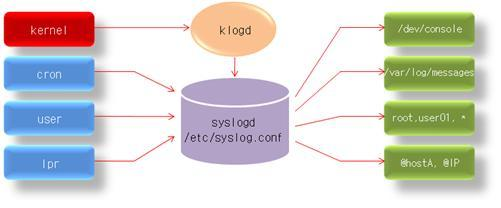
In Linux operating systems, message generation is centrally managed by the syslogd daemon.
The /etc/syslog.conf file is configured to specify "where to log messages when they are generated."
Then, the syslogd daemon records the generated messages in the appropriate location as configured in the /etc/syslog.conf file.
Practice #
Create a container. This container will print syslogtest and then exit.
$ docker run -d --name syslog_container
--log-driver=syslog ubuntu:18.04 echo syslogtest
You can verify this by entering the command below.
$ journalctl -u docker.service

Alternatively, you can view it as follows.
$ cat /var/log/syslog

fluentd logging #
fluentd #
ELK and Fluentd are representative tools among log collection architectures.

As shown in the figure above, fluentd is a tool that collects logs generated from various sources like applications, systems, and databases, processes them, and then distributes them to various storage locations.
Amazon CloudWatch #
AWS CloudWatch #
Amazon CloudWatch is a monitoring and observability service built for DevOps engineers, developers, SREs, and IT managers.
CloudWatch provides the data and actionable insights needed to monitor your applications, respond to system-wide performance changes, optimize resource utilization, and get a unified view of operational health.
If you are using Docker on EC2, you can use it without needing to install any other tools separately.
Practice #
- Create IAM permissions for CloudWatch
- Create a log group
- Create a log stream in the log group
- Create an EC2 instance that can use CloudWatch's IAM permissions and send logs