Improving LIKE Query Search Performance, Full-Text Search
When implementing search queries with SQL, the LIKE clause is generally used. If the table doesn't contain a large amount of data and searches aren't frequent, you can implement search functionality without much trouble. However, if the data grows to millions, tens of millions, or even hundreds of millions of records, it can become problematic.
Why might this be a problem? Let's take a look at the issues with the LIKE clause.
How the LIKE Clause Works #
In the example below, let's assume that an index is set on the 'title' column in 'table A'.
SELECT * FROM table_A WHERE title LIKE 'something%';
SELECT * FROM table_A WHERE title LIKE '%something';
SELECT * FROM table_A WHERE title LIKE '%something%';
As shown above, the LIKE clause can be categorized into three forms based on whether it includes a specific string.
The important point here is that the index is utilized only when checking if the string is included at the beginning of the data.
This means the following two queries cannot utilize an index (they perform a full scan to retrieve data).
SELECT * FROM table_A WHERE title LIKE '%something';
SELECT * FROM table_A WHERE title LIKE '%something%';
Why is that? This is a limitation due to the characteristics of the Index data structure.
In MySQL (InnoDB), indexes are managed using a B+Tree data structure.
Since a B+Tree fundamentally stores data in a sorted manner, data starting with a specific string can have its address retrieved via an index scan. However, for values that don't start with the specified string, the entire table must be scanned to find matching data.
SELECT * FROM table_A WHERE title LIKE '%something%';
We usually write search queries in the manner shown above, which forces a full table scan to find data that matches the conditions. Therefore, to provide search functionality for tables with a very large amount of data, it is best to utilize Full-text search.
Full Text Index #
Full Text Index can only be used with MySQL InnoDB or MyISAM engines and can only be applied to columns of types like char, varchar, or text.
To utilize full-text search, you must first set a full-text index on the column where you intend to use this feature.
Creating a Full-text Index
CREATE FULLTEXT INDEX {INDEX_NAME} ON {TABLE_NAME} ({COLUMN}); -- built in parser 사용
or
CREATE FULLTEXT INDEX {인덱스 이름} ON {테이블} ({컬럼}) WITH PARSER ngram; -- ngram parser 사용
Here, the Built-in Parser fundamentally parses words by separating them based on spaces, while the Ngram Parser has the characteristic of dividing an entire sentence into tokens of a minimum length and recording them.
For example, if there is a sentence "안녕하세요 반갑습니다", the Built-in Parser would parse it into '안녕하세요' and '반갑습니다' to create the index.
On the other hand, the Ngram Parser parses it in forms like '안녕', '하세', '요반', '반갑', '습니', '니다'. It is best to choose which parser to use depending on your specific situation.
How to Remove a Full-text Index
DROP INDEXT {인덱스 이름} on {테이블} ;
Viewing Indexes
SHOW INDEX FROM {테이블};
Appearance of Full-Text Index #
Let's create a Full-Text index on the sample table created above and see how the index data is structured.
SET GLOBAL innodb_ft_aux_table = 'index_test/book'; # {db명/table명}
SELECT * FROM information_schema.innodb_ft_index_table;
Executing the query above allows you to check how the Full-Text Index is applied.

As shown in the image above, the minimum number of characters for Full-text Indexing in InnoDB is 3, so only words consisting of 3 or more characters have been indexed.
Although the minimum character length for a Full-Text Index is set to 3 characters, this can be modified.
In InnoDB, innodb_ft_min_token_size refers to the minimum indexing character count, while in other engines, ft_min_word_len serves this role. Additionally, when using an ngram parser instead of a built-in parser, ngram_token_size is used to define the minimum token size (the size of indexed characters).
SHOW VARIABLES LIKE 'innodb_ft_min_token_size';
Executing the query above allows you to check from how many characters indexing begins.
Now, I will modify this setting value according to the method below.
Navigate to the conf file location
cd /etc/mysql/mysql.conf.d
Modify or add the setting value in mysqld.conf.
vim mysqld.conf
innodb_ft_min_token_size = 2
Afterward, restart the server to confirm that the setting has been applied.
service mysql restart
Now, let's DROP and then recreate the Full-Text Index. You can then confirm that the Full-Text Index has been set starting from two-character texts, as shown below.
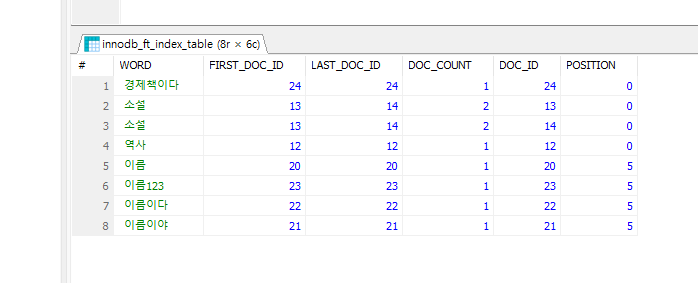
Depending on the value of innodb_ft_min_token_size and the type of Parser, the way Full-text indexing occurs varies significantly, and consequently, the results of the Full-Text search introduced below will also differ greatly. You need to clearly understand what method you require and configure the settings and Parser appropriately.