Redis Fragmentation Ratio
Internal fragmentation refers to the situation where less memory is used than the allocated capacity, resulting in leftover memory. Since Linux manages memory using paging, some degree of fragmentation is inevitable. Redis is an in-memory data store, often used as a cache, so memory management is crucial.
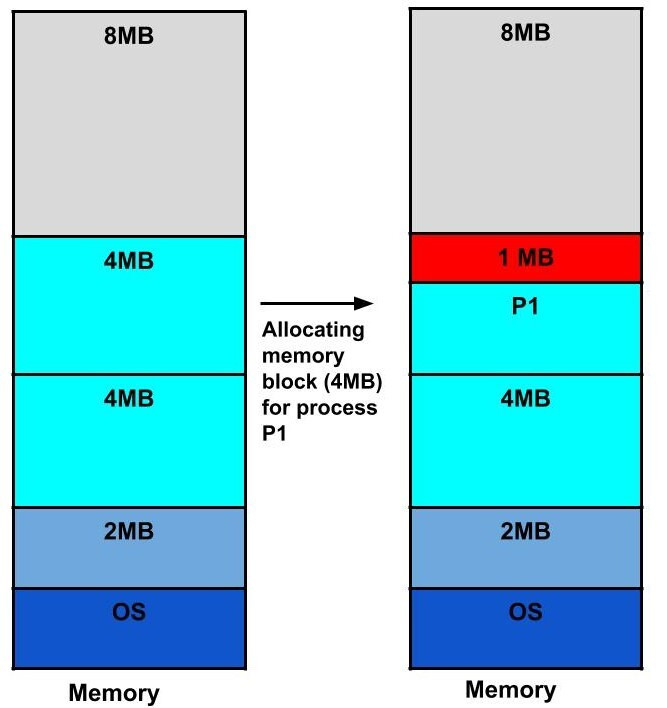
Among various metrics, let's look into the Fragmentation Ratio. You can check it using the INFO command in redis-cli.
redis> INFO
"# Server redis_version:7.0.5
redis_git_sha1:00000000
redis_git_dirty:0
redis_build_id:383256aa4e712b9d
redis_mode:standalone
os:Linux 5.15.0-1015-aws x86_64
arch_bits:64
monotonic_clock:POSIX clock_gettime

# Memory ...
mem_fragmentation_ratio:1.04
mem_fragmentation_bytes:9757104
...
"
- used_memory_rss
- RSS (Resident Set Size), the physical memory actually used, which is the memory allocated by the OS to run Redis.
- used_memory
- The memory actually used by Redis.
- mem_fragmentation_ratio
- This is
used_memory_rss / used_memory. Ideally, you'd expect a value of 1 or slightly above 1 (e.g., 1.04). A value exceeding 1.5 indicates a serious issue. - If Redis is not configured otherwise, it generally doesn't release memory after allocation. Therefore, if the peak memory was high and current usage is lower than usual, this might be normal.
- You can diagnose Redis's memory status with the
MEMORY DOCTORcommand.
- This is
- mem_fragmentation_bytes
used_memory_rss - used_memory- This value includes not only the size of fragmentation but also process overhead (refer to
allocator_*metrics). If the absolute value of this is small, around a few to tens of MB, then even if the fragmentation ratio is above 1.5, it might not be a significant problem.
High Fragmentation Ratio Problem Solution #
Now, let's look at solutions when the Fragmentation Ratio is high. We can consider two cases regarding whether Redis's state is normal or abnormal.
Normal State #
If the peak memory was high, meaning a large allocation was made once, and there's no significant change in used_memory, then it's not a fragmentation issue but simply a large allocation, so it's fine to leave it as is.
If memory is truly needed, you can restart Redis.
Abnormal State #
In this state, prioritizing root cause analysis over a clear-cut answer is essential. You might have an unusually large number of small key values, or you need to investigate the cause at the application level. You should absolutely never use flushall or flushdb because they are O(N).
Using memory purge attempts dirty page reclaim (the process of recovering modified pages and making them available for reuse), but it's slow and requires caution (only available with jemalloc).
You could also try solving the problem by changing the allocator. Redis primarily uses jemalloc as its memory allocator. It's possible to use other memory allocators like libc malloc or tcmalloc, but this requires compilation. Usually, using the default allocator is fine, but if you have strong suspicions, changing it might be an option.
active-defrag, also known as defragmentation, is a feature that operates during Redis runtime and automatically defragments memory to resolve fragmentation. We can directly configure the conditions under which defragmentation operates.
- ACTIVE-DEFRAG-IGNORE-BYTES
- ACTIVE-DEFRAG-THRESHOLD-LOWER
- ...
Active-defrag is disabled by default, and you can enable this feature by entering CONFIG SET activedefrag yes in redis-cli.
########################### ACTIVE DEFRAGMENTATION #######################
#
# What is active defragmentation?
# -------------------------------
#
# Active (online) defragmentation allows a Redis server to compact the
# spaces left between small allocations and deallocations of data in memory,
# thus allowing to reclaim back memory.
#
# Fragmentation is a natural process that happens with every allocator (but
# less so with Jemalloc, fortunately) and certain workloads. Normally a server
# restart is needed in order to lower the fragmentation, or at least to flush
# away all the data and create it again. However thanks to this feature
# implemented by Oran Agra for Redis 4.0 this process can happen at runtime
# in a "hot" way, while the server is running.
#
# Basically when the fragmentation is over a certain level (see the
# configuration options below) Redis will start to create new copies of the
# values in contiguous memory regions by exploiting certain specific Jemalloc
# features (in order to understand if an allocation is causing fragmentation
# and to allocate it in a better place), and at the same time, will release the
# old copies of the data. This process, repeated incrementally for all the keys
# will cause the fragmentation to drop back to normal values.
#
# Important things to understand:
#
# 1. This feature is disabled by default, and only works if you compiled Redis
#    to use the copy of Jemalloc we ship with the source code of Redis.
#    This is the default with Linux builds.
#
# 2. You never need to enable this feature if you don't have fragmentation
#    issues.
#
# 3. Once you experience fragmentation, you can enable this feature when
#    needed with the command "CONFIG SET activedefrag yes".
#
# The configuration parameters are able to fine tune the behavior of the
# defragmentation process. If you are not sure about what they mean it is
# a good idea to leave the defaults untouched.
While configuration parameters can fine-tune the behavior of the defragmentation process, it's a good idea to leave the defaults untouched if you're unsure about their meaning.
Looking at the comments in redis.conf, it states that there's no need to enable this feature if you don't have fragmentation issues. Since CPU usage might slightly increase when defragmentation runs, consider this carefully before enabling it (active-defrag is only available with jemalloc).