Redis Architecture
Once connected to a Redis instance, you can store or manipulate data by sending commands via redis-cli.
Redis is an in-memory data structure store, and all data structures shown in the diagram below reside in memory.
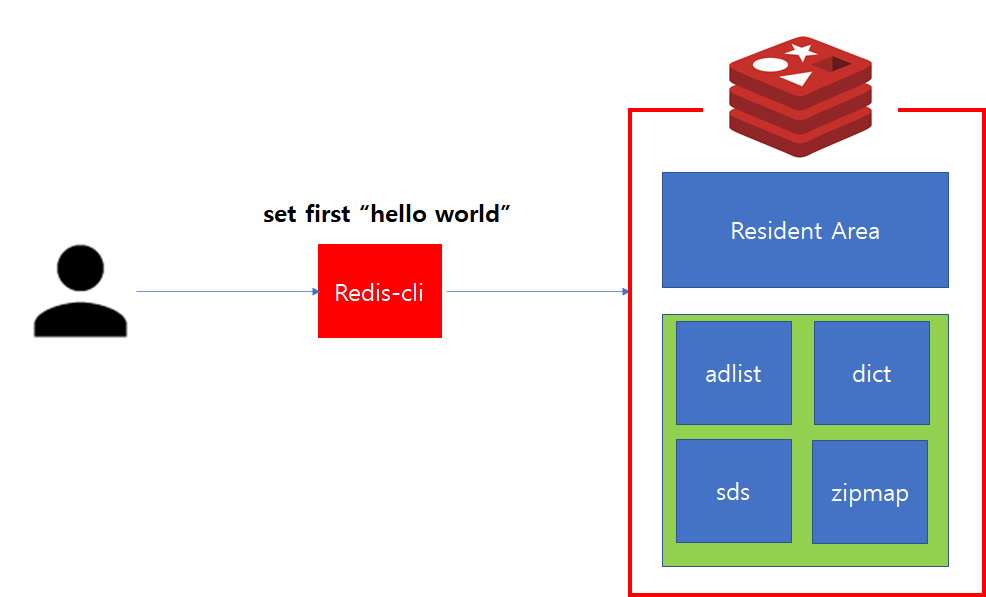
Redis Memory Structure
In the structure above, the Resident Area is the space where actual data is stored and operations are performed via commands.
The green area is used internally as memory space to store and manage server status, and is called the Data Structure area.
Redis Architecture #

Redis Architecture
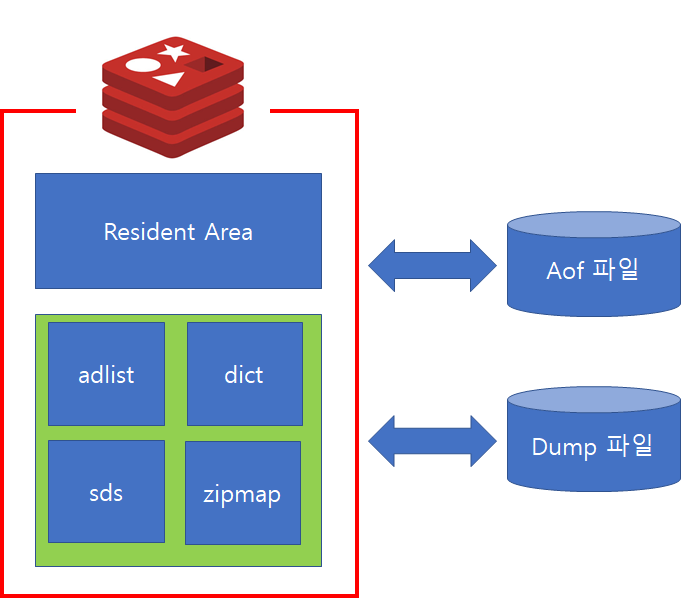
The image above details the basic Redis architecture, which consists of three main areas.
Memory Area #
- Resident Area: This area is where all data processed by users connected to the Redis server is first stored. It's the space where actual operations are performed and is also referred to as the WorkingSet area.
- Data Structure: When operating a Redis server, memory space is needed to store and manage various information and status collected for monitoring purposes. This memory area is called the Data Structure area.
File Area #
- AOF File: Stores files generated using the AOF method, which is used for data recovery in Redis.
- DUMP File: While user data can be stored on disk, the file used for temporarily storing small amounts of data is the DUMP file (RDB method).
Process Area #
- Server Process:
redis-server.exeorredis-sentinel.exerefers to the process activated by executable code. It manages the Redis instance and performs tasks requested by users. The Redis server process consists of 4 multi-threads: main thread, sub thread 1 (BIO-Close-File), sub thread 2 (BIO-AOF-Resync), and sub thread 3 (BIO-Lazy-Free).- main thread: Handles most commands and event processing performed by the Redis server.
- sub thread 1: Used to close the old file and write a new AOF file when rewriting AOF data.
- sub thread 2: Used for performing AOF write operations.
- sub thread 3: Used in the background to ensure faster performance when executing commands like
UNLINK,FLUSHALL, andFLUSHDB.
- Client Process: The process provided to execute commands run by
redis-cli.exeor user applications.
Redis Persistence
Redis is an in-memory data structure store. However, since memory is volatile, all data is lost when the process terminates. Therefore, to use it as a persistence store rather than just for caching, data must be saved to disk to prevent loss.
For this purpose, Redis uses AOF (Append Only File) and RDB (Snapshot) features.
AOF records transmitted commands to a separate file, similar to the redo log mechanism in RDBMS.
The role of AOF is to recover data by executing the commands recorded in the file in bulk upon restart.
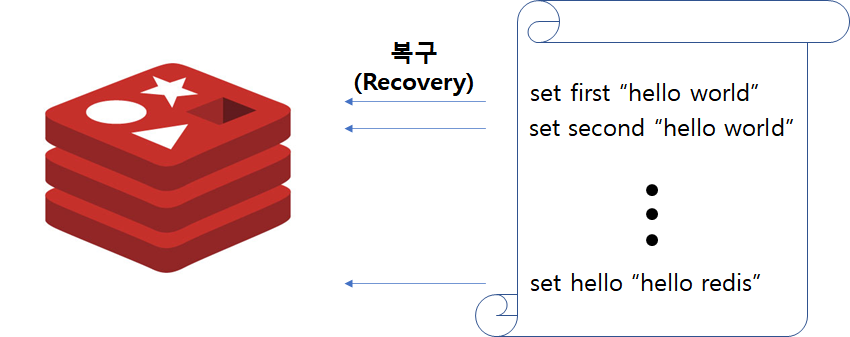
AOF
The advantage of AOF is that no data loss occurs. However, because synchronization to the file is required for every command, processing speed can significantly decrease. To mitigate this, a file sync option (appendfsync) exists, allowing the sync frequency to be adjusted appropriately. However, data loss may occur proportionally to the adjustment.
RDB, on the other hand, is a method of copying the memory contents at a specific point in time and writing them to a file. It corresponds to an RDBMS Full Backup, allowing data to be saved periodically or non-periodically when storage is needed.
The advantages of RDB include lower overhead compared to AOF, and the ability to compress data using LZF compression. Furthermore, restoring the dump file directly to memory is faster than AOF. However, data after the dump was recorded is not saved, which can lead to data loss during recovery.
RDB
Caveats #
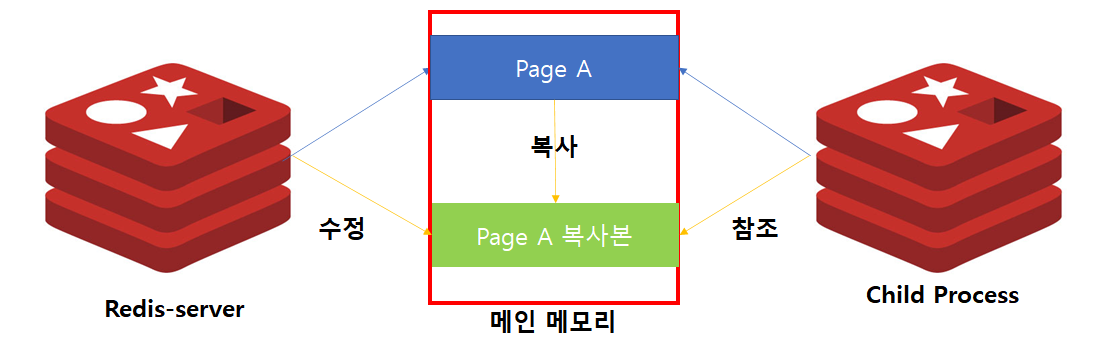
The most important point to note with AOF and RDB is Copy On Write. When performing AOF in the background or executing RDB, redis-server forks a child process and delegates the processing. If write operations are performed on redis-server's data during this process, instead of modifying the existing pages, they are saved to a separate space before processing. Therefore, if write operations increase while these tasks are being performed, memory usage can rapidly increase.
Master/Replica Synchronization Process #
Let's examine the synchronization process in a master/replica structure within a Redis Cluster.
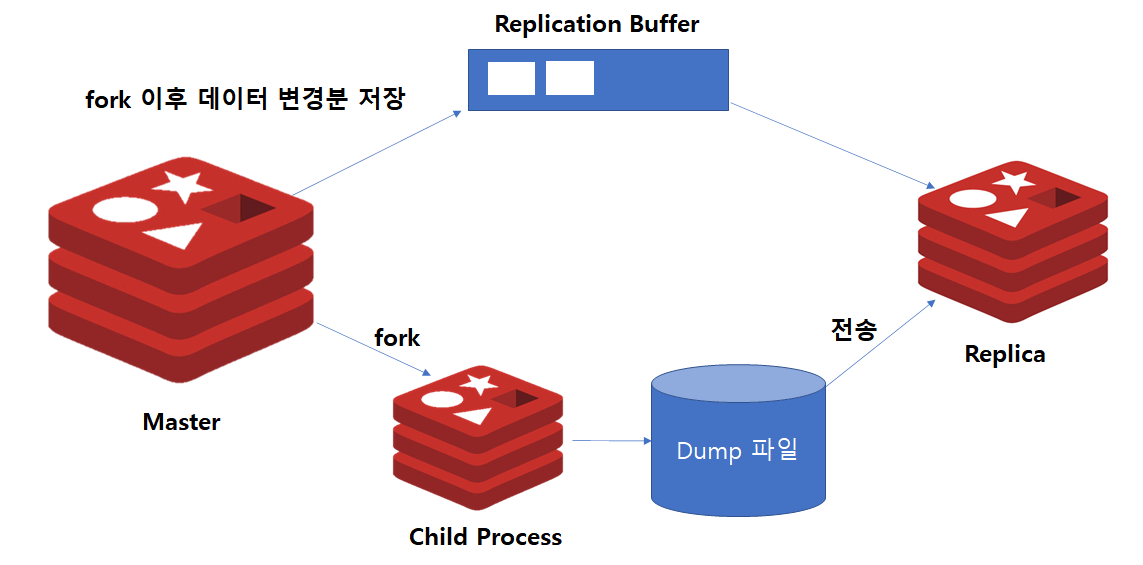
Full Synchronization Process
Replica nodes initially contain no data loaded from the Master node. Therefore, full synchronization occurs during initial setup. The full synchronization process is as follows:
- Configure master and replica instances separately.
- The replica instance performs a synchronization command with the master instance via the
ReplicaOfcommand. - The master creates a child process via
fork. - The child process dumps all data from the master's memory to disk.
- Once the dump is complete, it is transferred to the replica for application.
- During replication, the master stores changed data in a replication buffer.
- After the dump transfer is complete, the contents of the replication buffer are sent to the replica to bring the data up to date.
- Once the operation is complete, subsequent data changes are transmitted asynchronously.
Therefore, Full Sync occurs during initial setup, and since fork happens at this time, memory usage can increase.
What happens to synchronization if a network delay occurs after the master/replica configuration is complete?
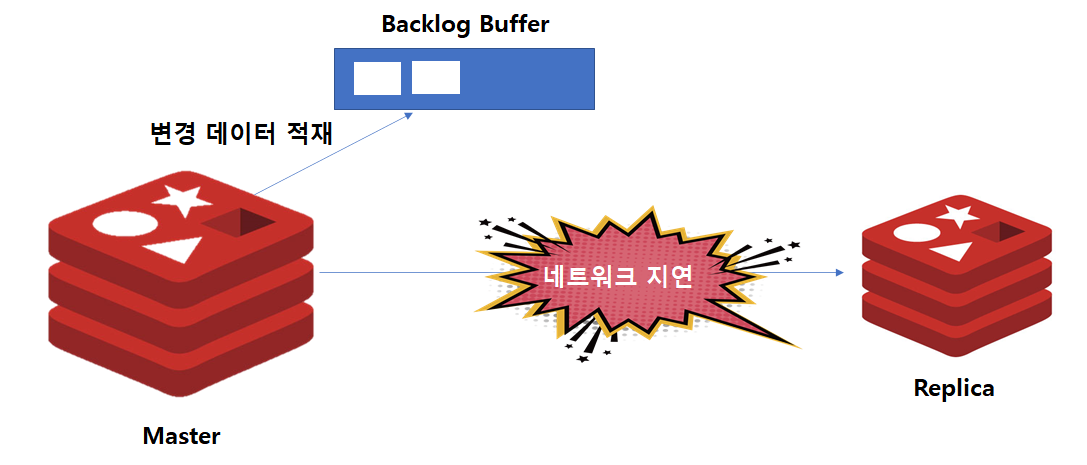
Backlog Buffer
Once a master/replica structure is established via the ReplicaOf command, the master instance internally creates a Backlog Buffer of size specified by the repl-backlog-size option. If a disconnection with the replica occurs afterward, the master instance stores changed data in the Backlog Buffer. Since the Backlog Buffer has a finite size, it can overflow if the delay persists for too long.
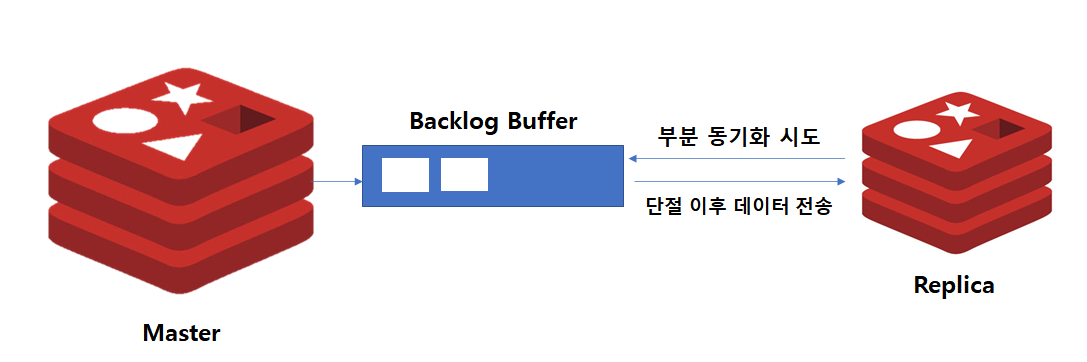
Partial Synchronization Process
The process when reconnection occurs after a disconnection is as follows:
- The replica attempts partial synchronization with the master.
- If all data since the network disconnection is present in the Backlog Buffer, the replica receives the buffer data to become up-to-date.
- If the Backlog Buffer's contents are lost due to a prolonged network disconnection, the full synchronization process is initiated again.
As explained with AOF and RDB, when a process fork occurs, it uses a COW (Copy On Write) mechanism. Therefore, during full synchronization or when adding a replica, monitoring and memory adjustments are necessary.