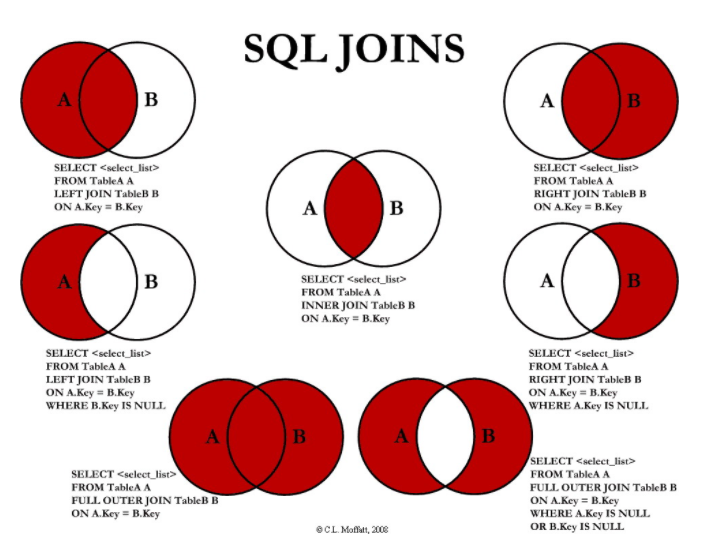
Summary of Join Operations
What is Join? #
Connecting or combining two or more tables to output data.
Generally, rows are joined based on the association of PK and FK values. However, in some cases, a Join can be established solely through the logical association of values, even without such PK-FK relationships.
EQUI Join vs Non EQUI Join #
EQUI JOIN #
- EQUI JOIN (Equi-join) is used when column values between two tables exactly match, mostly based on PK -> FK relationships.
- However, EQUI JOIN is not exclusively established through PK -> FK relationships.
Non EQUI JOIN #
- Non EQUI JOIN (Non-equi join) is used when column values between two tables do not exactly match.
- For Non EQUI JOIN, operators other than
=(such as Between, >, >=, <, <=, etc.) are used to perform the Join.
INNER JOIN #
INNER JOIN is a concept contrasted with OUTER JOIN and is also called an inner join.
- It returns only rows that have matching values in the Join condition.
- The INNER JOIN keyword indicates that the JOIN condition will be defined in the FROM clause, so a USING clause or ON clause must be used. The
INNERkeyword can be omitted in SQL statements.
NATURAL JOIN #
Performs an EQUI JOIN on all columns with the same name between the two tables.
- If NATURAL JOIN is specified, additional JOIN conditions cannot be defined in a USING clause, ON clause, or WHERE clause.
- The columns used in the JOIN must have the same data type and cannot have prefixes like ALIAS or table names.
- There is a constraint that the data characteristics (domain) and column names of the tables being joined must be identical.
USING Clause #
- By using the USING clause in the FROM clause, you can selectively perform an EQUI JOIN on desired columns among those with the same name.
- Similar to NATURAL JOIN, when using JOIN + USING clause, ALIASes or table name prefixes cannot be attached to the JOIN columns.
ON Clause #
- It is easy to understand by separating the JOIN predicate (ON clause) and non-JOIN predicate (WHERE clause), and it has the advantage of allowing join conditions even if column names are different.
- Used to specify arbitrary join conditions, use different column names as join conditions, and explicitly name join columns.
- Unlike JOIN + USING clause, when using an ON clause for a join, ALIASes or table name prefixes must be used to logically and clearly specify the columns used in the SELECT statement.
CROSS JOIN #
- Outputs all possible combinations of data that can occur when there is no JOIN condition between tables.
- Synonymous with CARTESIAN PRODUCT.
Results in the multiplication of the number of rows from all tables.
OUTER JOIN #
Contrasted with INNER JOIN, it is called an outer join.
It can be used to return rows even if there are no matching values in the join condition.
Outer joins also require the use of a USING clause or ON clause, as they indicate that the join condition will be defined in the FROM clause.
LEFT OUTER JOIN #
- When performing a join, it first reads data corresponding to the left table specified first, then reads join target data from the right table specified later.
- Can be used by omitting the OUTER keyword as LEFT JOIN.
RIGHT OUTER JOIN #
- When performing a join, it first reads data corresponding to the right table specified first, then reads join target data from the left table specified later.
- Can be used by omitting the OUTER keyword as RIGHT JOIN.
FULL OUTER JOIN #
- When performing a join, it reads all data from both the left and right tables to generate the result.
- Can be used by omitting the OUTER keyword as FULL JOIN.