Spring Boot Embedded Web Server Tomcat Configuration, How to Configure Other Embedded Web Servers
Spring Boot Embedded Web Server Configuration #
When creating a Spring Boot project, Spring Boot automatically configures Tomcat, which is an embedded servlet container.
Spring Boot's ServletWebFactoryAutoConfiguration class automatically handles the configuration for embedded web servers like Tomcat and Jetty, allowing Spring Boot users to easily include a web server within their project without explicit web server-related settings.
@Configuration
@AutoConfigureOrder(Ordered.HIGHEST_PRECEDENCE)
@ConditionalOnClass(ServletRequest.class)
@ConditionalOnWebApplication(type = Type.SERVLET)
@EnableConfigurationProperties(ServerProperties.class)
@Import({ ServletWebServerFactoryAutoConfiguration.BeanPostProcessorsRegistrar.class,
      ServletWebServerFactoryConfiguration.EmbeddedTomcat.class,
      ServletWebServerFactoryConfiguration.EmbeddedJetty.class,
      ServletWebServerFactoryConfiguration.EmbeddedUndertow.class })
public class ServletWebServerFactoryAutoConfiguration {

   @Bean
   public ServletWebServerFactoryCustomizer servletWebServerFactoryCustomizer(
         ServerProperties serverProperties) {
      return new ServletWebServerFactoryCustomizer(serverProperties);
   }

   @Bean
   @ConditionalOnClass(name = "org.apache.catalina.startup.Tomcat")
   public TomcatServletWebServerFactoryCustomizer tomcatServletWebServerFactoryCustomizer(
         ServerProperties serverProperties) {
      return new TomcatServletWebServerFactoryCustomizer(serverProperties);
   }
Looking at the code for the ServletWebServerFactoryAutoConfiguration class above, we can see that Tomcat is automatically customized through the TomcatServletWebServerFactoryCustomizer class.
Furthermore, DispatcherServlet-related configurations, which previously had to be set in web.xml in traditional Spring projects, are now handled by the DispatcherServletAutoConfiguration class below.
@AutoConfigureOrder(Ordered.HIGHEST_PRECEDENCE)
@Configuration
@ConditionalOnWebApplication(type = Type.SERVLET)
@ConditionalOnClass(DispatcherServlet.class)
@AutoConfigureAfter(ServletWebServerFactoryAutoConfiguration.class)
public class DispatcherServletAutoConfiguration {
How to Configure a Different Embedded Web Server in Spring Boot (Other Than Tomcat) #
When you create a Spring Boot project, it defaults to using the embedded Tomcat web server.
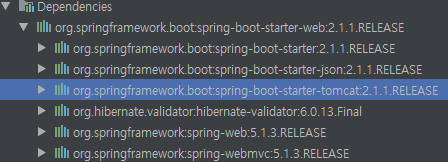
If you want to use a different embedded web server, such as Jetty, instead of Tomcat, you need to modify the pom.xml configuration as shown below.
<dependencies>
    <dependency>
        <groupId>org.springframework.boot</groupId>
        <artifactId>spring-boot-starter-web</artifactId>
        <exclusions>
            <exclusion>
                <groupId>org.springframework.boot</groupId>
                <artifactId>spring-boot-starter-tomcat</artifactId>
            </exclusion>
        </exclusions>
    </dependency>

    <dependency>
        <groupId>org.springframework.boot</groupId>
        <artifactId>spring-boot-starter-jetty</artifactId>
    </dependency>

    <dependency>
        <groupId>org.springframework.boot</groupId>
        <artifactId>spring-boot-starter-test</artifactId>
        <scope>test</scope>
    </dependency>
</dependencies>
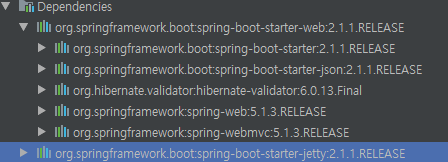
How to Configure Spring Boot Embedded Web Server #
One way to configure an embedded web server like Tomcat in Spring Boot is by entering configuration values in the application.properties file.
server.port=7070
server.compression.enabled=true
If you run Spring Boot with the configuration file above, you'll see that the web application server starts on port 7070.
Additionally, setting server.compression.enabled=true configures the server to automatically compress formats like CSS and HTML, which benefit from compression during transmission.
Below is the code to verify if the port was actually assigned using the configuration file above.
@Component
public class PortListener implements ApplicationListener<ServletWebServerInitializedEvent> {
    @Override
    public void onApplicationEvent(ServletWebServerInitializedEvent event) {
        ServletWebServerApplicationContext applicationContext = event.getApplicationContext();
        System.out.println(applicationContext.getWebServer().getPort());
    }
}
2018-12-23 16:30:02.252  INFO 10396 --- [           main] o.s.web.servlet.DispatcherServlet        : Completed initialization in 7 ms
2018-12-23 16:30:02.274  INFO 10396 --- [           main] o.e.jetty.server.AbstractConnector       : Started ServerConnector@1450078a{HTTP/1.1,[http/1.1]}{0.0.0.0:7070}
2018-12-23 16:30:02.276  INFO 10396 --- [           main] o.s.b.web.embedded.jetty.JettyWebServer  : Jetty started on port(s) 7070 (http/1.1) with context path ''
7070
...