📗 Spring Boot Actuator API + Example using Spring Cloud
Overview #
In a Spring Boot development environment, when data or YAML configurations change, is there a way to load the data's state without restarting the server? The answer is to use a library called Spring Actuator. Today, we'll explore Spring Actuator.
🧐 Spring Actuator #
What is Spring Actuator?
Spring Actuator is a library provided by the Spring Boot framework that offers features like monitoring and metrics for Spring Boot applications via HTTP and JMX endpoints.
What are metrics? They are measurements or indicators used to gauge the performance of a system, process, product, or service.
Spring Actuator allows for internal inspection of an application and, to some extent, enables control over its operation.
- Configuration properties of the application environment
- Logging levels
- Memory usage
- Number of requests received by a specific endpoint
- Application health status information
🖥 Spring Actuator API #
To use Spring Actuator, you need to add the following dependency:
implementation("org.springframework.boot:spring-boot-starter-actuator")
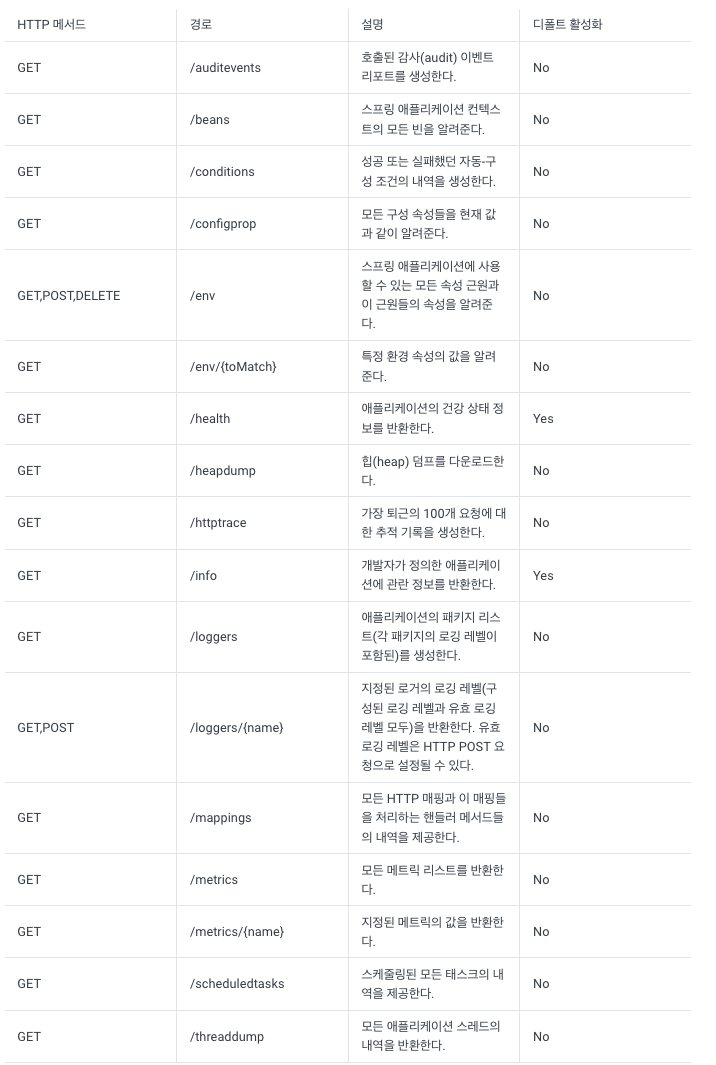
Once the Spring Actuator starter library is built, you can use its API through various Actuator endpoints like the following:
🔨 Example using Spring Cloud #
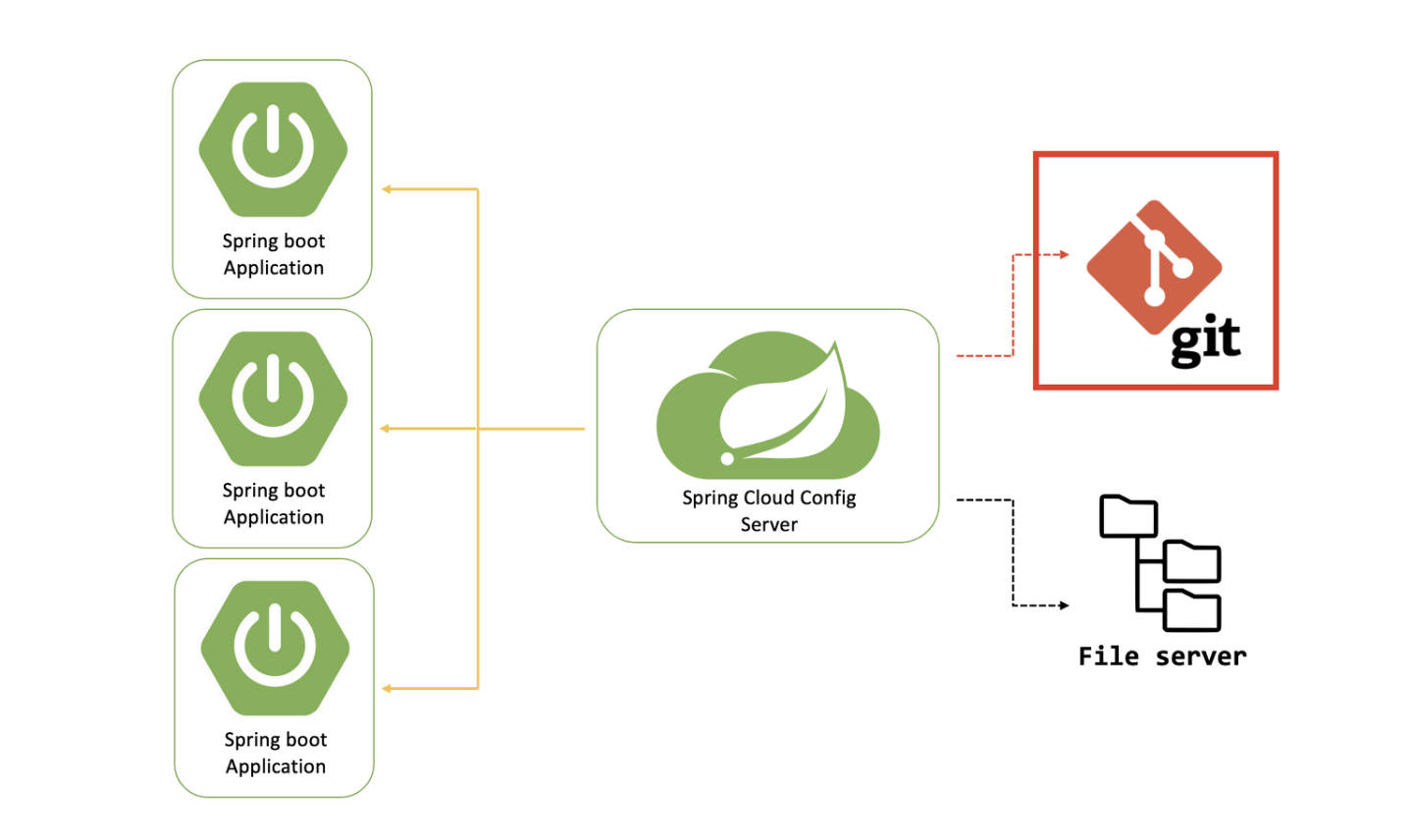
I'll demonstrate how to use the refresh API to immediately dump updated YAML values in a Spring Boot application without restarting the server. This will be done by configuring a RestController Client Server and a ConfigServer that reads and returns YAML from another repository via Spring Cloud.
Config Server #
@SpringBootApplication
@EnableConfigServer
class ConfigServerApplication

fun main(args: Array<String>) {
    runApplication<DmsBackendApplication>(*args)
}
server:
  port: 8081

spring:
  cloud:
    config:
      server:
        git:
          uri: https://github.com/대충yml파일있는곳 # configtest-dev
Client Server #
Controller
@RestController
class TestController(){
    @Value("test.value")
    private val configStr: String

    @GetMapping("/")
    fun test() = configStr
}
application.yml
server:
  port: 8082

spring:
  cloud:
     config:
       name: configtest-dev
       import: optional:configserver:http://localhost8081
configtest-dev
test:
  value: dev-test
If you send a GET request to http://localhost:8082, you can retrieve the result of the configtest-dev YAML information, including test.value = dev-test.
response: dev-test
Now, what happens if you change the value of test.value to dev-test-2 and send another GET request? Even after modification, the result dev-test will still be returned. This happens because the data state hasn't been reloaded.
Here, I'll use Spring Actuator to refresh.
Let's add the following information to application.yml:
<-- .... -->

management:
  endpoints:
    web:
      exposure:
        include : refresh # 액츄에이터 기능중 refresh를 사용한다는 뜻이다 * 를 달면 다 사용한다는 뜻
And add the following annotation to TestController:
@RestController
@RefreshScope
class TestController(){
    @Value("test.value")
    private val configStr: String

    @GetMapping("/")
    fun test() = configStr
}
Now, if you revert the data to dev-test and send a GET request, you'll get the same response: test.value: dev-test.
If you change it to dev-test-2 and send a GET request, you'll still get the dev-test response, meaning the value hasn't changed. At this point,
send a POST request to http://localhost:8082/refresh, and then send another GET request to http://localhost:8082.
You can then confirm that the data has been refreshed to dev-test-2.
response : dev-test-2
This is how we refreshed data using Spring Actuator. Besides refresh, there are many other features, so it would be beneficial to study and use them. I'd like to thank everyone who read this post, and I plan to study Spring Cloud and MSA further.