Socket Programming
If you've worked with networks, the term "socket" probably isn't unfamiliar.
The dictionary definition of "socket" includes meanings like hole, connection, or outlet. It primarily refers to a hole-shaped connector designed to allow electrical components to be connected according to specifications. You can think of a common electrical outlet at home. To elaborate, a socket is a connector designed to allow devices or components that require electricity to connect to an electrical supply infrastructure to receive power.
It's used similarly in network programming: a network socket is an abstracted connection point that allows connection within a network environment for sending and receiving data.
Of course, "network socket" isn't a perfectly clear term either. This is because to connect to a network, it must be created according to a protocol, leading to various names like TCP socket, TCP/IP socket, UDP socket, etc. Sockets operating at the fourth layer, TCP, are most commonly used.
Simply put, a socket is a way to exchange information with other programs using a regular Unix file descriptor. (This is a very strong statement, full of conviction.)
In Unix, everything is a file, and sockets are also treated as files. When these programs perform I/O, they do so through a file descriptor. Here, a file descriptor is an integer (index) number representing an open file, and a Socket Descriptor refers to the file descriptor obtained after creating a socket.
In simple terms, if I want to communicate with a server via a socket, I create it using socket(). When the function is called, it internally opens a file to be used as a socket, returns an index number, and then I use that number for send(), recv(), etc.
In short, a socket can be described as an abstraction of a network connection at the file level.
Therefore, if you create an infinite number of sockets, you might run out of files and encounter a socket creation error because you can't open any more. The index is an integer; if you create socket 'a' and its socket descriptor is 3, then 'b' would be 4, and so on.
TCP/IP Socket Programming #
In socket programming, you need to understand how to create sockets and the procedures for sending and receiving data to implement network communication functionality. You also need to be familiar with the usage of socket APIs provided dependently on the operating system and programming language.
Additionally, handling various exceptions that can occur in a network environment, such as network disconnections due to cable breaks, transmission delays due to increased traffic, and errors caused by system resource management issues, is also necessary. This is why socket programming can feel even more difficult for novice developers.
Simply put, TCP/IP can be thought of as a method that uses both IP and TCP protocols. It's convenient to think of IP as providing the data path and TCP as managing the data to be transmitted. (TCP handles various aspects like managing data reliability, such as data order, connection establishment (3-way, 4-way handshake), flow control, and congestion control.)
Client Socket, Server Socket #
For two systems to establish a connection via sockets, one must first initiate a connection request to the target. This involves notifying the target, identified by its IP and port number, of its intention to establish a network connection for data transmission and reception.
However, a connection isn't established just by one side blindly attempting to connect; it only happens when the request is accepted and the connection is ready to be made. Therefore, the system must be pre-configured to accept specific connection requests, so it's prepared to handle them when received.
In any case, these two systems (or processes) are categorized as client or server + socket, depending on whether they send or accept connection requests to establish a connection.
But don't mistakenly think that client and server sockets are different; they are the same type of socket, merely referred to differently based on their roles and implementation procedures. It's just that their roles, meaning the API functions called, are different... so don't get confused.
Don't think that client and server sockets exchange data after a connection is established. The server socket only performs the role of accepting connection requests from client sockets. Direct data transmission and reception are handled through a new socket created as a result of the server socket accepting the connection request.
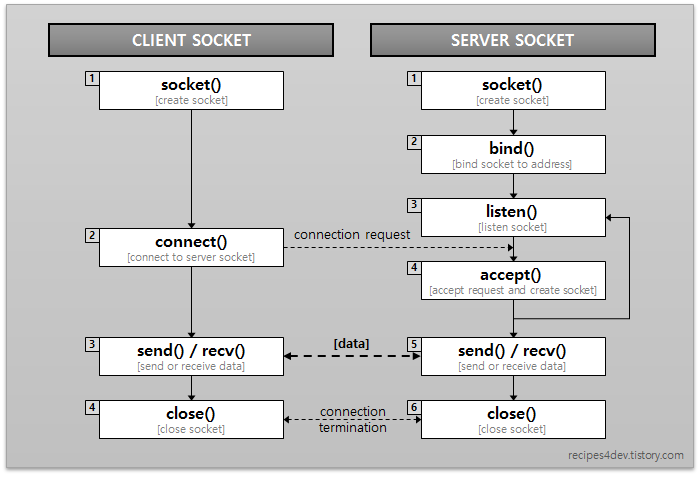
Typically, a server socket file is opened and bound to an IP port, using one port number from the range (0-65535). (Duplicate use is not allowed). Then, it waits for client requests via listen(). When a connect request arrives, a connection is established, and send and recv are used for data exchange. Finally, close() is called to terminate the connection. Connection requests are generally queued, and if a connection is not established, it remains in a NOT ESTABLISHED waiting state.
If you want to establish a connection with a client, you need to have listen() active, receive a connect() request, and then accept() it.
But here's an interesting point: the entity that accept()s is not the server socket that performed bind and listen.
You might say, "Huh? What does that mean?" But the conclusion is that the socket that ultimately establishes a connection with the client socket is not the server socket used previously, but rather a new socket created internally by the accept API.
Haha, as mentioned before, the main role of the server socket is to receive client connection requests. That's why it performs operations like bind and listen, binding a port number to the socket and creating a request queue to wait for requests. When accept occurs, a new socket is created for data transmission and reception, and the first connection request in the queue is mapped to it. After that, data exchange happens with that new socket, right?
So, the role of the server socket is listen and close.
And when the entire process is finished, you should close it. In addition to the server socket created via the API, you'll also need to manage the sockets created by accept.
This concludes my summary of sockets.