LXC (Linux Container)
There's a technology similar to LXC called chroot.
chroot changes the root directory of a process, which can restrict the directories a process can access or load system-related libraries.
However, chroot can only control access to files or directories; it cannot control networks or processes. FreeBSD also includes a feature called jail, which is an evolution of chroot.
Jail can control not only file system access but also resources such as processes and devices.
LXC is implemented with a concept similar to jail. cgroups is a tool for centrally controlling various resources managed by the OS. It groups resources and provides functionalities such as limiting priority and available resources for each group, or isolating groups.
The targets managed by cgroups include not only file systems and processes but also CPU resources, memory, various devices, network packets, and network interfaces. An example of cgroups usage is to make a specific directory recognized as the root directory, similar to chroot, and then use cgroups' namespace feature to isolate various resources, thereby implementing a virtual environment.
The resources partitioned for each container include the following:
- Process table: Each container manages its own separate process table, preventing processes in one container from being visible to processes in other containers.
- File system: Each container makes a specific directory appear as its root file system. This is the same concept as
chroot. - Network: The network namespace (netns) feature configures separate network settings for each container. It uses a virtual NIC device called veth, assigning one end of the veth to the container's internal namespace.
- CPU, memory devices (device files under /dev): cgroups' functionality limits the scope of what a container can use.
Looking at Linux containers, the OS's interior is divided into kernel space, which manages physical resources, and user space, which runs user processes.
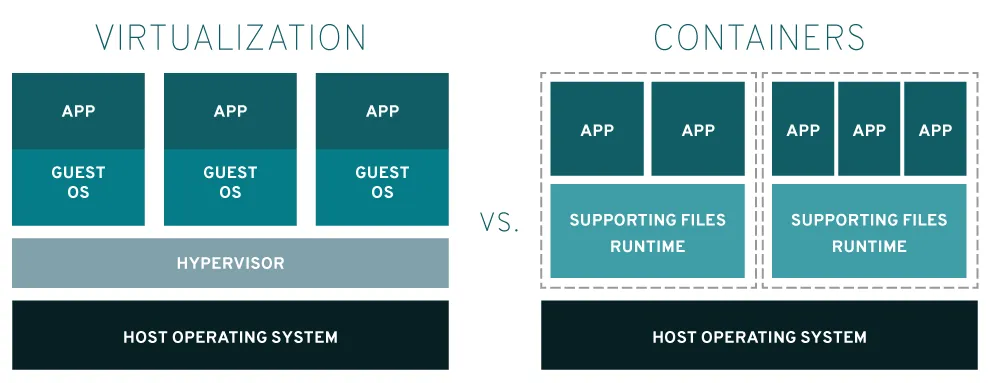
Container-based virtualization divides user space into multiple spaces, limiting the resources visible to each user process. A container is precisely such a space where multiple user processes are organized and isolated.
LXC (Linux Containers) is an operating system-level virtualization method for running multiple isolated Linux systems (containers) on a single control host. The Linux kernel uses cgroups to allocate resources (CPU, memory, block I/O, network) without needing to start a virtual machine. cgroups also provides namespace isolation to completely isolate the operating environment for applications, including process trees, networks, user IDs, and mounted file systems. LXC provides an isolated environment for applications using cgroups + namespaces. Docker can also use LXC as one of its execution drivers, providing image management and development services through it.
Practice #
Download lxc
ubuntu@master: sudo apt update
ubuntu@master: sudo apt install lxc
Check currently available lxc features
ubuntu@master: sudo lxc-checkconfig

# test 컨테이너 생성
sudo lxc-create -n test -t download

Distribution:
ubuntu
Release:
bionic
Architecture:
i386

Downloading the image index
Downloading the rootfs
Downloading the metadata
The image cache is now ready
Unpacking the rootfs

---

You just created an Ubuntu bionic i386 (20230118_07:43) container.

To enable SSH, run: apt install openssh-server
No default root or user password are set by LXC.
# Run container in background
ubuntu@master: sudo lxc-start -n test -d

# Check container
ubuntu@master: sudo lxc-ls --fancy

# Access container as root
ubuntu@master: sudo lxc-attach -n test

# Create test account
ubuntu@master: sudo adduser test

# Grant root privileges to test account via visudo
ubuntu@master: visudo

test ALL=(ALL:ALL) ALL

# Connect to container with test account
ubuntu@master: sudo lxc-console -n test

# Install openssh
test@test:~$: sudo apt install openssh-server

# Check sshd status
test@test:~$: sudo systemctl status sshd

# Install network tools
test@test:~$: sudo apt install net-tools

# Check container IP
test@test:~$: ifconfig

# Forward incoming TCP packets on eth0 port 9999 to 10.0.1.95 port 22 using NAT
ubuntu@master: sudo iptables -t nat -A PREROUTING -i eth0 -p tcp --dport 9999 -j DNAT --to 10.0.1.95:22
ubuntu@master: ssh test@10.0.1.95

The authenticity of host '10.0.1.95 (10.0.1.95)' can't be established.
ED25519 key fingerprint is SHA256:oO9Yns7H//bnnuDBSAODiHW3UxsuHw6kEG1MJonKTXg.
This key is not known by any other names
Are you sure you want to continue connecting (yes/no/[fingerprint])? yes
Warning: Permanently added '10.0.1.95' (ED25519) to the list of known hosts.
test@10.0.1.95's password:
Welcome to Ubuntu 18.04.6 LTS (GNU/Linux 5.15.0-56-generic i686)

* Documentation: https://help.ubuntu.com
* Management: https://landscape.canonical.com
* Support: https://ubuntu.com/advantage
Last login: Fri Jan 20 12:35:17 2023

# Stop container
sudo lxc-stop -n test

# Delete container
sudo lxc-destroy -n test

# Check container
sudo lxc-ls