launch, async
Requesting a coroutine to run on a CoroutineDispatcher is typically done using two methods: launch and async. Use launch for simple tasks that don't return a result, and async for tasks that need to return a result.
launch, which does not return a result #
launch does not return a result; instead, it returns a Job when executed.
val job: Job = launch { println(1) }
async, which returns a result #
async returns a result, which is wrapped in a Deferred object. A Deferred object holds a value that will be available in the future.
In the example below, since 1 (the last line of the async block) is to be returned, a Deferred<Int> value is returned.
fun main() = runBlocking<Unit> {
    val deferredInt: Deferred<Int> = async {
        1 // The last line returns
    }
    val value = deferredInt.await()
    println(value) // Prints 1
}
When the await() method of Deferred is executed, the coroutine that called await (in the code above, the runBlocking coroutine) yields its thread and waits until the result is returned.
We refer to this as the coroutine being suspended. Due to this characteristic, await() can only be used inside a suspendable coroutine. If await is used in a regular function, an error stating that a suspend function can only be called from a suspend fun will occur.
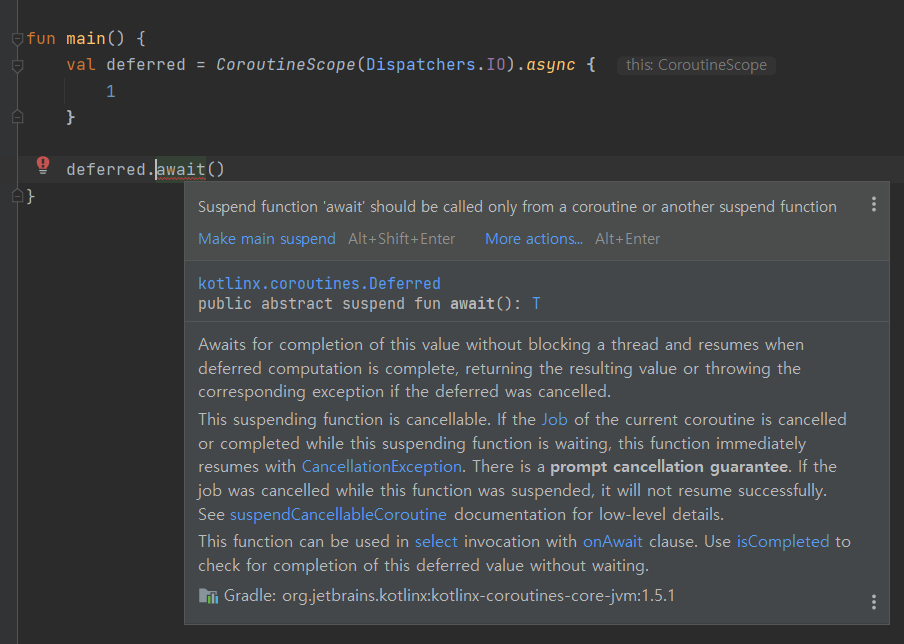
After the result is returned, the coroutine resumes and the code continues to execute.
Requesting Coroutine Execution on Different Dispatchers #
Consider a process where an Array<int> is received from a database, sorted, and then displayed in a text view. This process involves tasks suited for various dispatchers, such as file I/O on Dispatchers.IO, array sorting on Dispatchers.Default, and text view updates on the Main thread dispatcher. Coroutines provide a convenient way to request diverse tasks on different dispatchers.
suspend fun updateUI() = coroutineScope {
    // 1. Since database I/O operations are needed, a new coroutine is launched using the IO Dispatcher.
    val deferredInt: Deferred<Array<Int>> = async(Dispatchers.IO) {
        delay(1000L) // Time to fetch data from the database
        arrayOf(3, 1, 2, 4, 5) // The last line returns
    }

    val value = deferredInt.await()

    // 2. Since sorting is needed, a new coroutine is launched using the Default Dispatcher, which is suitable for CPU-intensive tasks.
    val sortedDeferred = async(Dispatchers.Default) {
        value.sortedBy { it }
    }

    val sortedArray = sortedDeferred.await()

    // 3. The coroutine for updating the UI is requested to run on the Main Dispatcher.
    val updateUIJob = launch(Dispatchers.Main) {
        setTextView(sortedArray)
    }
}
In this way, you can request coroutine execution for different tasks on different dispatchers by configuring the dispatcher.
[[CoroutineDispatcher]]