Kernel
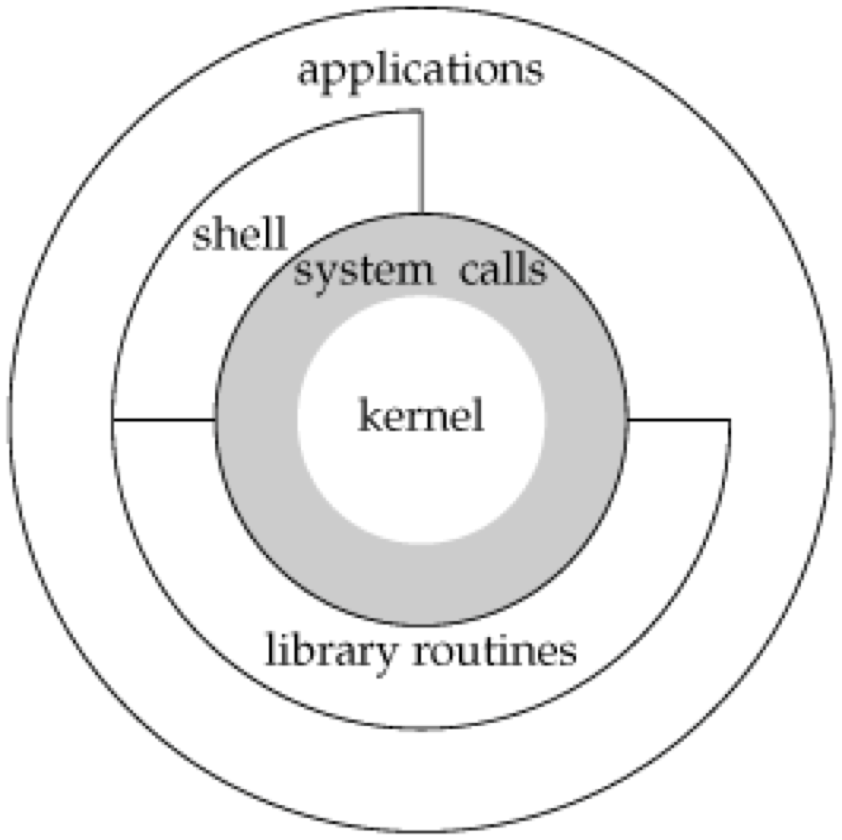
If you put 'kernel' into a translator, you might get 'core' or 'pith' as a result. Why is it called the 'core'? You can understand this immediately by looking at the Unix structure.
At the very top are applications, and at the innermost part, like a small core, is the kernel.
Besides these, shell, system calls, library routines, etc., play important roles by receiving requests from applications.
However, even the term 'core' is a bit abstract to understand. So, what exactly is considered the core component of the operating system in Unix? To understand this, we need to look more closely at how Unix system programs operate.
There are two modes in the Unix operating system: user mode and kernel mode.
User mode is the mode that runs when a regular user executes a program. To explain it more simply, when we open Chrome, the computer processes the execution of the Chrome application in user mode. However, it cannot directly access computer resources. In other words, in Unix, regular users are prevented from freely accessing computer resources.
Kernel mode can be simply explained as a mode that regular users cannot directly access.
That was a brief explanation. Now, to truly understand both, let's look at the program execution process in Unix.
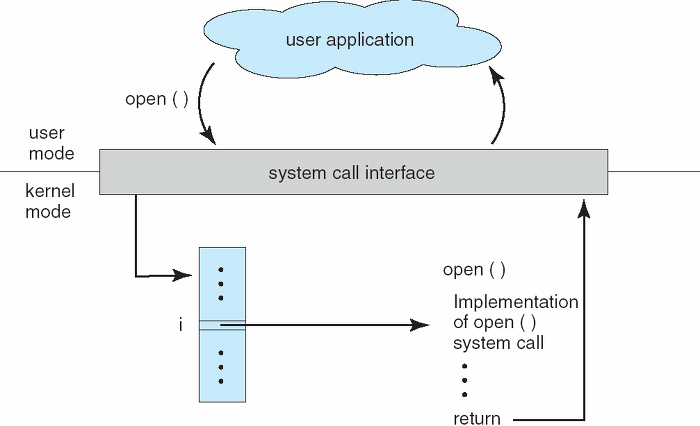
The diagram above illustrates the execution process of a user application written in C, focusing on the two modes: user mode and kernel mode.
Let's imagine clicking to start a program. To run a program, computing resources are naturally required. Beyond what immediately comes to mind, like CPU, memory, and disk, peripherals such as network connections (sockets), keyboards, mice, and monitors all contribute as computing resources to program execution.
So, how does a program receive resources and execute? Programs are allocated resources through a close connection between user mode and kernel mode. As mentioned earlier, user mode cannot directly access computing resources. Therefore, a user in user mode sends a request to allocate computer resources via a system call to the system call interface. The system call interface acts as an intermediary between user mode and kernel mode.
Upon entering kernel mode, to process the request received by the system call interface, the request is first mediated to something called the system call vector table. The system call vector table plays the role of indicating where the corresponding system call code is located. When an open system call request comes in, the system call vector table searches its table to perform that system call. Once the corresponding system call is found, it goes to that location and executes the code.
Finally, the execution result is returned to the system call interface, which then passes it back to the user application. Although it seems like a lot of content after writing it all out, the core idea is simple: user mode cannot access computer resources directly and must always go through kernel mode.
Kernel #
So, we've mentioned it again. Kernel. What exactly is the kernel now? As we've thoroughly examined above, the kernel is the entity that allocates the aforementioned resources. The kernel, as the solid core, controls and coordinates all major functions of the hardware, whether it's a phone, laptop, or server computer.
Instead of directly accessing the kernel, users request the resources needed for a process to execute by passing system calls to the system call interface via the shell or library routines (like C's lib), or by sending system call requests directly to the system call interface.