Kafka Consumer Offset Manual Commit
auto.offset.commit #
Kafka consumers are responsible for committing offsets to track the position of messages they have read. This offset is stored in Kafka's internal topic __consumer_offsets, and the consumer updates this offset value every time a commit occurs. Subsequently, the consumer reads the next record to be processed by referring to the offset value.
There are two ways for consumers to commit offsets: automatic commit and manual commit. Auto-commit is enabled when the auto.offset.commit setting is true, which is the default.
If auto-commit is enabled, when the poll() method is executed, an offset is automatically committed if the execution time exceeds the auto.commit.interval.ms setting.
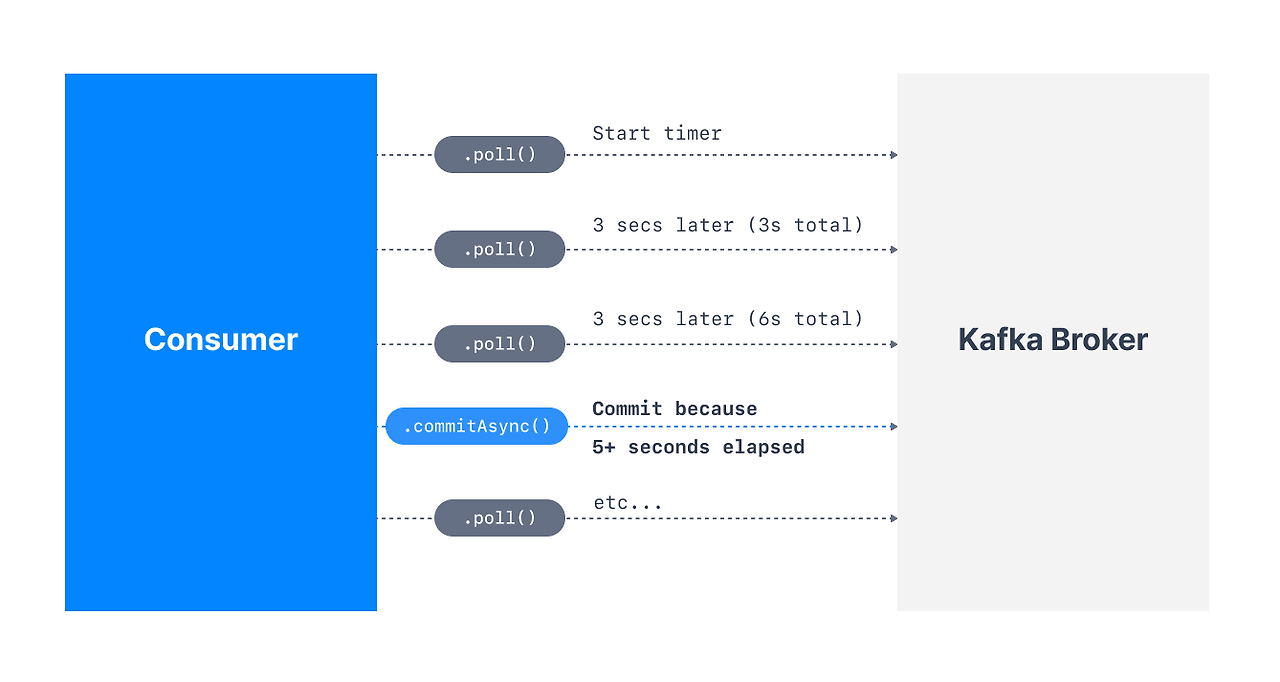
Each time the consumer calls poll(), it checks whether it's time to commit as defined by auto.commit.interval.ms and commits the last offset fetched by the poll request.
Let's examine the Kafka source code. ConsumerCoordinator.java #L1214
public void maybeAutoCommitOffsetsAsync(long now) {
	if(autoCommitEnabled) {
		nextAutoCommitTimer.update(now);
		if(nextAutoCommitTimer.isExpired()) {
			nextAutoCommitTimer.reset(autoCommitIntervalMs);
			doAutoCommitOffsetsAsync();
		}
	}
}
- Check Auto-Commit Enablement: Verifies if the auto-commit feature is enabled via the
autoCommitEnabledvalue. - Update Timer: Updates the timer for the next scheduled auto-commit based on the current time. The
updatemethod calculates the elapsed time between the current time and the last offset commit time, adjusting the remaining time until the next auto-commit execution. This process manages the auto-commit cycle, updating the timer's state based on the current time and the configured commit interval before the actual commit operation begins. - Check Timer Expiration: Examines the updated timer to see if the configured auto-commit interval has expired. If the timer has expired (i.e., the
auto.commit.interval.mssetting has passed), it proceeds to the next step. - Reset Timer: Resets the timer, adjusting the next auto-commit point to be after the configured interval from the current time.
- Execute Asynchronous Offset Commit: Calls the method that actually performs the offset commit asynchronously.
Caveats of Auto-Commit Configuration #
While auto-commit configuration is convenient, it can lead to message duplication or loss issues when consumer group rebalancing occurs.
Let's discuss the message loss problem. If auto-commit is set to 1 second, the consumer normally calls poll() to fetch and process messages. However, if the message processing takes longer than 1 second, a problem arises. For example, if processing a message (e.g., saving it to a DB or delivering it to another service) exceeds 1 second due to network latency or other failures, the offset commit might occur before message processing is complete. If an error then occurs during message processing, that message cannot be reprocessed, leading to message loss.
Message duplication is a similar problem that can occur with settings like the following example:
enable.auto.commit = trueauto.commit.interval.ms = 5000msmax.poll.records = 100
Consumers poll to fetch up to 100 records. If the application terminates or rebalancing occurs after processing 30 of these records but before a commit, consumers are re-assigned. Subsequently, consumers poll data again from the last committed offset, leading to the reprocessing of the 30 records that were already successfully processed.
While message loss can be addressed by configuring a Dead Letter Queue (DLT) to manage and reprocess unhandled messages, and message duplication can be resolved by ensuring idempotency within the business logic, manual commits can be used to prevent these issues proactively.
Manual Commit Configuration #
To manually configure Kafka consumer commits, both the auto.offset.commit setting and the ack-mode setting must be configured.
First, you can disable auto-commit in the Kafka consumer configuration by setting ENABLE_AUTO_COMMIT_CONFIG to false.
private Map<String, Object> consumerConfigs() {
	Map<String, Object> configs = new HashMap<>();
	// ...
	configs.put(ConsumerConfig.ENABLE_AUTO_COMMIT_CONFIG, "false");
	return configs;
}
However, even if enable.auto.commit is set to false, commits still occur normally, and no lag accumulates. The reason is that while enable.auto.commit=false disables auto-commit for the Kafka client, Spring keeps offset commits enabled by default. Therefore, although this setting is not affected by auto.commit.interval.ms like auto-commit, a commit will still occur automatically when the listener method completes.
Thus, to achieve a true manual commit, the listener container's ack mode must also be modified separately. There are several ways to configure AckMode, but it can be easily set via ContainerFactory.
@Bean
public ConcurrentKafkaListenerContainerFactory<String, String> testKafkaListenerContainerFactory() {
	ConcurrentKafkaListenerContainerFactory<String, String> testFactory = new ConcurrentKafkaListenerContainerFactory<>();
	testFactory.getContainerProperties().setAckMode(AckMode.MANUAL);
	testFactory.setConsumerFactory(testConsumerFactory());
	return testFactory;
}
The default AckMode is BATCH (commits after all records fetched by poll() are processed), which is why Spring performed an auto-commit when the listener method finished, even with enable.auto.commit=false.
Therefore, only by setting it to MANUAL or MANUAL_IMMEDIATE will the listener consume topics as originally intended, but offset commits will not occur, and lag will accumulate. You can then directly apply the commit point by calling Acknowledgement.acknowledge() as follows:
- MANUAL: When the
Acknowledgement.acknowledge()method is called, the commit occurs during the nextpoll(). - MANUAL_IMMEDIATE: When the
Acknowledgement.acknowledge()method is called, the commit occurs immediately.