Differences Between Regular Join and Fetch Join
Differences #
Regular Join #
- Unlike Fetch Join, even if you join an associated entity, the actual query only selects and persists the entity that is the subject of the JPQL query.
- Since only the entity that is the subject of the query is selected and persisted, it is mainly used when data is not needed but the associated entity is required for search conditions.
Fetch Join #
- In addition to the entity that is the subject of the query, associated entities involved in a Fetch Join are also selected and all are persisted.
- Since all entities involved in a Fetch Join are persisted, even if a
FetchType.LAZYentity is referenced, it is already in the persistence context, thus resolving the N+1 problem without executing additional queries.
Verifying Differences Between Join and Fetch Join #
Test Entities #
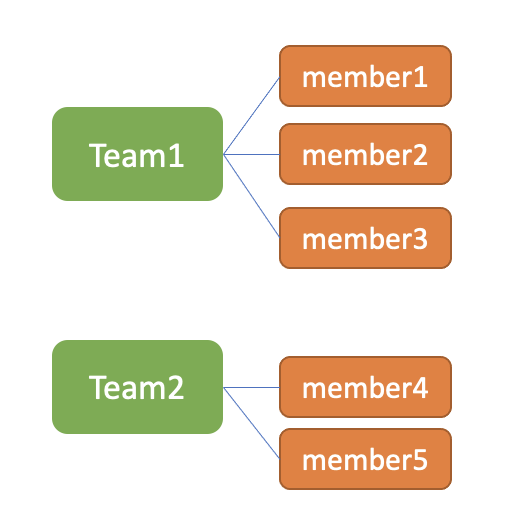
@Builder
@Setter
@Getter
@NoArgsConstructor
@AllArgsConstructor
@ToString
// @ToString(exclude = "members")
@Entity
public class Team {
  @Id
  @GeneratedValue(strategy = GenerationType.IDENTITY)
  private long id;

  private String name;

  @OneToMany(mappedBy = "team", fetch = FetchType.LAZY, cascade = CascadeType.PERSIST)
  @Builder.Default
  private List<Member> members = new ArrayList<>();

  public void addMember(Member member){
    member.setTeam(this);
    members.add(member);
  }
}
@Builder
@Setter
@Getter
@NoArgsConstructor
@AllArgsConstructor
@ToString(exclude = "team")
@Entity
public class Member {
  @Id
  @GeneratedValue(strategy = GenerationType.IDENTITY)
  private long id;

  public String name;

  public int age;

  @ManyToOne(fetch = FetchType.LAZY)
  public Team team;

  public Member(String name, int age, Team team) {
    this.name = name;
    this.age = age;
    this.team = team;
  }
}
Resolving N+1 with Regular Join #
When querying Team and Member using a regular join, the corresponding executed query is as follows:
// TeamRepository.java
@Query("SELECT distinct t FROM Team t join t.members")
public List<Team> findAllWithMemberUsingJoin();
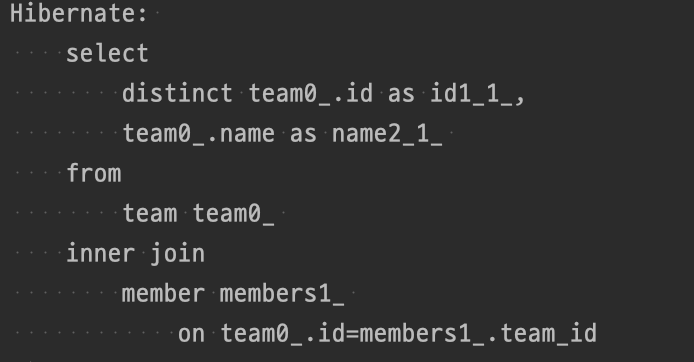
A query in the form of a join between Team and Member, as one would typically expect, is executed.
A peculiar point is that if you look at the columns being retrieved, only the Team's columns, id and name, are fetched.
Let's print the result of the join using toString() in this state.
// TeamService.java
@Transactional
public List<Team> findAllWithMemberUsingJoin(){
  return teamRepository.findAllWithMemberUsingJoin();
}

// FetchJoinApplicationTests.java
@BeforeEach
public void init(){
  teamService.initialize();
}

@Test
public void joinTest() {
  List<Team> memberUsingJoin = teamService.findAllWithMemberUsingJoin();
  System.out.println(memberUsingJoin);
}
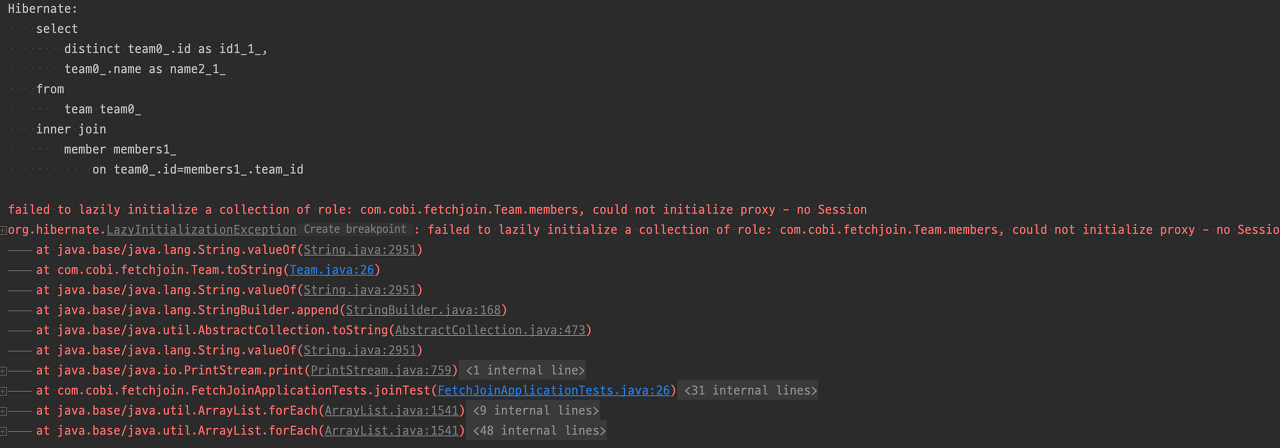
Although the query was executed as a join, a LazyInitializationException suddenly occurs.
LazyInitializationExceptiontypically occurs when a lazy entity is used without a Session (Transaction).
If we set a breakpoint, we can understand why the LazyInitializationException occurred.
@Test
public void joinTest(){
    List<Team> memberUsingJoin = teamService.findAllWithMemberUsingJoin();
    //break point
    System.out.println(memberUsingJoin)
}
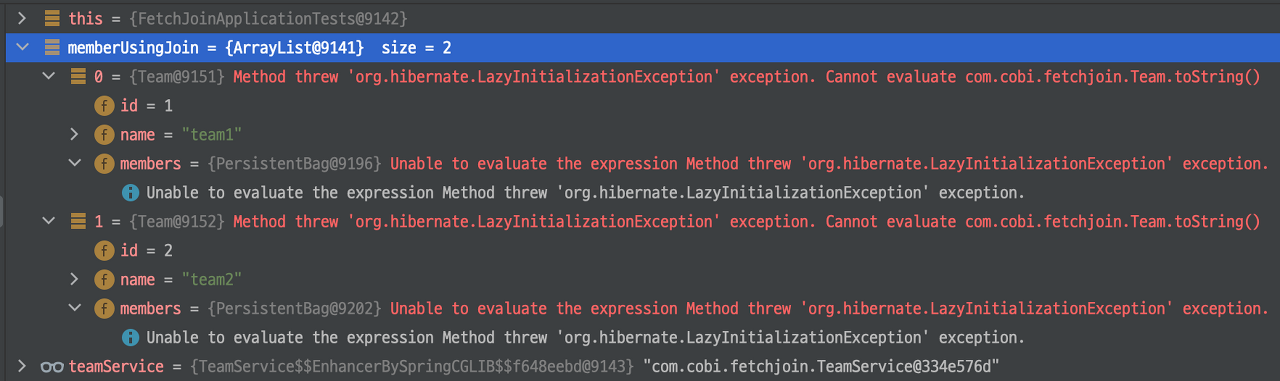
Looking at the actual query, even though a join was performed, it shows that the members (a lazy entity of each Team) have not yet been initialized.
In reality, a regular join does apply a join to the actual query, but it does not concern itself with the persistence of the joined entities.
It only performs the join, and only the selected entities are placed in the persistence context.
Based on the above, reconsidering the situation, the LazyInitializationException occurs under the following circumstances:
- Team entities are initialized via a regular join.
- However, since a regular join does not initialize associated entities, Member entities are not initialized.
- Accessing the uninitialized
membersviatoString()causes aLazyInitializationException.
In fact, if
@ToString(exclude="members")is set on Team,memberswill not be accessed, andLazyInitializationExceptionwill also not occur.
Resolving N+1 with Fetch Join #
The code using Fetch Join and the corresponding executed query are as follows:
// TeamRepository.java
@Query("SELECT distinct t FROM Team t join fetch t.members")
public List<Team> findAllWithMemberUsingFetchJoin();
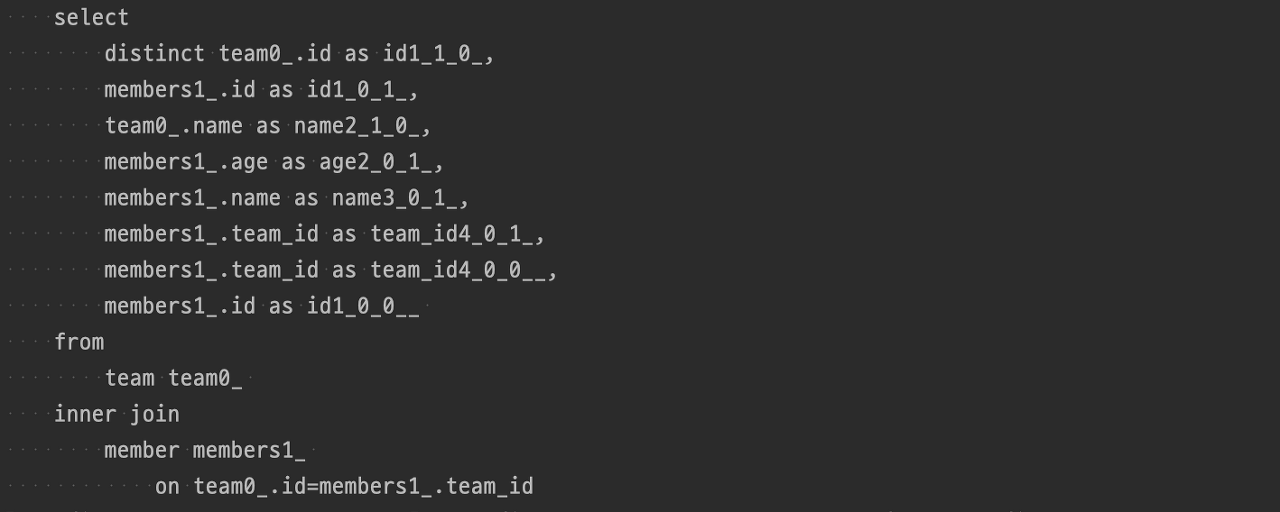
Although the join form is identical to a regular join, differences are visible starting from the SELECTed columns.
- Regular Join: SELECTs only the columns of the target entity being queried, excluding join conditions.
- Fetch Join: SELECTs columns of both the target entity being queried and the entities involved in the Fetch Join.
As shown above, there is a difference between regular join and Fetch Join even in the columns used in the query.
If we print the execution result of Fetch Join using toString(), we can see that all Teams and Members are included, as shown below.
// TeamService.java
@Transactional
public List<Team> findAllWithMemberUsingFetchJoin(){
  return teamRepository.findAllWithMemberUsingFetchJoin();
}

//FetchJoinApplicationTests.java
@Test
public void fetchJoinTest() {
  List<Team> memberUsingFetchJoin = teamService.findAllWithMemberUsingFetchJoin();
  System.out.println(memberUsingFetchJoin);
}
Execution Result
[
    Team(
        id=1,
        name=team1,
        members=[
            Member(
                id=1,
                name=team1member1,
                age=1
            ),
            Member(
                id=2,
                name=team2member2,
                age=2
            ),
            Member(
                id=3,
                name=team3member3,
                age=3
            )
        ]
    ),
    Team(
        id=2,
        name=team2,
        members=[
            Member(
                id=4,
                name=team2member4,
                age=4
            ),
			Member(
                id=5,
                name=team2member5,
                age=5
            )
        ]
    )
]