Embedded Types @Embedded, @Embeddable
Embedded Types #
Embedded types are also known as composite value types and are a JPA method for directly defining and using new value types.
Looking at the code below, the User entity has id, name, email, gender, and address data, where the address information (city, district, detail address, zip code) is divided into multiple columns. Storing such detailed data directly is not object-oriented and reduces cohesion.
In such cases, using embedded types can lead to more object-oriented code.
// user.java
@Entity
public class User {
    @Id
    @GeneratedValue(strategy = GenerationType.IDENTITY)
    private Long id;

    @NonNull
    private String name;

    @NonNull
    private String email;


    @Enumerated(value = EnumType.STRING)
    private Gender gender;

    // 주소 정보
    private String city; // 도시
    private String district; // 구
    private String detail; // 상세주소
    private String zipCode; // 우편번호

}
@Embedded, @Embeddable #
- To apply an embedded type, you need to create a new class, put the attributes you want to group as an embedded type into that class, and then annotate it with
@Embeddable. - Usage
@Embeddable: Marks where a value type is defined.@Embedded: Marks where a value type is used.
- Looking at the code below with embedded types applied, you can see that address-related attributes are now used as a single type. This shows that the code has become more object-oriented and cohesive than the previous example.
// user.java
@Entity
public class User {
    @Id
    @GeneratedValue(strategy = GenerationType.IDENTITY)
    private Long id;

    @NonNull
    private String name;

    @NonNull
    private String email;


    @Enumerated(value = EnumType.STRING)
    private Gender gender;

    @Embedded
    private Address address;

}

// Address.java
@Embeddable
@Data
@AllArgsConstructor
@NoArgsConstructor
public class Address {
    // 주소 정보
    private String city; // 도시
    private String district; // 구

    @Column(name = "address_detail")
    private String detail; // 상세 주소
    private String zipCode; // 우편번호
}
// How to add data
user.setAddress(new Address("서울시", "강남구", "강남대로 123", "16427"));
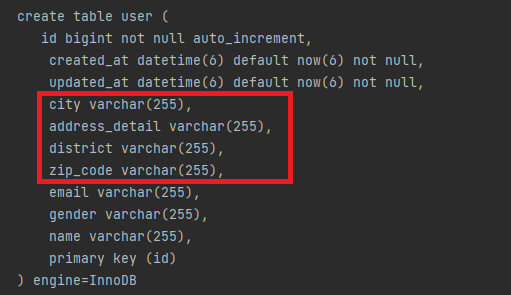
- You can see that columns are generated identically even when using embedded types.
@AttributeOverride: Redefining Attribute Names #
- For attributes of the same type, you can declare them simply and intuitively without needing to write duplicate code.
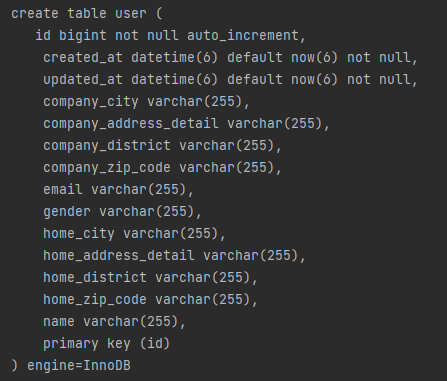
- For example, the address format for a company address and a home address (city, district, detail address, zip code) is the same. In such cases, you can use a single class to represent multiple addresses through
@Embedded,@AttributeOverrides, and@AttributeOverride. - The code below redefines all column names using
@AttributeOverridesand@AttributeOverrideinstead of reusing an object, which might make the code look messy. -> The developer must decide whether to write cleaner-looking code by declaring separate objects instead of reusing them, or to write code that reuses objects.
@Entity
public class User {

.....

    @Embedded
    @AttributeOverrides({
            @AttributeOverride(name = "city", column = @Column(name = "home_city")), // city를 home_city라는 column명으로 사용
            @AttributeOverride(name = "district", column = @Column(name = "home_district")),
            @AttributeOverride(name = "detail", column = @Column(name = "home_address_detail")),
            @AttributeOverride(name = "zipCode", column = @Column(name = "home_zipCode"))
    })
    private Address homeAddress;

    @Embedded
    @AttributeOverrides({
            @AttributeOverride(name = "city", column = @Column(name = "company_city")),
            @AttributeOverride(name = "district", column = @Column(name = "company_district")),
            @AttributeOverride(name = "detail", column = @Column(name = "company_address_detail")),
            @AttributeOverride(name = "zipCode", column = @Column(name = "company_zipCode"))
    })
    private Address companyAddress;

   	.....
}
Caution #
If you want to create multiple pieces of information using a single class but do not redefine column names using @AttributeOverrides and @AttributeOverride as shown above, you will encounter a 'Repeated column in mapping for entity' error, so you must redefine the column names.
@Embedded
private Address homeAddress;

@Embedded
private Address companyAddress;
Caused by: javax.persistence.PersistenceException: [PersistenceUnit: default] Unable to build Hibernate SessionFactory; nested exception is org.hibernate.MappingException: Repeated column in mapping for entity: com.example.jpa_study.entity.User column: city (should be mapped with insert="false" update="false")
	at org.springframework.orm.jpa.AbstractEntityManagerFactoryBean.buildNativeEntityManagerFactory(AbstractEntityManagerFactoryBean.java:421)
	at org.springframework.orm.jpa.AbstractEntityManagerFactoryBean.afterPropertiesSet(AbstractEntityManagerFactoryBean.java:396)
	at org.springframework.orm.jpa.LocalContainerEntityManagerFactoryBean.afterPropertiesSet(LocalContainerEntityManagerFactoryBean.java:341)
	at org.springframework.beans.factory.support.AbstractAutowireCapableBeanFactory.invokeInitMethods(AbstractAutowireCapableBeanFactory.java:1845)
	at org.springframework.beans.factory.support.AbstractAutowireCapableBeanFactory.initializeBean(AbstractAutowireCapableBeanFactory.java:1782)
	... 107 more
Embedded Types and Null #
When an embedded type itself is set to null, or when the attribute values of an embedded type are set to null, all corresponding columns will have null values.
Executing the code below shows that the values of all related columns are null.
In other words, if an embedded type object is null, it is treated as if all its internal columns are null.