Apache Kafka Key Components 2: Zookeeper, Broker + Clustering Walkthrough
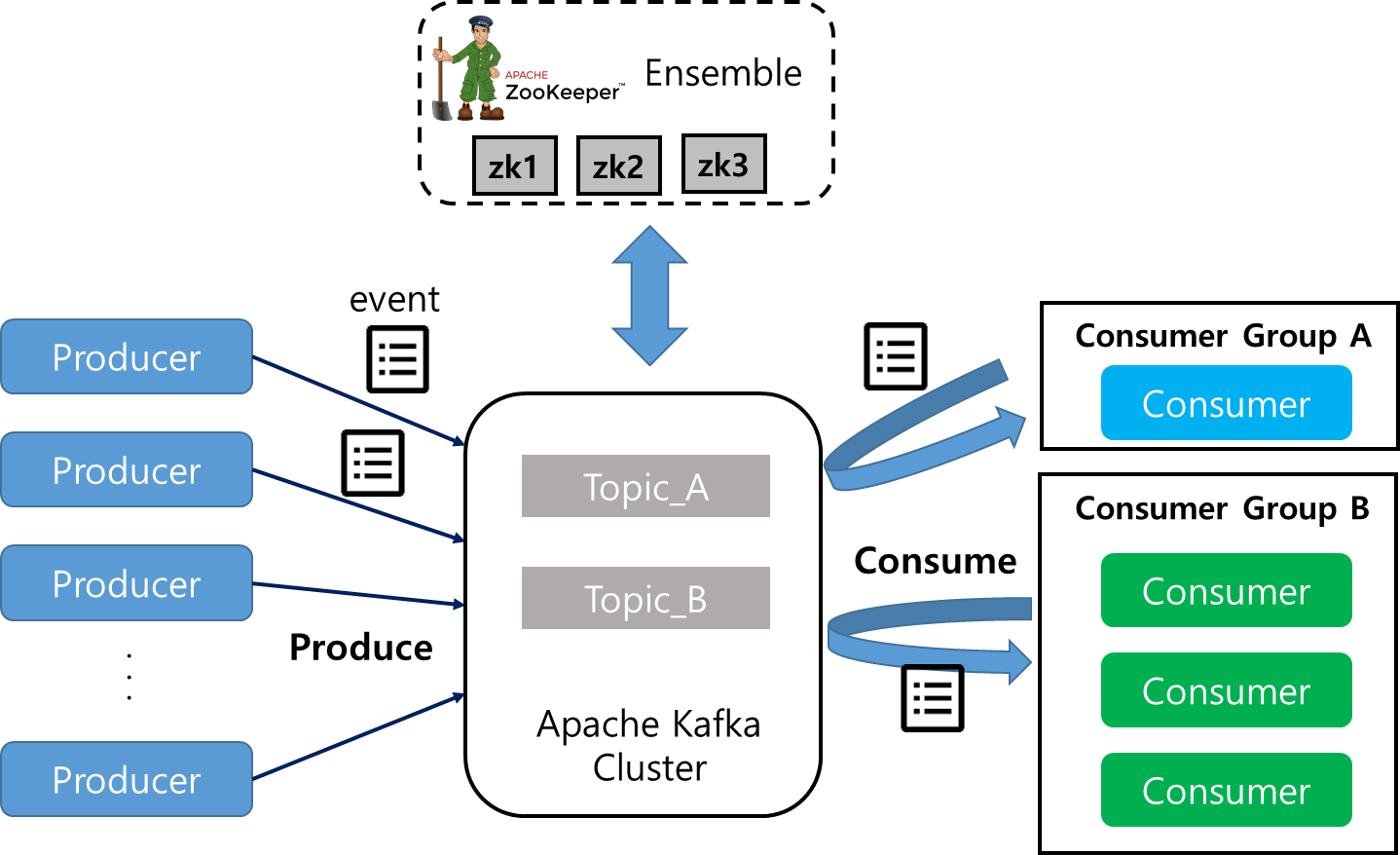
Broker, Zookeeper #
Kafka Broker #
A Kafka Broker is software that manages Read and Write operations for Partitions.
It is also referred to as a Kafka Server, and it distributes, maintains, and manages Partitions within a Topic.
Each Broker is identified by an ID (the ID must be a number).
It contains some Partitions of a Topic -> it only holds a portion (Partition) of the Topic data, not the entire data.
Kafka Cluster: Composed of multiple Brokers. When a Client connects to a specific Broker, it connects to the entire cluster.
It is recommended to configure a cluster with at least 3 Brokers, but 4 or more are generally advised.
Relationship Between Kafka Broker ID and Partition ID, and Bootstrap Servers #
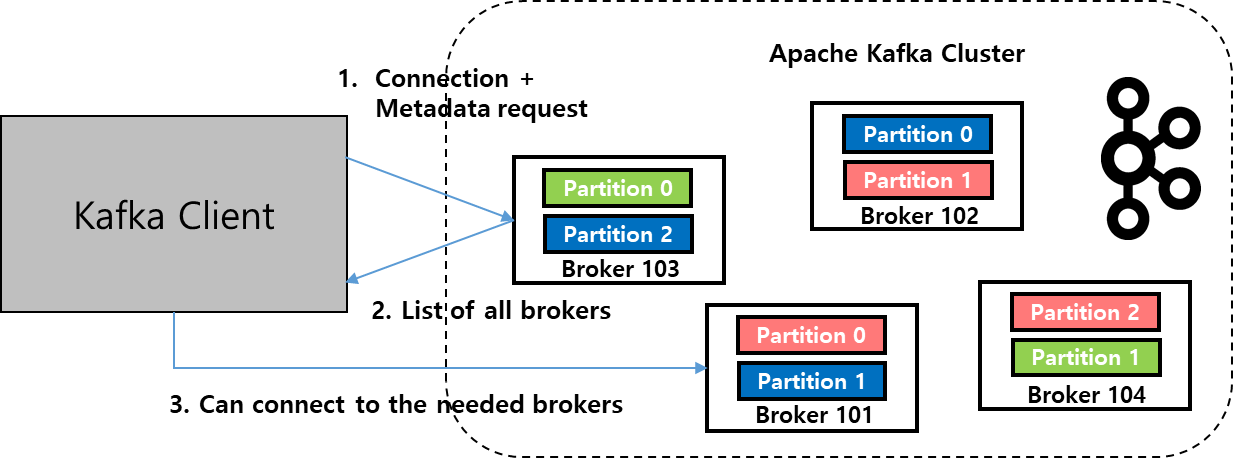
There is no relationship between Broker ID and Partition ID.
Partitions that make up a Topic are distributed across multiple Brokers.
When a Topic is created, Kafka automatically allocates and distributes all Partitions forming the Topic to all Brokers.
All Kafka Brokers are called Bootstrap Servers.
Connecting to just one Broker connects you to the entire Cluster -> However, to prepare for a specific Broker failure, it is recommended to provide the entire Broker List (IP, port) as a parameter.
Each Broker knows about all Brokers, Topics, and Partitions (Metadata).
Zookeeper #
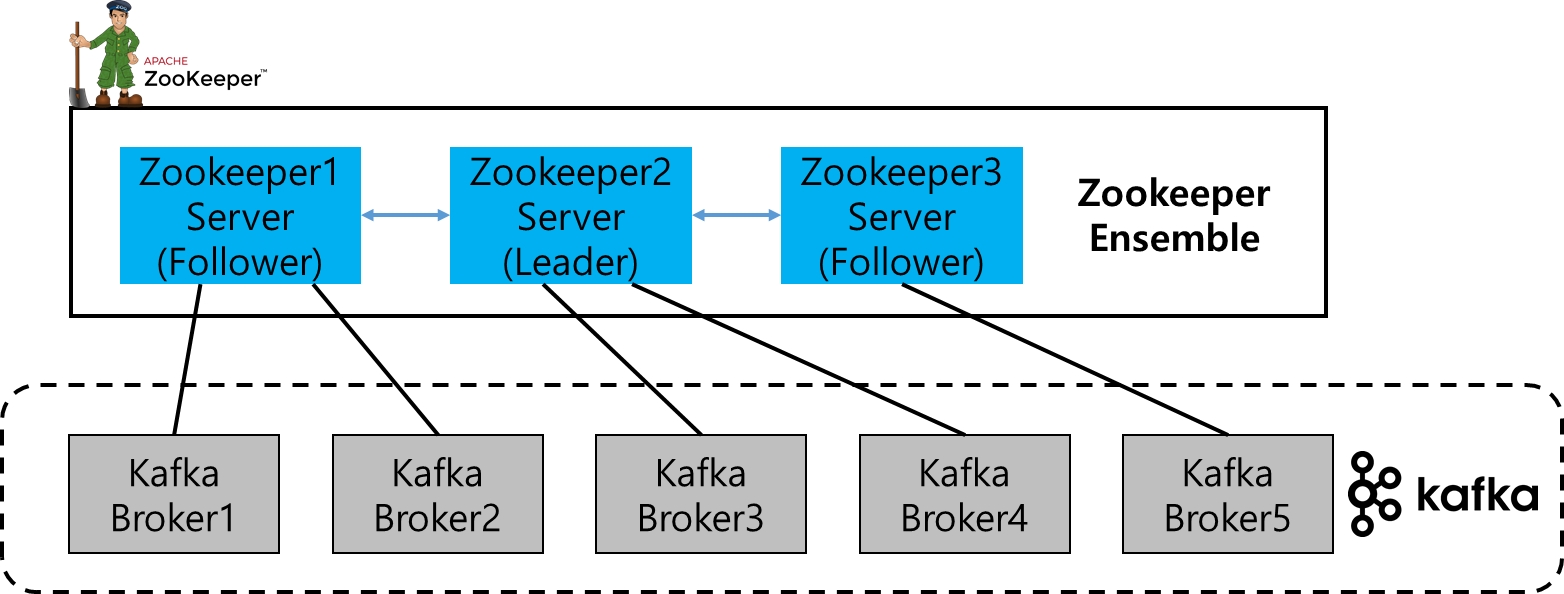
Zookeeper is software that manages Brokers (manages the list/configuration of Brokers).
Kafka cannot operate without Zookeeper, and Zookeeper is designed to run with an odd number of servers (minimum 3, recommended 5).
Zookeeper has a Leader (writes) and the remaining servers are Followers (reads).
Zookeeper is software that provides distributed configuration information maintenance, distributed synchronization services, and a naming registry for large-scale distributed systems.
It is a tree-structured data store for controlling distributed operations -> Zookeeper is used to share information (including changes) and perform synchronization among multiple Kafka Brokers.
An Ensemble is a cluster of Zookeeper servers. A Quorum refers to the minimum number of members required for a deliberative body to conduct business or make decisions.
It is used to maintain the consistency of a distributed system even if unexpected failures occur in a distributed coordination environment.
e.g., If an Ensemble consists of 3 machines, the Quorum is 2, meaning it operates normally even if 1 Zookeeper fails. If an Ensemble consists of 5 machines, the Quorum is 3, meaning it operates normally even if 2 Zookeepers fail.
Clustering Walkthrough #
I tried clustering using docker-compose on CentOS8. It consists of 3 Zookeepers, 3 Brokers, and AKHQ, which is a monitoring tool for Broker data resources. The images used are provided by Confluent.
etc/hosts
 Register kafka1 to kafka3.
docker-compose -f filename.yml up
version: '3'
services:
  zookeeper-1:
    hostname: zookeeper1
    image: confluentinc/cp-zookeeper:6.2.0
    environment:
      ZOOKEEPER_SERVER_ID: 1
      ZOOKEEPER_CLIENT_PORT: 12181
      ZOOKEEPER_DATA_DIR: /zookeeper/data
      ZOOKEEPER_SERVERS: zookeeper1:22888:23888;zookeeper2:32888:33888;zookeeper3:42888:43888
    ports:
      - 12181:12181
      - 22888:22888
      - 23888:23888
    volumes:
      - ./zookeeper/data/1:/zookeeper/data

  zookeeper-2:
    hostname: zookeeper2
    image: confluentinc/cp-zookeeper:6.2.0
    environment:
      ZOOKEEPER_SERVER_ID: 2
      ZOOKEEPER_CLIENT_PORT: 22181
      ZOOKEEPER_DATA_DIR: /zookeeper/data
      ZOOKEEPER_SERVERS: zookeeper1:22888:23888;zookeeper2:32888:33888;zookeeper3:42888:43888
    ports:
      - 22181:22181
      - 32888:32888
      - 33888:33888
    volumes:
      - ./zookeeper/data/2:/zookeeper/data

  zookeeper-3:
    hostname: zookeeper3
    image: confluentinc/cp-zookeeper:6.2.0
    environment:
      ZOOKEEPER_SERVER_ID: 3
      ZOOKEEPER_CLIENT_PORT: 32181
      ZOOKEEPER_DATA_DIR: /zookeeper/data
      ZOOKEEPER_SERVERS: zookeeper1:22888:23888;zookeeper2:32888:33888;zookeeper3:42888:43888
    ports:
      - 32181:32181
      - 42888:42888
      - 43888:43888
    volumes:
      - ./zookeeper/data/3:/zookeeper/data

  kafka-1:
    image: confluentinc/cp-kafka:6.2.0
    hostname: kafka1
    depends_on:
      - zookeeper-1
      - zookeeper-2
      - zookeeper-3
    environment:
      KAFKA_BROKER_ID: 1
      KAFKA_ZOOKEEPER_CONNECT: zookeeper1:12181,zookeeper2:22181,zookeeper3:32181
      KAFKA_ADVERTISED_LISTENERS: PLAINTEXT://kafka1:19092
      KAFKA_LOG_DIRS: /kafka
    ports:
      - 19092:19092
    volumes:
      - ./kafka/logs/1:/kafka

  kafka-2:
    image: confluentinc/cp-kafka:6.2.0
    hostname: kafka2
    depends_on:
      - zookeeper-1
      - zookeeper-2
      - zookeeper-3
    environment:
      KAFKA_BROKER_ID: 2
      KAFKA_ZOOKEEPER_CONNECT: zookeeper1:12181,zookeeper2:22181,zookeeper3:32181
      KAFKA_ADVERTISED_LISTENERS: PLAINTEXT://kafka2:29092
      KAFKA_LOG_DIRS: /kafka
    ports:
      - 29092:29092
    volumes:
      - ./kafka/logs/2:/kafka

  kafka-3:
    image: confluentinc/cp-kafka:6.2.0
    hostname: kafka3
    depends_on:
      - zookeeper-1
      - zookeeper-2
      - zookeeper-3
    environment:
      KAFKA_BROKER_ID: 3
      KAFKA_ZOOKEEPER_CONNECT: zookeeper1:12181,zookeeper2:22181,zookeeper3:32181
      KAFKA_ADVERTISED_LISTENERS: PLAINTEXT://kafka3:39092
      KAFKA_LOG_DIRS: /kafka
    ports:
      - 39092:39092
    volumes:
      - ./kafka/logs/3:/kafka

  akhq:
    image: tchiotludo/akhq:latest
    hostname: akhq
    depends_on:
      - kafka-1
      - kafka-2
      - kafka-3
    environment:
      AKHQ_CONFIGURATION: |
        akhq:
          connections:
            kafka:
              properties:
                bootstrap.servers: kafka1:19092,kafka2:29092,kafka3:39092
    ports:
      - 8080:8080
- Directory Permissions There are situations where Kafka terminates due to permission issues in the volume-configured path. This can be resolved by changing permissions.

If you restart the Kafka container, it will operate normally.
- Confluent Installation - Provides Commands to Use
$ curl -O http://packages.confluent.io/archive/7.0/confluent-7.0.1.tar.gz
$ tar -zxvf confluent-7.0.1.tar.gz
$ cd confluent-7.0.1/bin
Topic Creation
./kafka-topics --bootstrap-server localhost:19092 --create --topic test --partitions 2 --replication-factor 3
A shell for a producer to send messages to the 'test' topic is executed.
./kafka-console-producer --bootstrap-server localhost:19092 --topic test
You can see that a consumer can receive messages from the 'test' topic.
./kafka-console-consumer --bootstrap-server localhost:19092 --topic test

$ ./kafka-topics --describe --bootstrap-server localhost:19092 --topic test # Since we are operating a total of 3 brokers (29092, 39092), it doesn't matter which one you use.