Wrapper Class, Boxing and Unboxing
What is a Wrapper Class? #
Java's data types are broadly divided into primitive types and reference types.
Primitive types typically include char, int, float, double, boolean, etc., while reference types include classes, interfaces, and so on. In programming, there are often cases where primitive type data needs to be represented as objects. In such situations, the classes used to treat primitive data types as objects are called wrapper classes.
Java can create objects that hold values for all primitive types. These objects are also referred to as "wrapper objects" because they encapsulate the primitive type's value internally. The primitive type value wrapped by a wrapper class cannot be changed externally. If you want to change the value, you must create a new wrapper object.
Types of Wrapper Classes #
| Primitive Type | Wrapper Class |
|---|---|
| byte | Byte |
| char | Character |
| int | Integer |
| float | Float |
| double | Double |
| boolean | Boolean |
| long | Long |
| short | Short |
Wrapper classes are included in the java.lang package, and there are wrapper classes corresponding to primitive types as follows. The char and int types have Character and Integer as their wrapper classes, respectively, while the others have names formed by capitalizing the first letter of their primitive type.
Wrapper Class Structure Diagram #
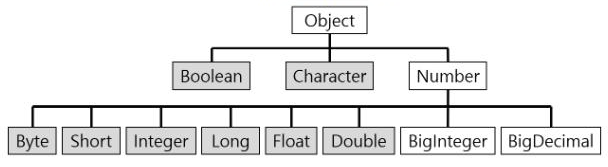
As seen in the hierarchy above, the parent of all wrapper classes is Object, and the parent class for wrapper classes that handle numbers internally is the Number class. All wrapper classes are defined as final classes.
Boxing, Unboxing #
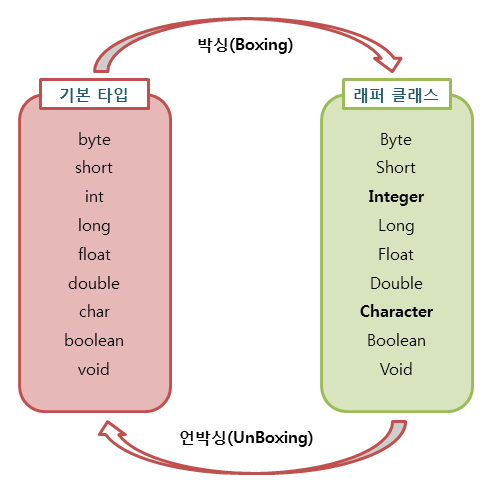
- The process of converting a primitive type into a wrapper object is called
boxing. - Conversely, the process of extracting the primitive type value from a wrapper object is called
unboxing.
public class Wrapper_Ex {
    public static void main(String[] args)  {
        Integer num = new Integer(17); // Boxing
        int n = num.intValue(); // Unboxing
        System.out.println(n);
    }
}
AutoBoxing and AutoUnBoxing #
There are cases where boxing and unboxing occur automatically without explicitly boxing or unboxing primitive type values.
- Occurs when a primitive value is assigned to a wrapper class type during autoboxing.
- e.g.) When an
inttype value is assigned to anIntegerclass variable, autoboxing occurs, and anIntegervalue is created in the heap.
- e.g.) When an
public class Wrapper_Ex {
    public static void main(String[] args)  {
        Integer num = 17; // AutoBoxing
        int n = num; // AutoUnboxing
        System.out.println(n);
    }
}
Simple Wrapper Class Usage Example #
public class Wrapper_Ex {
    public static void main(String[] args)  {
        String str = "10";
        String str2 = "10.5";
        String str3 = "true";

        byte b = Byte.parseByte(str);
        int i = Integer.parseInt(str);
        short s = Short.parseShort(str);
        long l = Long.parseLong(str);
        float f = Float.parseFloat(str2);
        double d = Double.parseDouble(str2);
        boolean bool = Boolean.parseBoolean(str3);

        System.out.println("String to byte conversion: "+b);
        System.out.println("String to int conversion: "+i);
        System.out.println("String to short conversion: "+s);
        System.out.println("String to long conversion: "+l);
        System.out.println("String to float conversion: "+f);
        System.out.println("String to double conversion: "+d);
        System.out.println("String to boolean conversion: "+bool);
    }
}
Result
String to byte conversion: 10
String to int conversion: 10
String to short conversion: 10
String to long conversion: 10
String to float conversion: 10.5
String to double conversion: 10.5
String to boolean conversion: true
- The main purpose of wrapper classes is to box primitive type values into wrapper objects, but they are also used to convert strings into primitive type values.
- Most wrapper classes have static methods named
parse+ primitive type name. These methods take a string as an argument and convert it into a primitive type value.
Value Comparison #
public class Wrapper_Ex {
    public static void main(String[] args)  {
        Integer num = new Integer(10); // Wrapper class 1
        Integer num2 = new Integer(10); // Wrapper class 2
        int i = 10; // Primitive type

        System.out.println("Wrapper class == Primitive type: "+(num == i)); //true
        System.out.println("Wrapper class.equals(Primitive type): "+num.equals(i)); //true
        System.out.println("Wrapper class == Wrapper class: "+(num == num2)); //false
        System.out.println("Wrapper class.equals(Wrapper class): "+num.equals(num2)); //true
    }
}
- Wrapper objects cannot use the
==operator to compare their internal values. - This operator compares the
reference addressesof the wrapper objects, not their internal values. - Since wrapper objects are objects, their reference addresses are different. To compare objects, you must obtain and compare only their internal values, so
equals()should be used. - Comparison between wrapper classes and primitive types is possible with both the
==operator and theequalsmethod. - This is because the compiler automatically performs autoboxing and unboxing.