What is a Web Servlet?
What is a Servlet? #
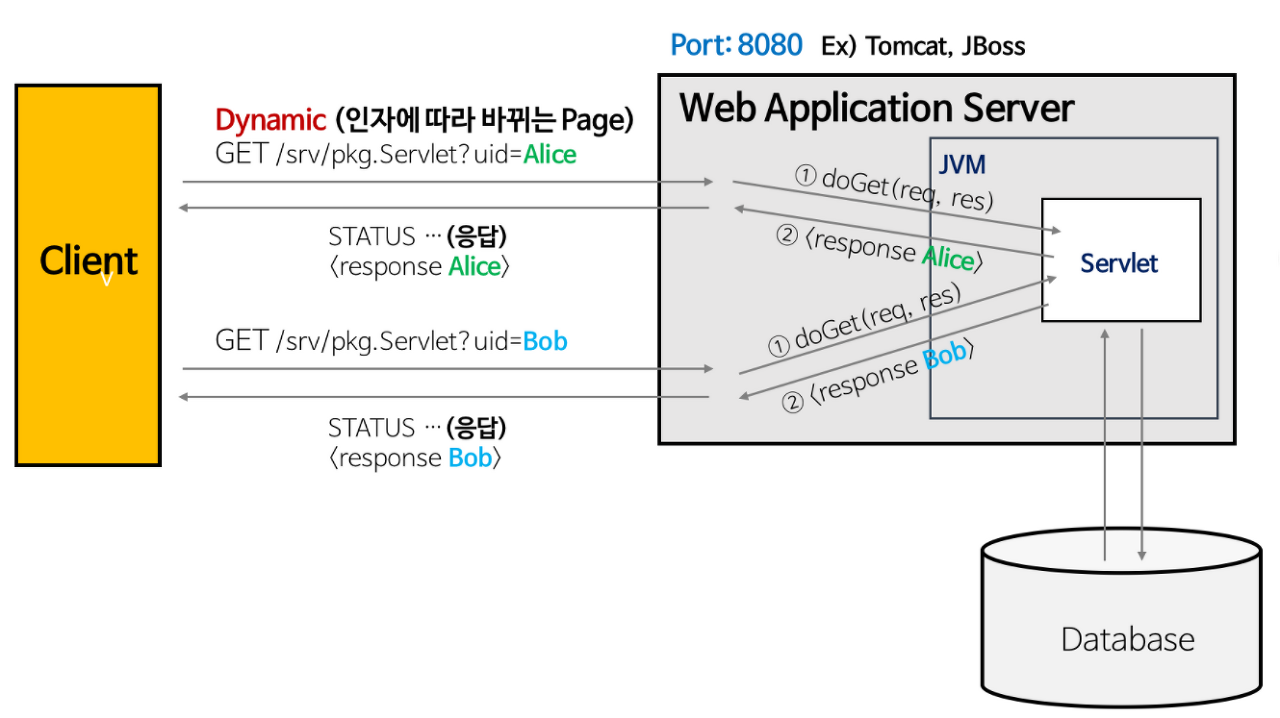 Servlet
A Servlet is a Java-based web application programming technology used to create Dynamic Web Pages.
- When building a web application, there are various requests and responses, and these requests and responses follow certain rules.
- Handling these requests and responses individually would be very difficult.
- A Servlet can be understood as a technology that allows you to systematically manage the flow of web requests and responses through simple method calls.
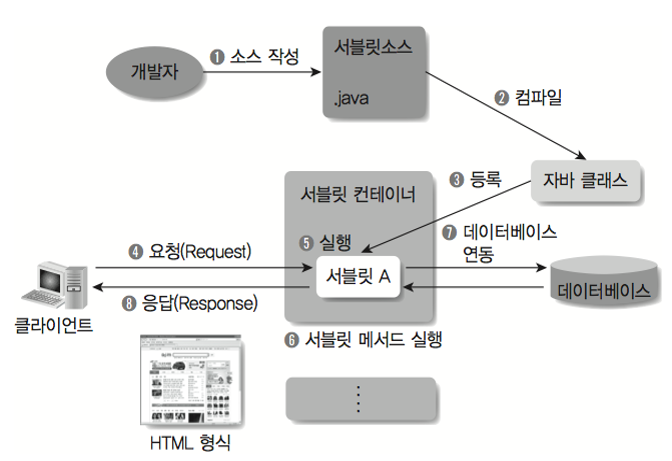 Servlet Container
- Servlets are Java classes used to write web applications, which are then executed by a web container within a web server.
- The web container creates a Servlet instance and runs it on the server. When a web browser sends a request to the server, the Servlet performs the appropriate action for the request and responds to the web browser in HTTP format.
Key Characteristics of Servlets #
- A web application component that operates dynamically in response to client requests.
- Responds using HTML.
- Operates using Java threads.
- Used as a
controllerin the MVC pattern. - Inherits from the
javax.servlet.http.HttpServletclass, which supports HTTP protocol services. - Slower than UDP.
- Has the disadvantage of requiring Servlet recompilation when HTML changes.
What is a Servlet Container? #
- As the name suggests, it's a container that holds and manages Servlets.
- A Servlet container manages Servlets according to the rules of the implemented Servlet class. When a client sends a request, the container creates two objects, HttpServletRequest and HttpServletResponse.
- It then generates a dynamic page based on whether it's a POST or GET request and sends the response.
HttpServletRequest #
Used to deliver HTTP protocol request information to the Servlet. It has methods to read header information, parameters, cookies, URI, URL, and methods to read the Body's Stream.
HttpServletResponse #
The WAS knows which client sent the request and creates an HttpServletResponse object to send a response to that client, passing it to the Servlet. This object is then used to send content type, response codes, response messages, and more.
Key Functions of a Servlet Container #
Lifecycle Management
- Manages the lifecycle of Servlets.
- The moment the Servlet container starts, it loads the Servlet class, instantiates it,
- calls the initialization method. When a request comes in, it finds and executes the appropriate Servlet method.
- When the Servlet's life ends, it is removed from memory through garbage collection.
Communication Support
- Creates sockets and communicates with the web server to receive client requests and send responses.
- When we think about communication, we know that we create sockets, listen on specific ports, and when a connection request comes in, we create a stream to receive the request.
- The Servlet container handles this entire process for us.
- The Servlet container provides APIs for functions like creating sockets, listening, and accepting, simplifying complex processes.
- This allows developers to focus more on business logic.
Multithreading Management
- When a request comes in for a Servlet, the Servlet container creates a thread to perform the task.
- Therefore, even if multiple requests come in simultaneously, it can manage concurrent tasks in a multithreading environment.
- Additionally, once a thread is loaded into memory, there's no need to create it again, making memory management efficient.
Declarative Security Management
- The Servlet container supports security-related features.
- Therefore, there's no need to implement security-related methods within the Servlet or Java class.
- Security management is generally recorded in the XML deployment descriptor, so even if a security issue requires source modification, there's no need to modify the Java source code and recompile.
Servlet Operation Process #
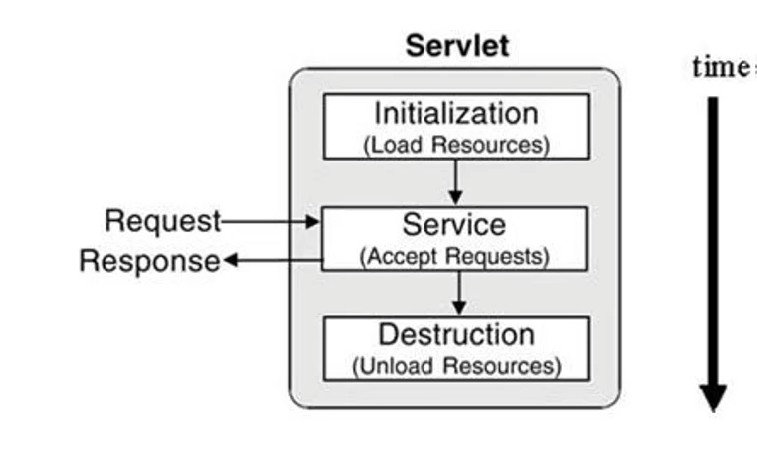 Servlet Operation Process
- Creates Servlet Request and Response objects.
- Refers to the configuration file to identify the Servlet to map.
- Checks for the existence of the Servlet instance; if it doesn't exist, calls the
init()method to create it. - Creates a thread in the Servlet Container and executes the
servicemethod. - Once the response is processed, executes the
destroy()method to destroy the Servlet Request and Response objects.
Example Code #
public class myServlet extends HttpServlet {

    @Override
    public void init(ServletConfig config) throws ServletException {
        System.out.println("init method 호출!");
    }

    @Override
    public void destroy() {
        System.out.println("destroy method 호출!");
    }

    @Override
    protected void doGet(HttpServletRequest request, HttpServletResponse response)
        throws ServletException, IOException
    {
        System.out.println("doGet service method 호출!");
    }

    @Override
    protected void doPost(HttpServletRequest request, HttpServletResponse response)
        throws ServletException, IOException
    {
        System.out.println("doPost service method 호출!");
    }

}
init()
- This method
initializesthe Servlet when it is first requested. - Just as you
newa class to use it, a Servlet class also needs to be initialized before it can be used. - An initialized Servlet is managed as a singleton, so if the same Servlet class is called again, it won't re-initialize but will instead call the existing Servlet class.
- This method
service()
- This is the Servlet's
service method required when the Servlet container receives a request and sends a response. Methods likedoGetanddoPostof theHttpServletclass, which implements theServletinterface, are called.
- This is the Servlet's
destroy()
- Servlet classes that are no longer in use are periodically
removed by the Servlet container calling this method. - When a Servlet is removed, all threads corresponding to its service methods are terminated, or
- if it has timed out due to long usage, it needs to be re-initialized to be used again.
- Servlet classes that are no longer in use are periodically