How Web Browsers Work
Communication Process Between Web Browser and Web Server #
- The browser's main function is to request resources from a server and display the requested resources in the browser.
- When you enter a URL in a web browser, a program called a web server provides the web page to the web browser.
When a web browser asks a web server for a web page: Request Providing the requested web page to the web browser: Response
Each computer address has an IP. However, IP addresses are composed of numbers, making them difficult to remember. For this reason, human-friendly domain names are used instead of IP addresses.
Since web browsers and web servers connect using IP addresses, domain names need to be converted into IP addresses. The tool used for this is DNS. When you enter a URL in a web browser, the web browser requests the IP address corresponding to the domain name from DNS, and DNS provides the IP address as a response.
- In general, the requesting party in a network program is called the
client, and the party that receives the request and provides appropriate functions or data is called theserver.
Key Functions of a Web Browser #
The browser's main function is to request the resources selected by the user from the server and display them in the browser. The browser's user interface typically includes the following elements:
- An address bar for entering URLs
- Back and forward buttons
- A refresh button and a stop button to halt the loading of the current document
- A home button
Basic Browser Structure #
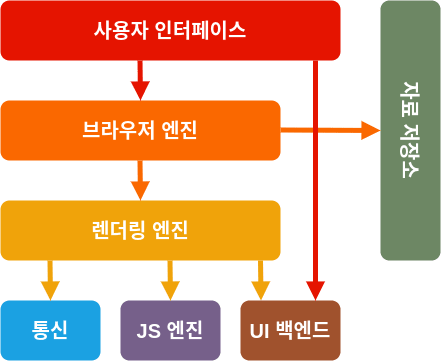
- User Interface: The parts other than the page view, such as the address bar, back/forward buttons, bookmarks, etc.
- Browser Engine: Controls the interaction between the user interface and the rendering engine
- Rendering Engine: Parses HTML and CSS to display the requested content on the screen
- Networking: Used for network calls like HTTP requests
- JS Engine: Interprets and executes JavaScript code
- UI Backend: Draws basic widgets (e.g., combo boxes)
- Data Storage: A layer for storing data, such as web databases for cookies, etc.
It's noteworthy that Chrome, unlike most browsers, maintains a separate rendering engine instance for each tab. Each tab is handled as an independent process.
Rendering Engine #
The rendering engine displays the requested content on the browser screen. It can display HTML, XML documents, and images. Other types, such as PDFs, can also be displayed using plugins or browser extensions.
Firefox, Chrome, and Safari were built with two types of rendering engines. Firefox uses the
Geckoengine, developed by Mozilla, while Safari and Chrome use theWebkitengine.
Operation Process #
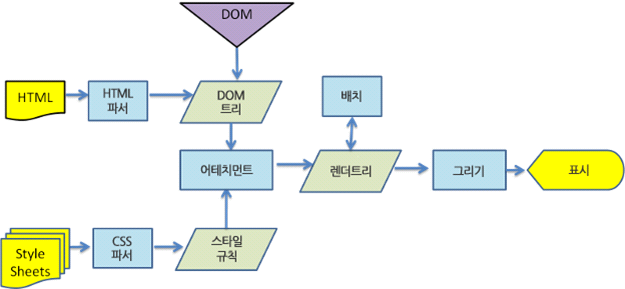
- HTML Parsing for DOM Tree Construction: The browser receives the entire HTML document from the server. The rendering engine parses the received HTML document to build the
DOMtree. It also parses external CSS files and style elements. - Render Tree Construction: The
DOMtree and style information are combined to create the render tree. - Render Tree Layout: For each node in the render tree, its position on the screen is determined.
- Render Tree Painting: The UI backend paints the render tree, and it is displayed on the screen we see.
Webkit operation.