Subnetting & Supernetting Concepts and Easy Calculation Methods
Subnetting #
Dividing a given network address into smaller parts to form multiple subnets.
The mask used to distinguish the network identifier portion is called a subnet mask.
IP is 192.168.10.0, Subnet mask is 255.255.255.0 -> Number of networks: 1 / Number of hosts: 255 usable hosts 192.168.10.1 ~ 192.168.10.254
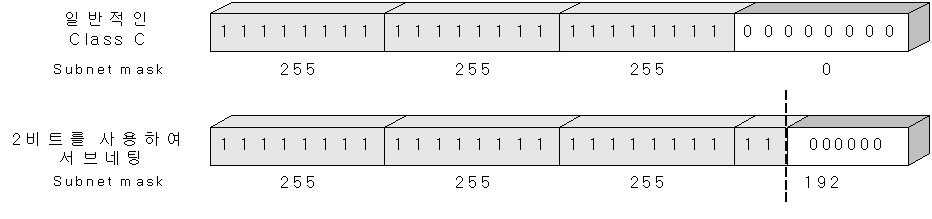
Dividing one network into four networks through subnetting
From now on, we will perform subnetting to divide a single network of 255 hosts into multiple networks.
After converting to binary, change 2 of the 8 zeros to 1, then the subnet mask becomes 255.255.255.192 -> Number of networks: 4 / Number of hosts: 64
192.168.10.1 ~ 192.168.10.62 ( hosts divided into respective networks)

192.168.10.65 ~ 192.168.10.126

192.168.10.129 ~ 192.168.10.190

192.168.10.193 ~ 192.168.10.254
A single network with 255 hosts is divided into 4 networks, each with 64 hosts, through subnetting. Subnetting allows a large network to be divided into multiple smaller networks (Broadcast Domains).
Reasons for using Subnetting #
- To effectively design a network by dividing the number of networks and hosts into multiple segments.
- Effective network configuration by reducing unnecessarily large broadcast domains.
- To efficiently use IP addresses, as IPv4 allocated addresses are limited.
Supernetting #
The opposite of subnetting, the process of combining divided networks.
IP is 192.168.10.0, Subnet mask is 255.255.255.0
-> Number of networks: 1 / Number of hosts: 255 Usable hosts 192.168.10.1 ~ 192.168.10.254
Consider a company that used to have 250 employees and now has grown to 350. Supernetting is used to create a single network that 350 people can use.
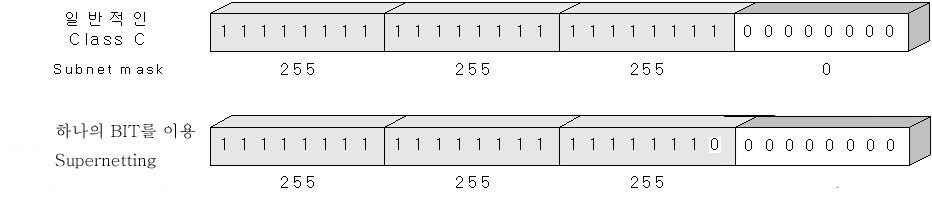
Combining two networks into one through supernetting
After supernetting, IP is 192.168.10.0, subnet mask is 255.255.254.0 -> Number of networks: 1 / Number of hosts: 512
Usable hosts 192.168.10.1 ~ 192.168.11.254
Two C Class networks can be combined through supernetting to form and use a single network.