How DNS Works
What is DNS? #
The Domain Name System was developed to enable the conversion of a host's domain name to its network address, or vice versa.
For example, naver.com and google.com, which we frequently encounter, can both be considered Domain Names (DNs) that have DNS.
These can actually be seen as IPs disguised as strings.
How DNS Works #
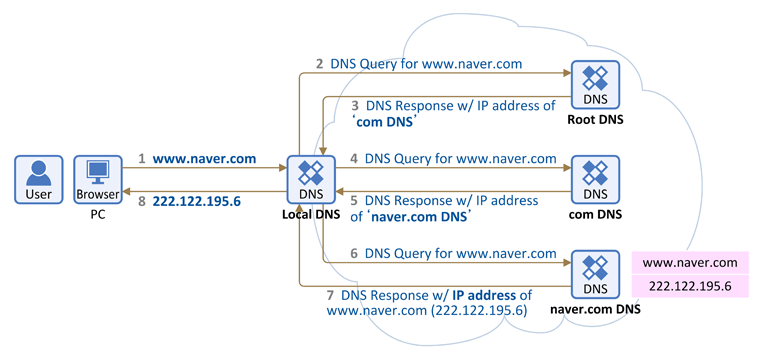
- When you enter www.naver.com into a web browser, it first queries the local DNS for the IP address corresponding to the hostname www.naver.com. If the local DNS does not have it, it receives information about other DNS name servers.
Root DNS #
- It is the root zone of the internet's Domain Name System.
- It directly responds to requests for records in the root zone and responds to other requests by returning a list of authoritative name servers for the appropriate top-level domains.
- There are 961 Root DNS servers operating worldwide.
- Query 'www.naver.com' to the Root DNS server.
- Receive
TLD (Top-Level Domain)name server information that manages the ".com domain" from the Root DNS server.
Here, TLD refers to the server managing .com.
- Query 'www.naver.com' to the TLD.
- TLD provides DNS information managing 'name.com'.
- Query the DNS server managing the 'naver.com' domain for the IP address corresponding to the hostname 'www.naver.com'.
- Response to the Local DNS server: Yes! The IP address for www.naver.com is 222.122.195.6.
- Local DNS provides the IP address information for www.naver.com.